AI agent for education consultants
School Client Needs Audit Agent
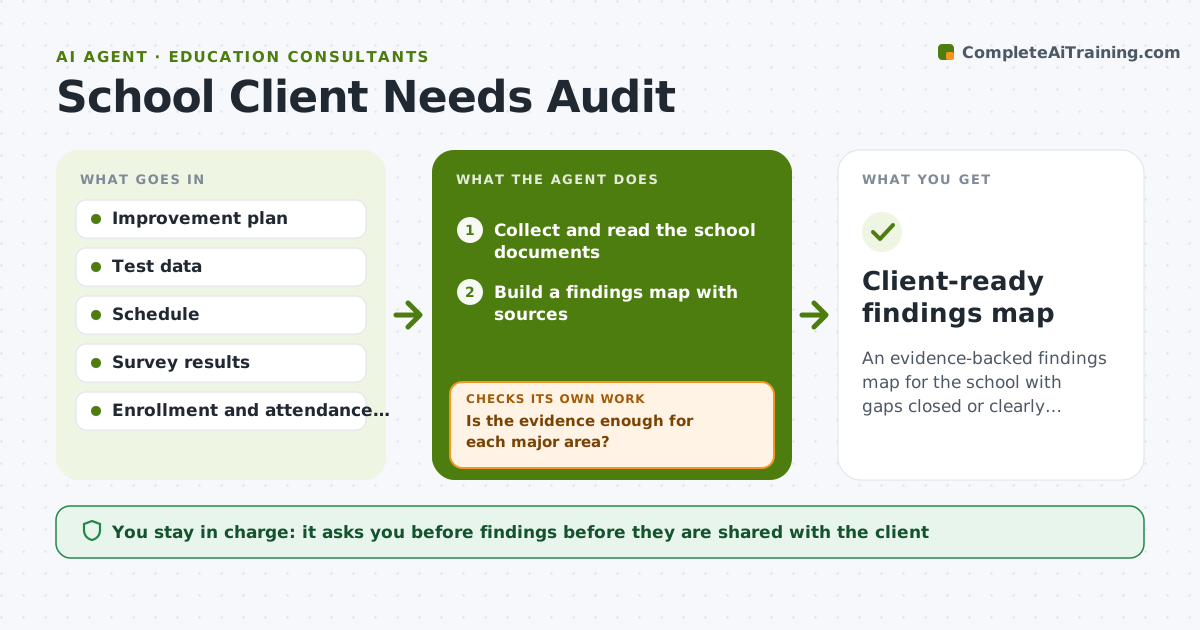
An evidence-backed findings map for the school with gaps closed or clearly listed.
What it does
You start with a new school client and a folder of documents: an improvement plan, test results, a bell schedule and survey data. Reading it all takes days and key context stays buried. This agent collects those documents and builds a findings map: what the data says about strengths, problems and likely causes, each linked to its source. It then lists evidence gaps, such as no data on attendance, and asks you for them. When the missing data arrives it updates the map and checks that every finding still has evidence. Edge case: the improvement plan names reading as a priority but test data shows math dropping, so the agent flags the mismatch. You approve findings before they are shared with the client.
How it works
Follow the arrows from top to bottom. The orange dashed arrow is the loop: when a check fails, the agent goes back and tries again.
Read the steps as a list
- New school client engagement begins
- Collect and read the school documents
- Build a findings map with sources
- List evidence gaps against a standard audit list
- Is the evidence enough for each major area?If not: ask the consultant for the missing data and wait. Back to step 3.
- Update the map with new data
- Does every finding link to at least one source?If not: remove or rework unsupported findings. Back to step 5.
- Flag conflicts between documents
- Consultant approves findings for the clientThe agent waits here for your OK.
- Client-ready findings map
How it decides
A finding is included only if at least one document supports it, and conflicts between documents are listed instead of resolved by guess.
- Every finding must cite a source document.
- Conflicts between documents are listed for discussion, not settled.
- Areas with no data are shown as gaps, not as strengths.
- Student-level data is summarized, never copied out.
Make it yours
Every agent is a starting point. You choose these settings for your own situation.
- Audit areas
- Standard documents list
- Data privacy rules
- Report format
- Evidence threshold
What keeps you in control
It always asks you first
- Findings before they are shared with the client
- Any request for data sent to the school
Hard limits
- Do not share findings with the client directly.
- Do not include student names.
It stops when
- Done: all findings sourced and approved
- Stop: the school cannot provide key data, so the agent lists the limits in the report
Set it up
We guide you through the set-up, step by step
Members get the full set-up guide for this agent. No technical skills needed: you copy, paste and upload.
- One set of instructions to paste into your AI, with the clicks for ChatGPT, Claude, Microsoft 365 Copilot, Gemini and Grok
- The agent then walks you through connecting your own data, one source at a time
- A downloadable copy with the flow chart, the rules and the full guide