AI agent for education consultants
Engagement Scope and Deliverable Tracker Agent
A running view of each engagement against its contract, with change orders ready when scope grows.
What it does
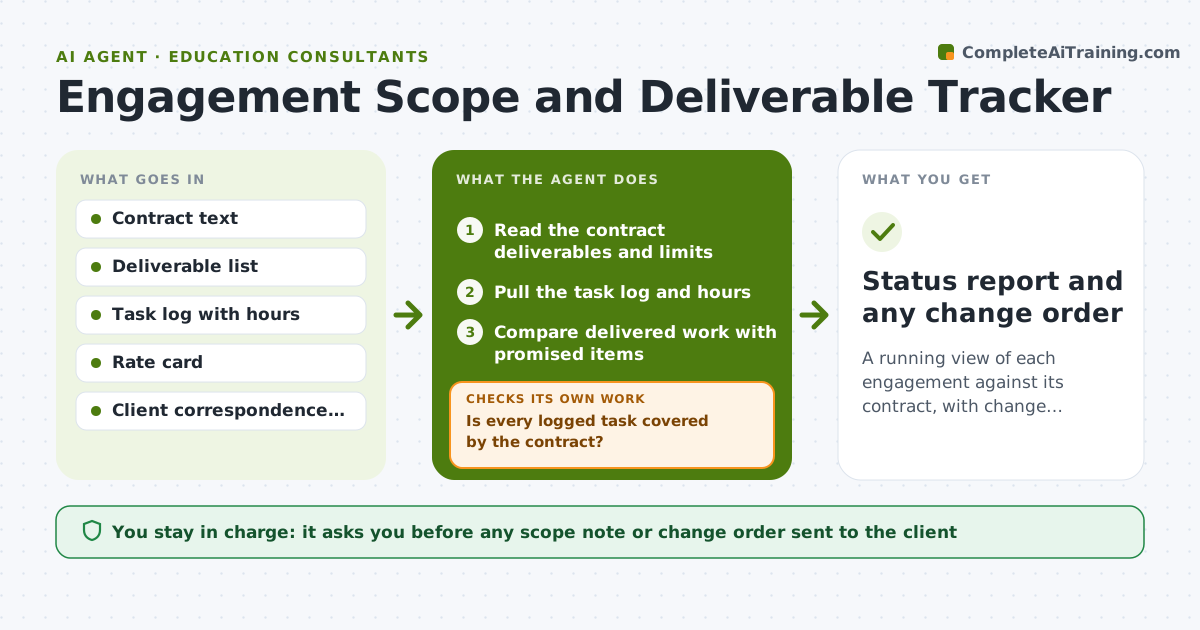
A consultant promises three deliverables, then adds a workshop, two extra calls and a rewrite. Nobody tracks it against the contract until the invoice dispute. This agent reads the contract and your task log and compares delivered work with what was promised. It flags overruns, such as hours or revisions beyond the agreement, and calculates how far past scope the work is. When work goes beyond the agreement, it drafts a scope note or change order with the extra work and cost. It rechecks the contract wording before the draft is final. Edge case: a client request is partly in scope, so the agent splits it into included and extra parts. You approve anything sent to the client.
How it works
Follow the arrows from top to bottom. The orange dashed arrow is the loop: when a check fails, the agent goes back and tries again.
Read the steps as a list
- Weekly engagement review
- Read the contract deliverables and limits
- Pull the task log and hours
- Compare delivered work with promised items
- Is every logged task covered by the contract?If not: mark tasks as extra and price them from the rate card. Back to step 3.
- Calculate overage in hours and cost
- Does the draft note match the contract wording?If not: correct the references and recalculate. Back to step 4.
- Draft a scope note or change order
- Consultant approves what is sent to the clientThe agent waits here for your OK.
- Status report and any change order
How it decides
It treats work as extra when it is not in the contract list or exceeds stated limits such as revision rounds, and drafts a note once it passes 10% overage.
- Flag when logged hours exceed 90% of the contract allowance.
- Draft a change order when extra work passes 10% overage.
- Revisions beyond the stated number are treated as extra.
- Quote extra work at the contract rate card.
Make it yours
Every agent is a starting point. You choose these settings for your own situation.
- Overage threshold (default 10%)
- Rate card
- Review frequency
- Contract fields tracked
- Note tone
What keeps you in control
It always asks you first
- Any scope note or change order sent to the client
- Any price for extra work
Hard limits
- Do not email the client.
- Do not alter contract terms.
It stops when
- Done: all work mapped to the contract and notes approved
- Stop: the contract is unclear on scope, so the agent asks the consultant to clarify
Set it up
We guide you through the set-up, step by step
Members get the full set-up guide for this agent. No technical skills needed: you copy, paste and upload.
- One set of instructions to paste into your AI, with the clicks for ChatGPT, Claude, Microsoft 365 Copilot, Gemini and Grok
- The agent then walks you through connecting your own data, one source at a time
- A downloadable copy with the flow chart, the rules and the full guide