AI agent for online sellers
Product Compliance Check Agent
Check each new product against restricted lists, labeling and safety rules, and hold the listing until documents arrive
What it does
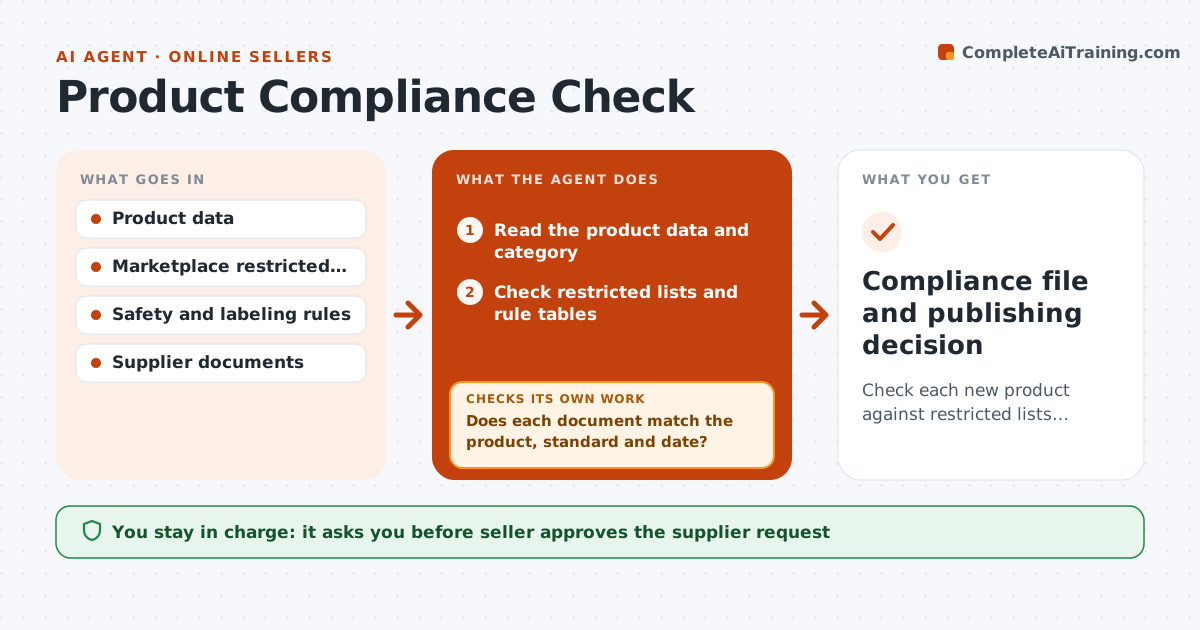
Restricted or regulated products are listed and removed later, sometimes with the whole account at risk. When a product is added, the agent checks its category and ingredients against the marketplace's restricted lists. It looks up the labeling and safety rules for the product type, such as a battery, a toy or a supplement. It requests test reports or certificates from the supplier and checks each document for the right product, standard and date. If a document fails, it asks again. It holds the listing until all checks pass. The seller approves publishing. Edge case: a children's toy shows a test report for a different model, and the agent rejects it.
How it works
Follow the arrows from top to bottom. The orange dashed arrow is the loop: when a check fails, the agent goes back and tries again.
Read the steps as a list
- Product added
- Read the product data and category
- Check restricted lists and rule tables
- List the required labels and certificates
- Seller approves the document request to the supplierThe agent waits here for your OK.
- Read the documents received
- Does each document match the product, standard and date?If not: Reject the document and ask for a correct one. Back to step 2.
- Check the label and listing text against the rules
- Do all checks pass?If not: Hold the listing and list the open items. Back to step 3.
- Seller approves publishingThe agent waits here for your OK.
- Compliance file and publishing decision
How it decides
A product is cleared only when category rules, labels and required certificates all check out.
- Block any product on a restricted list
- Require documents dated within 2 years
- Match the model number on every report
- Hold the listing until all checks pass
Make it yours
Every agent is a starting point. You choose these settings for your own situation.
- Document age limit (default 2 years)
- Categories checked
- Marketplaces covered
- Hold rule
What keeps you in control
It always asks you first
- Seller approves the supplier request
- Seller approves publishing the listing
Hard limits
- Never publish a product that fails a check
- Never invent a certificate
It stops when
- Done: all checks pass and the listing is published
- Stop: the product is restricted
Set it up
We guide you through the set-up, step by step
Members get the full set-up guide for this agent. No technical skills needed: you copy, paste and upload.
- One set of instructions to paste into your AI, with the clicks for ChatGPT, Claude, Microsoft 365 Copilot, Gemini and Grok
- The agent then walks you through connecting your own data, one source at a time
- A downloadable copy with the flow chart, the rules and the full guide