AI agent for product marketing managers
Product Launch Readiness Agent
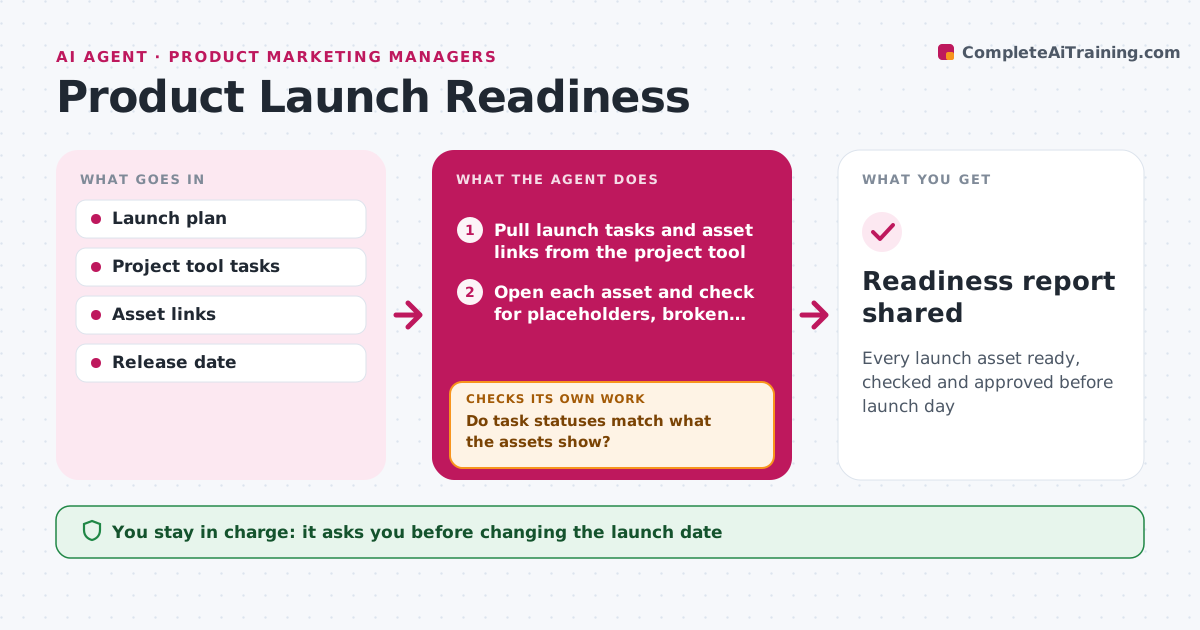
Every launch asset ready, checked and approved before launch day
What it does
Launches slip when tasks are marked done but the actual pages, decks and articles are not ready. From the launch plan, this agent builds a readiness list for every team: web pages, pricing, sales enablement, support articles, press, emails and in-product messages. At each weekly review it pulls task statuses and asset links, then opens each asset and checks for placeholders, broken links and missing sign-off. An item is ready only when the asset exists, has no placeholders and is signed off. If a task status does not match what the asset shows, it reopens the item and asks the owner for a date. Red items in the last three days go straight to the PMM. When the release date moves, it recalculates dependent dates. It drafts a summary with owners and dates. The PMM decides go, hold or shift. Edge case: a moved release date triggers recalculation of all dependent dates.
How it works
Follow the arrows from top to bottom. The orange dashed arrow is the loop: when a check fails, the agent goes back and tries again.
Read the steps as a list
- Readiness review time
- Pull launch tasks and asset links from the project tool
- Open each asset and check for placeholders, broken links, missing sign-off
- Mark items ready, at risk or blocked
- Do task statuses match what the assets show?If not: reopen mismatched items and ask the owner for a date. Back to step 3.
- Draft readiness summary with owners and dates
- PMM decides go, hold or shift launch dateThe agent waits here for your OK.
- Readiness report shared
How it decides
It marks an item ready only when the asset exists, has no placeholders and has its approver's sign-off.
- A task marked done with placeholder text is reopened
- Any red item in the last three days goes to the PMM directly
- Recalculate dependent dates when the release date moves
Make it yours
Every agent is a starting point. You choose these settings for your own situation.
- Teams and asset types on the readiness list
- Review cadence by phase
- Who receives the summary
- What counts as sign-off
What keeps you in control
It always asks you first
- Changing the launch date
- Sending readiness summary to leadership
Hard limits
- Never publishes pages or sends launch emails
- Does not change task owners
It stops when
- Done: all items green on launch eve
- Stop: launch cancelled or postponed indefinitely
Set it up
We guide you through the set-up, step by step
Members get the full set-up guide for this agent. No technical skills needed: you copy, paste and upload.
- One set of instructions to paste into your AI, with the clicks for ChatGPT, Claude, Microsoft 365 Copilot, Gemini and Grok
- The agent then walks you through connecting your own data, one source at a time
- A downloadable copy with the flow chart, the rules and the full guide