AI agent for product owners
Product Owner Alignment Prep Agent
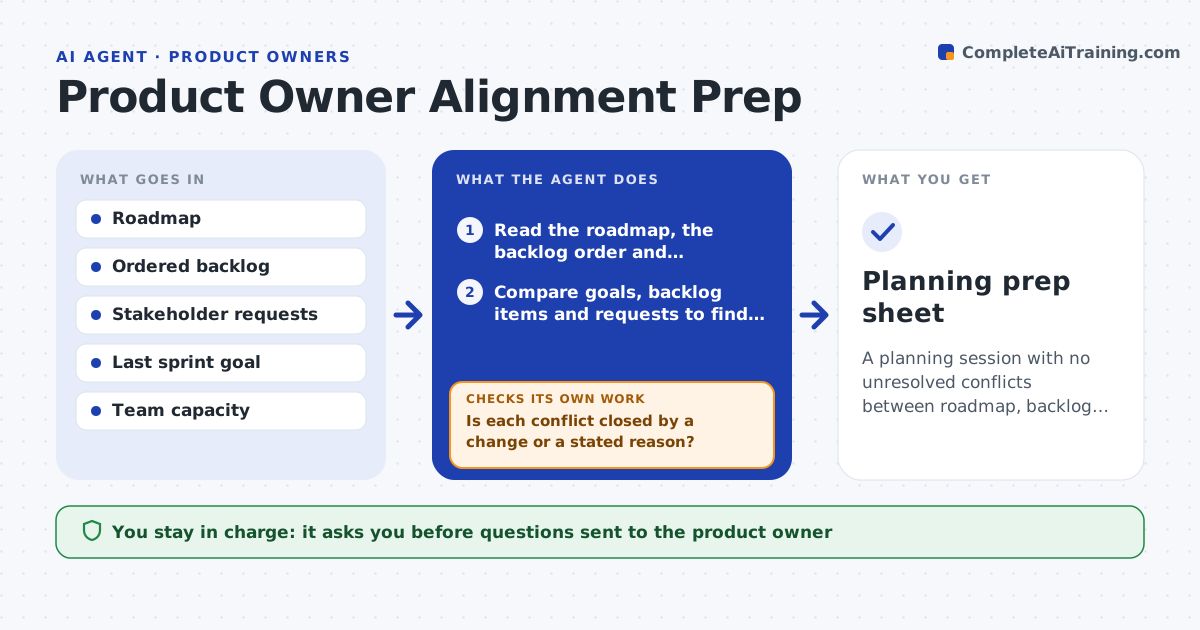
A planning session with no unresolved conflicts between roadmap, backlog order and stakeholder requests
What it does
Sprint planning slows down when the team finds out in the room that the backlog and the roadmap disagree. Before each planning session, this agent reads the roadmap, the ordered backlog and recent stakeholder requests. It compares them and finds conflicts, such as a roadmap goal with no backlog items, a high-ranked item that no goal mentions, or a stakeholder request marked urgent but sitting low. It drafts specific questions for the product owner and sends them once the scrum master approves. After each answer, it updates its comparison and checks whether the conflict is closed. If new conflicts show up, it adds them to the list. It repeats until planning day. Edge case: two stakeholders ask for opposite outcomes, and the agent sets them side by side for the owner to decide.
How it works
Follow the arrows from top to bottom. The orange dashed arrow is the loop: when a check fails, the agent goes back and tries again.
Read the steps as a list
- Planning is three days away
- Read the roadmap, the backlog order and stakeholder requests
- Compare goals, backlog items and requests to find mismatches
- Draft specific questions for the product owner with the evidence
- Scrum master approves the questions before they are sentThe agent waits here for your OK.
- Record each answer and update the comparison
- Is each conflict closed by a change or a stated reason?If not: keep the conflict open and ask a sharper follow-up. Back to step 3.
- Did the answers create any new mismatch?If not: add it to the list and draft the next question. Back to step 3.
- Write a one-page summary of settled and open items for planning
- Scrum master approves the summaryThe agent waits here for your OK.
- Planning prep sheet
How it decides
A conflict is closed only when the product owner's answer changes the backlog or roadmap, or states why the mismatch stays.
- Flag any roadmap goal with no backlog item in the next two sprints
- Flag top-5 items with no linked goal
- Escalate a stakeholder request marked urgent but ranked below 10
- Show conflicting requests side by side
Make it yours
Every agent is a starting point. You choose these settings for your own situation.
- Days before planning it starts (default 3)
- Backlog depth to check (default 2 sprints)
- Where questions are sent
- Request sources it reads
What keeps you in control
It always asks you first
- Questions sent to the product owner
- Summary shared with the team
Hard limits
- Never reorders the backlog
- Never contacts stakeholders directly
It stops when
- Done: conflicts are closed or listed as open for planning
- Stop: the product owner does not respond before planning
Set it up
We guide you through the set-up, step by step
Members get the full set-up guide for this agent. No technical skills needed: you copy, paste and upload.
- One set of instructions to paste into your AI, with the clicks for ChatGPT, Claude, Microsoft 365 Copilot, Gemini and Grok
- The agent then walks you through connecting your own data, one source at a time
- A downloadable copy with the flow chart, the rules and the full guide