AI agent for industrial designers
Production Sample Review Agent
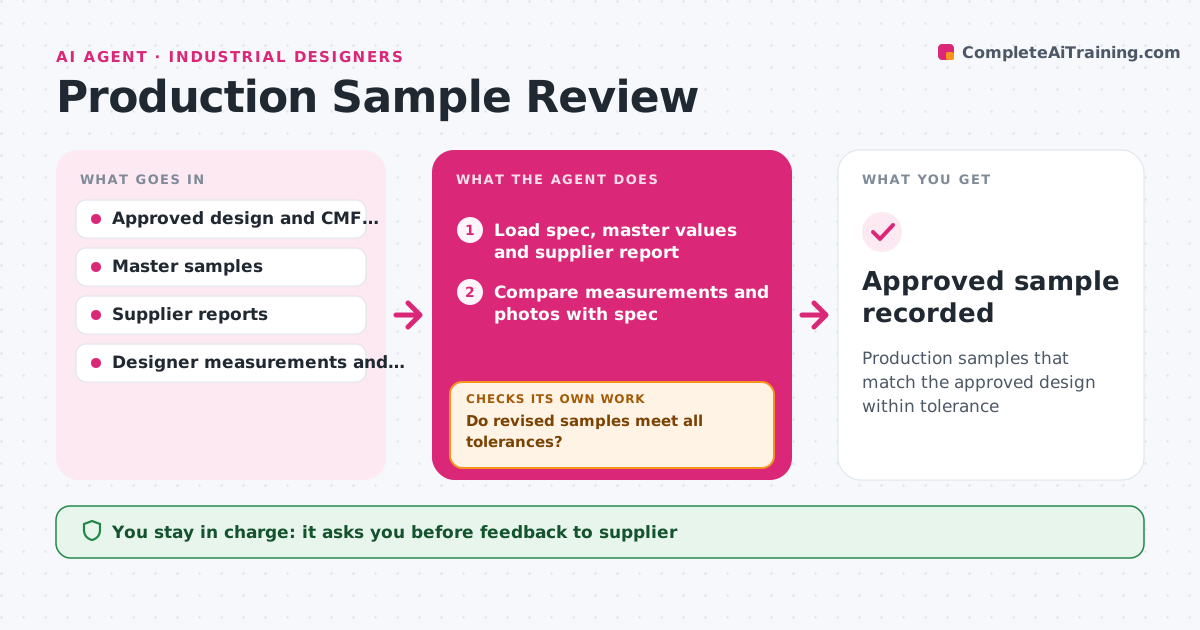
Production samples that match the approved design within tolerance
What it does
Production samples that drift from the approved design can slip through if review is rushed or measured differently. When samples arrive, this agent organizes the review against the approved design: color against master sample values, gloss, texture, part gaps and flushness, logo placement and assembly fit. It reads the supplier's measurement report, compares it with the designer's own measurements and photos, and lists deviations. Each deviation is rated against agreed tolerances. Before judging color, it confirms the measurement used the agreed light. It drafts feedback to the supplier with photos and required fixes. When revised samples come, it checks again. The designer signs off the golden sample. Edge case: color measured under different lighting is re-measured before any judgment.
How it works
Follow the arrows from top to bottom. The orange dashed arrow is the loop: when a check fails, the agent goes back and tries again.
Read the steps as a list
- Samples arrive
- Load spec, master values and supplier report
- Compare measurements and photos with spec
- Rate deviations against tolerances
- Draft feedback to supplier
- Designer approves feedbackThe agent waits here for your OK.
- Do revised samples meet all tolerances?If not: draft another round of feedback. Back to step 3.
- Designer signs off the golden sampleThe agent waits here for your OK.
- Approved sample recorded
How it decides
It judges each attribute against agreed tolerances and requires measurements under agreed conditions.
- Color must be measured under the agreed light source
- Gaps over tolerance require tool adjustment
- Sign-off needs every attribute in tolerance or accepted
Make it yours
Every agent is a starting point. You choose these settings for your own situation.
- Tolerances per attribute
- Measurement conditions
- Feedback format
- Number of rounds before escalation
What keeps you in control
It always asks you first
- Feedback to supplier
- Golden sample sign-off
Hard limits
- Never approves samples itself
- Never changes the spec
It stops when
- Done: golden sample approved
- Stop: supplier can't meet tolerance, escalate
Set it up
We guide you through the set-up, step by step
Members get the full set-up guide for this agent. No technical skills needed: you copy, paste and upload.
- One set of instructions to paste into your AI, with the clicks for ChatGPT, Claude, Microsoft 365 Copilot, Gemini and Grok
- The agent then walks you through connecting your own data, one source at a time
- A downloadable copy with the flow chart, the rules and the full guide