AI agent for pmo managers
Project Dependency Slip Alert Agent
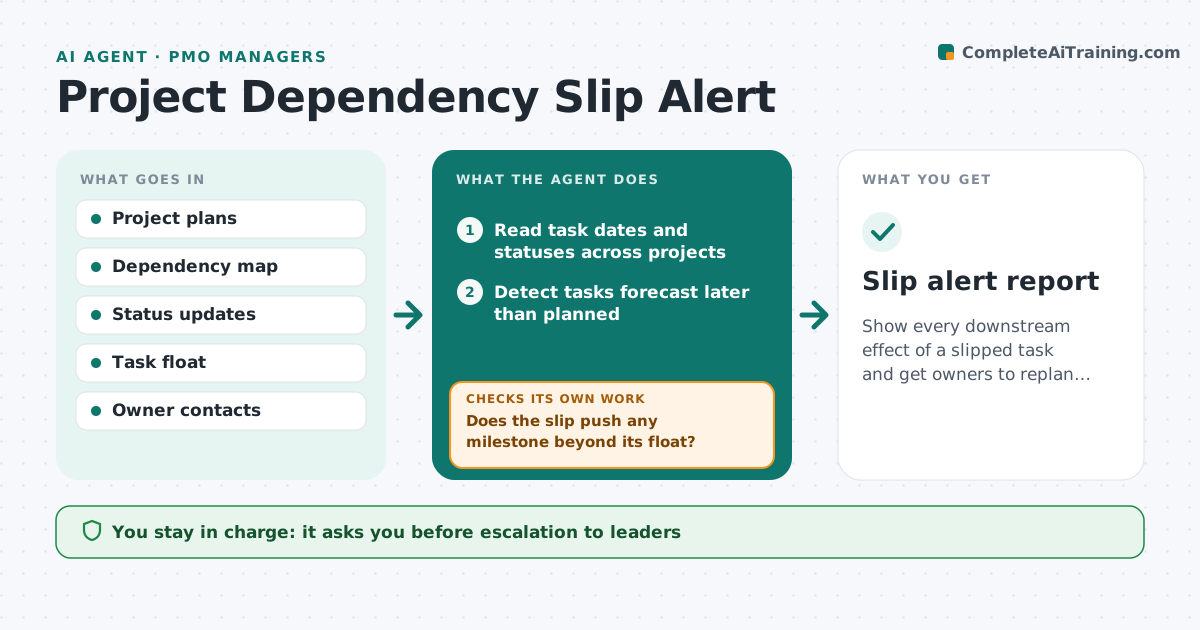
Show every downstream effect of a slipped task and get owners to replan before the delay spreads.
What it does
Projects share teams, systems and deliverables. When a task on one slips, the effect on others is not seen until a manager asks why something is late. This agent keeps a map of dependencies across projects. It reads status dates every day, detects tasks that have slipped, and traces the downstream tasks and projects that now depend on a later date. It estimates the new dates and drafts a note to the owners affected. After the owners replan, it rechecks that the new plan resolves the conflict. It escalates only what stays unsolved. The manager approves each escalation. Edge case: a slip on a task with float is noted but not escalated.
How it works
Follow the arrows from top to bottom. The orange dashed arrow is the loop: when a check fails, the agent goes back and tries again.
Read the steps as a list
- Daily status update is loaded
- Read task dates and statuses across projects
- Detect tasks forecast later than planned
- Follow the dependency map to downstream tasks and projects
- Does the slip push any milestone beyond its float?If not: Log it as a watch item and stop. Back to step 3.
- Estimate the new dates and effect on each project
- Draft a note to the affected owners with the options
- Manager approves escalationThe agent waits here for your OK.
- Read the replanned dates
- Does the new plan clear the conflict?If not: Escalate the open items with the remaining effect. Back to step 6.
- Slip alert report
How it decides
Compares planned and forecast dates, follows dependencies downstream, and escalates a slip only when it moves a milestone beyond the float.
- Slip within float is noted only
- Milestone slip over 3 days is escalated
- Cross-project conflict needs both owners in the message
- Replan expected within 2 working days
Make it yours
Every agent is a starting point. You choose these settings for your own situation.
- Escalation threshold in days (default 3)
- Which projects to include
- Replan deadline (default 2 days)
- Message tone
- Float rules
What keeps you in control
It always asks you first
- Escalation to leaders
- Any message to owners that proposes a date
- Changes to a baseline
Hard limits
- Never change a plan itself
- Never blame an owner in a message
It stops when
- Done: conflict cleared
- Stop: project cancelled
- Stop: baseline reset by the sponsor
Set it up
We guide you through the set-up, step by step
Members get the full set-up guide for this agent. No technical skills needed: you copy, paste and upload.
- One set of instructions to paste into your AI, with the clicks for ChatGPT, Claude, Microsoft 365 Copilot, Gemini and Grok
- The agent then walks you through connecting your own data, one source at a time
- A downloadable copy with the flow chart, the rules and the full guide