AI agent for prompt engineers
Prompt Output Consistency Tuning Agent
Raise a prompt's output consistency to the agreed target without lowering quality
What it does
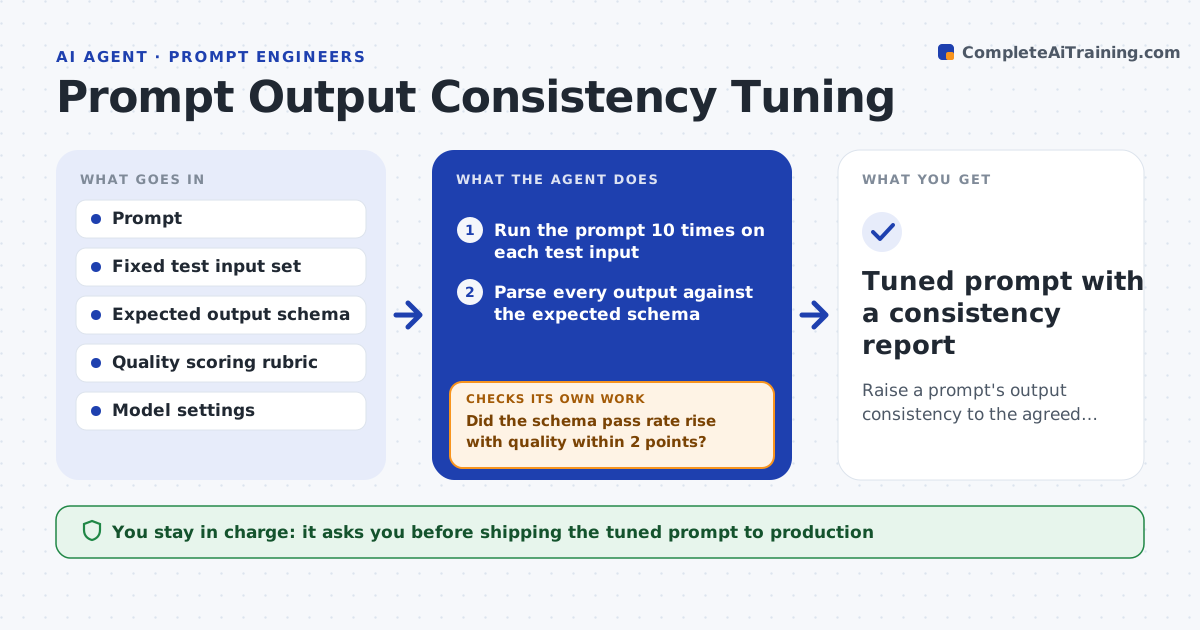
Developers complain when the same prompt returns valid JSON nine times and a chatty paragraph the tenth. Checking this by hand means running the prompt many times and eyeballing the results. This agent runs a chosen prompt against a fixed input set many times, parses every output against the expected schema, and measures how often fields, lengths and labels vary. It then tries one change at a time: a tighter format block, a worked example, a lower temperature, or an explicit fallback instruction. After each change it reruns the same inputs and keeps the change only if consistency improves without hurting the quality score. If nothing reaches the target, it reports which inputs still drift. The prompt engineer chooses which version ships. Edge case: when an input is ambiguous by nature, the agent labels it as such instead of forcing a format change.
How it works
Follow the arrows from top to bottom. The orange dashed arrow is the loop: when a check fails, the agent goes back and tries again.
Read the steps as a list
- Prompt marked for consistency tuning
- Run the prompt 10 times on each test input
- Parse every output against the expected schema
- Measure schema pass rate, length spread and label variation
- Pick the next single change to try: format block, example, temperature or fallback rule
- Rerun the test set with the changed prompt
- Did the schema pass rate rise with quality within 2 points?If not: revert the change and try the next option on the list. Back to step 5.
- Is the pass rate at or above the target?If not: keep the best version and list inputs that still drift. Back to step 5.
- Prompt engineer chooses the version to shipThe agent waits here for your OK.
- Tuned prompt with a consistency report
How it decides
It changes one factor per round and keeps a change only when the schema pass rate rises and the quality score stays within 2 points of the baseline.
- Target schema pass rate is 98% unless the user sets another
- Try at most 6 changes per session to limit cost
- Mark an input ambiguous when even the best version passes on it less than 60% of the time
- Prefer prompt wording changes over temperature changes when both help equally
Make it yours
Every agent is a starting point. You choose these settings for your own situation.
- Target schema pass rate (default 98%)
- Runs per input (default 10)
- Maximum changes per session (default 6)
- Run budget in dollars (default 15)
What keeps you in control
It always asks you first
- Shipping the tuned prompt to production
Hard limits
- Never changes the production prompt itself
- Stays within the run budget set by the user
It stops when
- Done: target reached and version chosen
- Stop: run budget used up; report best version so far
Set it up
We guide you through the set-up, step by step
Members get the full set-up guide for this agent. No technical skills needed: you copy, paste and upload.
- One set of instructions to paste into your AI, with the clicks for ChatGPT, Claude, Microsoft 365 Copilot, Gemini and Grok
- The agent then walks you through connecting your own data, one source at a time
- A downloadable copy with the flow chart, the rules and the full guide