AI agent for real estate agents
Property Listing Fact Verification Agent
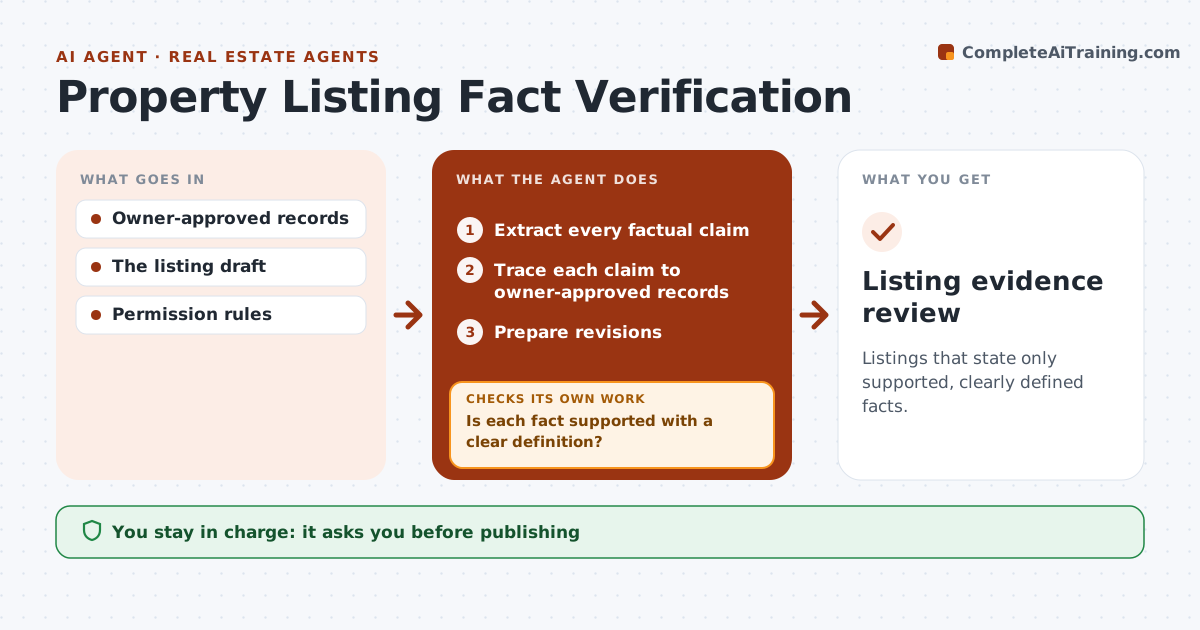
Listings that state only supported, clearly defined facts.
What it does
Property listings sometimes state facts that the records do not support, such as an inflated floor area or a renovation year nobody can prove. That creates complaints and legal risk. This agent reads the listing draft and traces every factual claim, including dimensions, features, dates and permitted uses, back to owner-approved records. When sources use different definitions, such as internal area versus total area, it qualifies the figure with a clear label instead of picking the bigger number. Claims with no source are removed or turned into questions for the owner. It then prepares revisions and checks the revised draft again before marketing approves publishing. Edge case: a feature that appears only in an old listing, not in owner records, counts as unsupported.
How it works
Follow the arrows from top to bottom. The orange dashed arrow is the loop: when a check fails, the agent goes back and tries again.
Read the steps as a list
- Listing drafted
- Extract every factual claim
- Trace each claim to owner-approved records
- Is each fact supported with a clear definition?If not: qualify it with a label, remove it, or ask the owner. Back to step 3.
- Prepare revisions
- Does the revised draft contain only supported claims?If not: recheck the changed claims. Back to step 2.
- Marketing approves publishingThe agent waits here for your OK.
- Listing evidence review
How it decides
It qualifies figures when definitions differ.
- Qualify figures when sources use different definitions.
- Old listings are not evidence; owner records are.
- Unsupported claims are removed or become owner questions.
- Nothing is published without marketing approval.
Make it yours
Every agent is a starting point. You choose these settings for your own situation.
- Which records count as approved sources
- Area definition to state first (default: internal area)
- How to handle unsupported claims (default: remove and ask the owner)
- Who approves publishing (default: marketing lead)
- Listing portals the final text is formatted for
What keeps you in control
It always asks you first
- Publishing
- Legal representations
Hard limits
- No representations.
It stops when
- Done: reviewed.
Set it up
We guide you through the set-up, step by step
Members get the full set-up guide for this agent. No technical skills needed: you copy, paste and upload.
- One set of instructions to paste into your AI, with the clicks for ChatGPT, Claude, Microsoft 365 Copilot, Gemini and Grok
- The agent then walks you through connecting your own data, one source at a time
- A downloadable copy with the flow chart, the rules and the full guide