AI agent for sales development representatives
Prospect List Build and Verify Agent
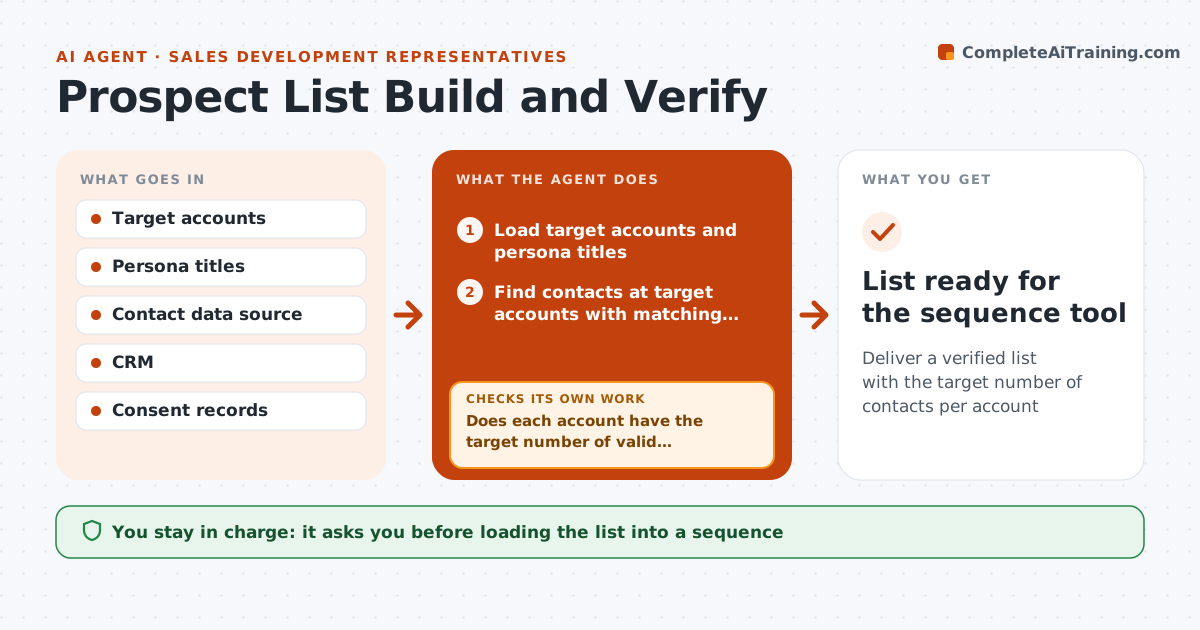
Deliver a verified list with the target number of contacts per account
What it does
Every new campaign needs a clean list of the right people, and bad lists hurt both reply rates and sender reputation. This agent takes the target account list and persona and finds contacts with matching titles. It verifies each contact's current employment and email, and checks the CRM: anyone in an active sequence or open deal is excluded. Contacts in regions that need prior consent are excluded unless the CRM shows consent. It removes contacts that fail any rule and checks whether each account still has the target number of valid contacts. If not, it searches adjacent titles for replacements, stopping after three rounds per account. It reports accounts where no valid contact was found. The SDR approves the final list before it is loaded into a sequence. Edge case: consent-required regions are excluded without recorded consent.
How it works
Follow the arrows from top to bottom. The orange dashed arrow is the loop: when a check fails, the agent goes back and tries again.
Read the steps as a list
- Campaign planned
- Load target accounts and persona titles
- Find contacts at target accounts with matching titles
- Verify email, employment and CRM status
- Remove contacts that fail any rule, including consent
- Does each account have the target number of valid contacts?If not: search adjacent titles for replacements, up to three rounds. Back to step 3.
- List accounts with no valid contact
- SDR approves the listThe agent waits here for your OK.
- List ready for the sequence tool
How it decides
A contact is valid when the title matches, the email verifies, they are not in an active sequence or open deal, and region consent rules are met.
- Exclude contacts in active sequences or open deals
- Exclude consent-required regions without recorded consent
- Stop searching an account after three rounds
Make it yours
Every agent is a starting point. You choose these settings for your own situation.
- Contacts per account (default 3)
- Persona titles and adjacent titles
- Regions requiring consent
- Email verification threshold
What keeps you in control
It always asks you first
- Loading the list into a sequence
Hard limits
- Never loads contacts into sequences without approval
- Never uses contacts without required consent
It stops when
- Done: list approved
- Stop: persona or account list missing
Set it up
We guide you through the set-up, step by step
Members get the full set-up guide for this agent. No technical skills needed: you copy, paste and upload.
- One set of instructions to paste into your AI, with the clicks for ChatGPT, Claude, Microsoft 365 Copilot, Gemini and Grok
- The agent then walks you through connecting your own data, one source at a time
- A downloadable copy with the flow chart, the rules and the full guide