AI agent for landscape architects
Public Engagement Feedback to Design Agent
Trace every public comment to a documented design response across all revisions
What it does
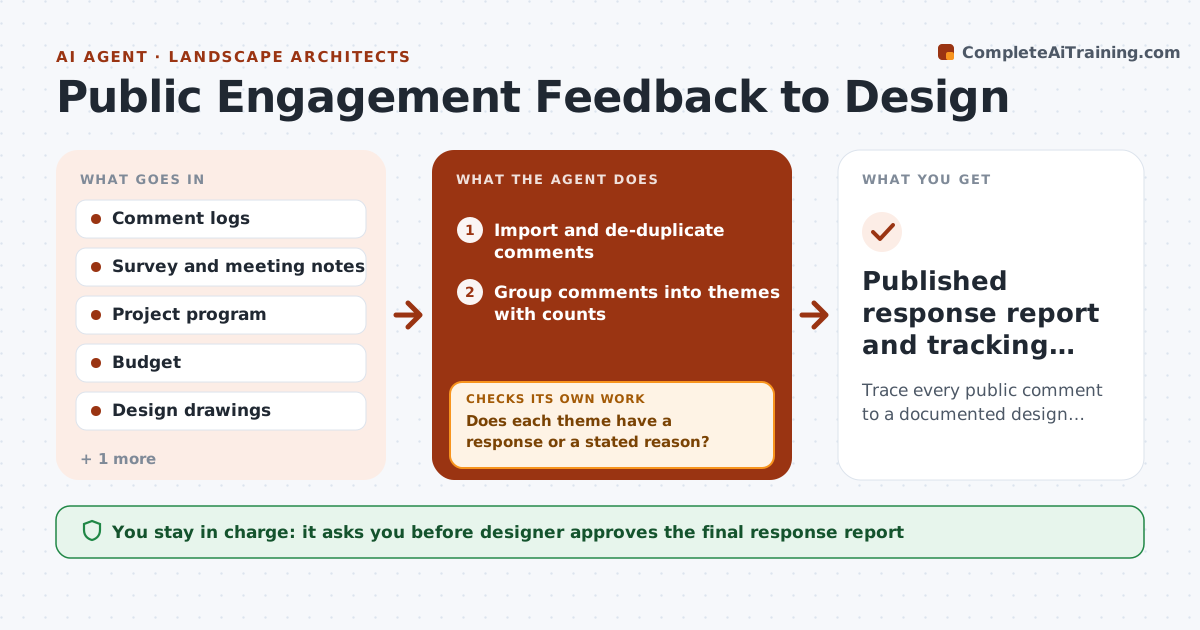
Public comments pile up in spreadsheets and meeting notes, and months later nobody can say which ones shaped the design. The agent reads every comment, groups them by theme (shade, safety, parking, play space) and checks each against the project program and budget. For each theme it proposes a design response or a clear reason it cannot be met. It records which comments were adopted in a tracking table. After every design revision it rechecks the table, and if a response no longer matches the drawings it reopens that item and revises the response. It then drafts the response report. The designer always decides what is published. Edge case: forty comments ask for a dog park, but the program has no land for one, so the agent drafts a shared-use alternative and lists the cost.
How it works
Follow the arrows from top to bottom. The orange dashed arrow is the loop: when a check fails, the agent goes back and tries again.
Read the steps as a list
- Comments or a revision arrive
- Import and de-duplicate comments
- Group comments into themes with counts
- Check each theme against program and budget
- Does each theme have a response or a stated reason?If not: Re-read the comments and the program, then draft a response or a reason for each gap. Back to step 3.
- Draft design responses and log adopted, partly adopted or declined
- Compare responses with the latest drawings
- Do the drawings still match each adopted response?If not: Reopen the mismatched items and rewrite the response or flag the drawing. Back to step 6.
- Designer approves the response report for releaseThe agent waits here for your OK.
- Published response report and tracking table
How it decides
Each comment goes to a theme, then is tested against the program and budget; feasible ones get a design response, others get a reasoned explanation.
- Adopt a response only if it fits the program and stays within the budget contingency (default 2%)
- Group comments into one theme when at least three share the same request
- Mark a response as partly adopted when only some of the request fits
- Reopen any item when a revision changes the related drawing
Make it yours
Every agent is a starting point. You choose these settings for your own situation.
- Budget contingency limit for adopted changes (default 2%)
- Number of comments that forms a theme (default 3)
- Report format and tone (default plain-language summary)
- Revision events that trigger a recheck (default every issued revision)
What keeps you in control
It always asks you first
- Designer approves the final response report
- Designer approves any statement that promises a design change
Hard limits
- Never publish a response the designer has not approved
- Never promise a design change that is not in the drawings
It stops when
- Done: every theme has an approved response and the table matches the latest drawings
- Stop: comments request something outside the project scope and the designer must decide
Set it up
We guide you through the set-up, step by step
Members get the full set-up guide for this agent. No technical skills needed: you copy, paste and upload.
- One set of instructions to paste into your AI, with the clicks for ChatGPT, Claude, Microsoft 365 Copilot, Gemini and Grok
- The agent then walks you through connecting your own data, one source at a time
- A downloadable copy with the flow chart, the rules and the full guide