AI agent for quantity surveyors
Quantity Takeoff Cross-Check Agent
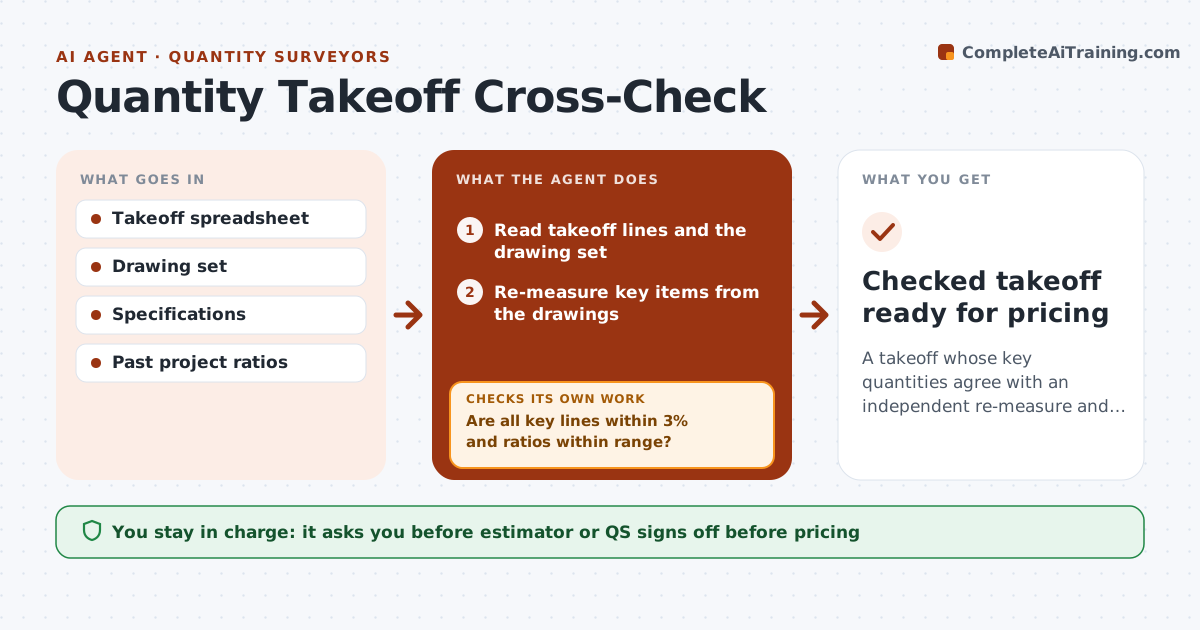
A takeoff whose key quantities agree with an independent re-measure and past-project ratios
What it does
Quantities measured from drawings drive every price, and one missed floor or wrong unit can sink a bid. When a takeoff is marked ready, this agent reads the takeoff spreadsheet and drawing set and re-measures the key items, the top lines that make up 80% of cost, on its own. It compares quantities line by line and checks units. It also runs sanity ratios, such as concrete per square foot of floor or rebar per cubic yard, against the firm's past projects. Gaps over 3% or ratios out of range are flagged with the drawing area it measured, so the estimator can see the difference. It re-measures after edits. The estimator or quantity surveyor signs off. Edge case: when drawings and specs disagree on a material, it raises an RFI candidate instead of picking one.
How it works
Follow the arrows from top to bottom. The orange dashed arrow is the loop: when a check fails, the agent goes back and tries again.
Read the steps as a list
- Takeoff marked ready for pricing
- Read takeoff lines and the drawing set
- Re-measure key items from the drawings
- Compare quantities line by line and check units
- Run ratios against past projects
- Are all key lines within 3% and ratios within range?If not: show the differing areas to the estimator and re-measure after edits. Back to step 3.
- Estimator or QS signs off the takeoffThe agent waits here for your OK.
- Checked takeoff ready for pricing
How it decides
Lines that differ from the re-measure by more than 3%, or ratios outside the past-project range, are flagged with the area measured.
- Key items are the top lines making 80% of cost
- Gaps over 3% are flagged
- Drawing and spec conflicts become RFI candidates
Make it yours
Every agent is a starting point. You choose these settings for your own situation.
- Tolerance for differences (default 3%)
- Which trades to re-measure
- Ratio set from past projects
- Units system
What keeps you in control
It always asks you first
- Estimator or QS signs off before pricing
Hard limits
- Never changes the takeoff itself
- Never prices the bid
It stops when
- Done: all key lines agree
- Stop: drawing set incomplete
Set it up
We guide you through the set-up, step by step
Members get the full set-up guide for this agent. No technical skills needed: you copy, paste and upload.
- One set of instructions to paste into your AI, with the clicks for ChatGPT, Claude, Microsoft 365 Copilot, Gemini and Grok
- The agent then walks you through connecting your own data, one source at a time
- A downloadable copy with the flow chart, the rules and the full guide