AI agent for elementary school teachers
Reading Group Book Matching Agent
Each reading group has a confirmed book set at the right level with enough copies
What it does
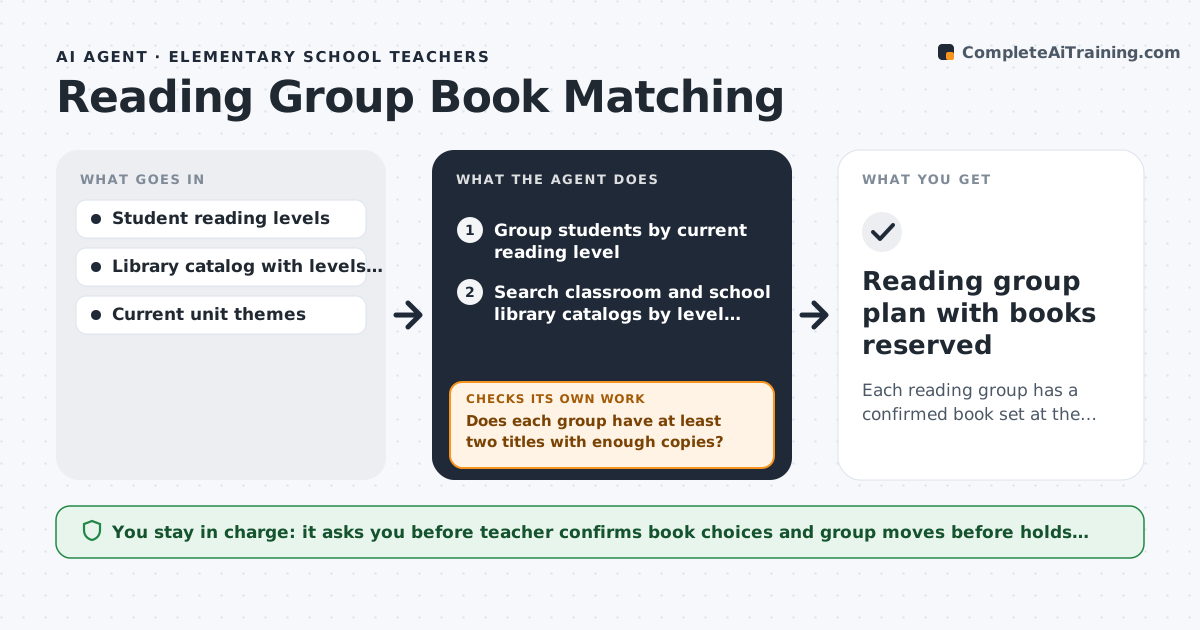
Guided reading groups change as children progress, and finding enough copies of the right books at the right level is slow. This agent takes the latest reading benchmark levels and groups students by level. It searches the classroom and school library catalogs for titles within one level of each group's median that fit the current unit theme. It checks that each group has at least two titles with one copy per student. If not, it widens the search to nearby levels or digital editions and searches again. It writes a short reason for each suggested title. Students who jumped two or more levels are listed separately for the teacher to confirm. The teacher picks the books and confirms group moves, then the agent places holds. Edge case: a student jumped two levels since last time.
How it works
Follow the arrows from top to bottom. The orange dashed arrow is the loop: when a check fails, the agent goes back and tries again.
Read the steps as a list
- New reading benchmark scores arrive
- Group students by current reading level
- Search classroom and school library catalogs by level and theme
- Does each group have at least two titles with enough copies?If not: widen to one level up or down and digital editions, then search again. Back to step 3.
- Did any student jump two or more levels?If not: keep grouping as is. Back to step 2.
- Write a short reason for each suggested title
- Teacher picks titles and confirms group movesThe agent waits here for your OK.
- Place holds on chosen titles
- Reading group plan with books reserved
How it decides
It matches books within one level of the group's median, prefers the unit theme, and needs one copy per student. Students who jumped two or more levels are held for teacher review.
- Books must be within one level of the group median
- One copy per student, or a digital edition
- Students jumping two or more levels are confirmed by the teacher first
Make it yours
Every agent is a starting point. You choose these settings for your own situation.
- Leveling system (Fountas and Pinnell, Lexile, DRA)
- How far from the group level to search (default 1 level)
- Include digital titles (yes or no)
- How often to regroup (default every 4 weeks)
What keeps you in control
It always asks you first
- Teacher confirms book choices and group moves before holds are placed
Hard limits
- Does not move a student between groups without teacher approval
- Uses only the school's catalogs and approved digital libraries
It stops when
- Done: every group has a reserved book set
- Stop: catalog has no level data
Set it up
We guide you through the set-up, step by step
Members get the full set-up guide for this agent. No technical skills needed: you copy, paste and upload.
- One set of instructions to paste into your AI, with the clicks for ChatGPT, Claude, Microsoft 365 Copilot, Gemini and Grok
- The agent then walks you through connecting your own data, one source at a time
- A downloadable copy with the flow chart, the rules and the full guide