AI agent for data protection officers
Record Access Audit Agent
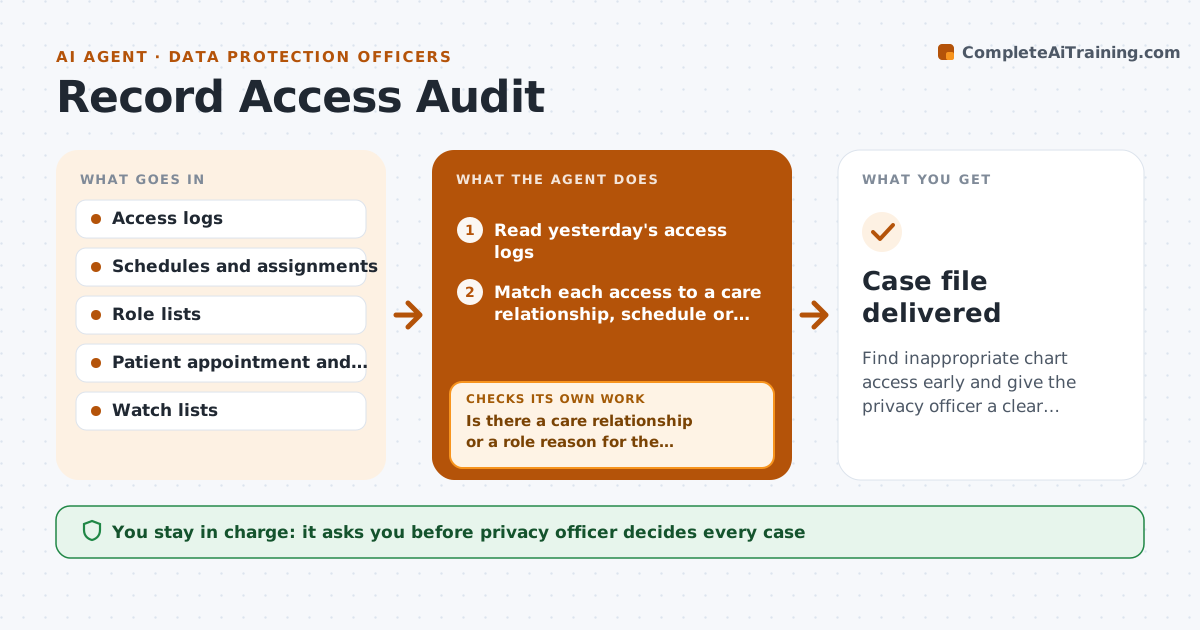
Find inappropriate chart access early and give the privacy officer a clear case file.
What it does
Snooping in patient charts is a privacy breach, and it is usually found only after a complaint. This agent reviews the access logs on a schedule. It looks for staff who opened records with no care relationship, such as no appointment, no order and no assignment, and for unusual volumes, like one person opening hundreds of charts in an hour. It checks the person's schedule and role to remove normal reasons, such as covering for a colleague. It builds a case file with the log entries, the context and the reasons it flagged. The privacy officer decides what happens next. Edge case: access to a staff member's own family record is flagged with a higher priority and no details are shown to others.
How it works
Follow the arrows from top to bottom. The orange dashed arrow is the loop: when a check fails, the agent goes back and tries again.
Read the steps as a list
- Daily access log review
- Read yesterday's access logs
- Match each access to a care relationship, schedule or role
- Is there a care relationship or a role reason for the access?If not: Mark the access as a candidate for review. Back to step 2.
- Check for unusual volumes and patterns
- Look for sensitive cases such as colleagues, family and public figures
- Does the context explain the access, for example coverage or a covering shift?If not: Add it to the case file as unexplained. Back to step 6.
- Build the case file with log entries and reasons
- Privacy officer decides on the caseThe agent waits here for your OK.
- Case file delivered
How it decides
It flags access with no care relationship and no role-based reason, and ranks cases by sensitivity and volume.
- Flag views with no appointment, order or assignment within 30 days
- Flag over 100 charts opened in an hour outside the person's role
- Raise priority for records of colleagues and public figures
- Drop access that matches a recorded coverage shift
Make it yours
Every agent is a starting point. You choose these settings for your own situation.
- Care relationship window (default 30 days)
- Volume threshold
- Sensitive record types
- Review frequency
What keeps you in control
It always asks you first
- Privacy officer decides every case
Hard limits
- Never accuse anyone or contact the person
- Never show case details to anyone but the officer
It stops when
- Done: cases are filed with evidence for the officer
- Stop: the log source is incomplete and the officer is told
Set it up
We guide you through the set-up, step by step
Members get the full set-up guide for this agent. No technical skills needed: you copy, paste and upload.
- One set of instructions to paste into your AI, with the clicks for ChatGPT, Claude, Microsoft 365 Copilot, Gemini and Grok
- The agent then walks you through connecting your own data, one source at a time
- A downloadable copy with the flow chart, the rules and the full guide