AI agent for medical records clerks
Record Amendment Request Agent
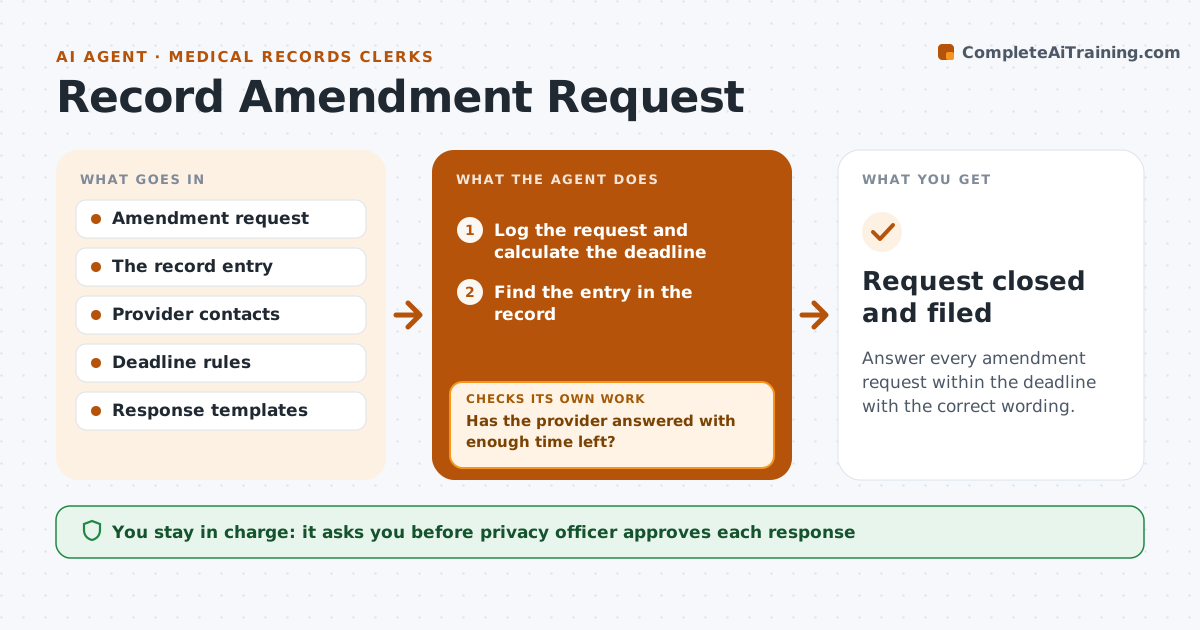
Answer every amendment request within the deadline with the correct wording.
What it does
A patient has the right to ask for a correction to their record, and the deadline is short. This agent logs each request the day it arrives and starts the clock. It finds the entry in question, routes it to the provider who made it, and tracks their decision. It drafts the patient response, whether the request is accepted or denied, using the required wording. If the decision date is near and the provider has not answered, it alerts the privacy officer before the deadline. The officer approves the response. Edge case: a request about an entry that was made at another facility is routed to that facility's contact.
How it works
Follow the arrows from top to bottom. The orange dashed arrow is the loop: when a check fails, the agent goes back and tries again.
Read the steps as a list
- Amendment request received
- Log the request and calculate the deadline
- Find the entry in the record
- Route it to the provider with the deadline
- Has the provider answered with enough time left?If not: Send a reminder, then alert the privacy officer before the deadline. Back to step 4.
- Record the decision and the reasons
- Draft the patient response using the required wording
- Privacy officer approves the responseThe agent waits here for your OK.
- Send the response and amend the record if accepted
- Is the amendment visible in the record and linked to the request?If not: Fix the link or flag it to the officer. Back to step 9.
- Request closed and filed
How it decides
It tracks the deadline from the receipt date and escalates when the provider has not decided in time.
- Deadline is 60 days from receipt
- Alert the officer at 45 days with no decision
- Use the denial wording required for refusals
- Notify others who hold the record when accepted
Make it yours
Every agent is a starting point. You choose these settings for your own situation.
- Deadline (default 60 days)
- Alert point (default 45 days)
- Reminder intervals
- Response templates
What keeps you in control
It always asks you first
- Privacy officer approves each response
Hard limits
- Never change a medical record without the provider
- Never send a response without the officer
It stops when
- Done: response sent and record updated if accepted
- Stop: the deadline passes and the officer takes over
Set it up
We guide you through the set-up, step by step
Members get the full set-up guide for this agent. No technical skills needed: you copy, paste and upload.
- One set of instructions to paste into your AI, with the clicks for ChatGPT, Claude, Microsoft 365 Copilot, Gemini and Grok
- The agent then walks you through connecting your own data, one source at a time
- A downloadable copy with the flow chart, the rules and the full guide