AI agent for librarians
Reference Desk Trend and Gap Agent
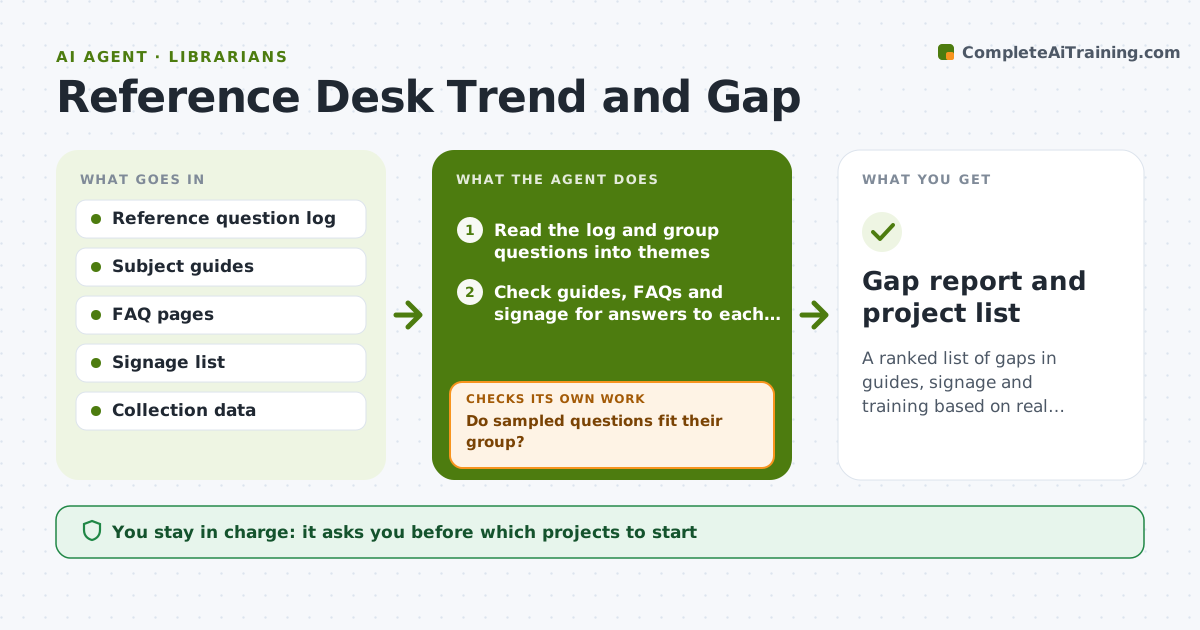
A ranked list of gaps in guides, signage and training based on real questions.
What it does
The reference desk log shows a dozen questions about citation styles every week, but the guides say nothing on it. Nobody has time to read the log. This agent reads the reference question log and groups questions by theme. For each theme it checks whether a guide, FAQ or collection already answers it and where the gap is. It proposes new guides, signs or training sessions, and re-reads samples from each group to confirm the grouping was right. Edge case: two themes turn out to be one, such as printer help and printing fees, so the agent merges them. The librarian approves which projects to start.
How it works
Follow the arrows from top to bottom. The orange dashed arrow is the loop: when a check fails, the agent goes back and tries again.
Read the steps as a list
- Question log exported for the period
- Read the log and group questions into themes
- Do sampled questions fit their group?If not: merge, split or rename groups and reread. Back to step 2.
- Check guides, FAQs and signage for answers to each theme
- Rank themes by volume and gap size
- Propose guides, signs or training for the top gaps
- Reread a sample to confirm the proposals fit the questions
- Librarian approves which projects to startThe agent waits here for your OK.
- Gap report and project list
How it decides
It ranks themes by volume and by whether existing resources answer them, favoring frequent questions with no answer.
- Rank a theme as a gap when it has at least 10 questions and no matching resource.
- Merge themes that share 70% of the same question wording.
- Sample at least 10% of each group.
- Do not include personal details from the log.
Make it yours
Every agent is a starting point. You choose these settings for your own situation.
- Review frequency
- Gap threshold (default 10 questions)
- Sample percentage
- Log fields used
- Output format
What keeps you in control
It always asks you first
- Which projects to start
- Any new public-facing content
Hard limits
- Do not publish guides itself.
- Do not quote patron names or details.
It stops when
- Done: gaps ranked and projects approved
- Stop: the log is too thin to group, so the agent recommends collecting more data
Set it up
We guide you through the set-up, step by step
Members get the full set-up guide for this agent. No technical skills needed: you copy, paste and upload.
- One set of instructions to paste into your AI, with the clicks for ChatGPT, Claude, Microsoft 365 Copilot, Gemini and Grok
- The agent then walks you through connecting your own data, one source at a time
- A downloadable copy with the flow chart, the rules and the full guide