AI agent for underwriters
Reinsurance Treaty Limit Check Agent
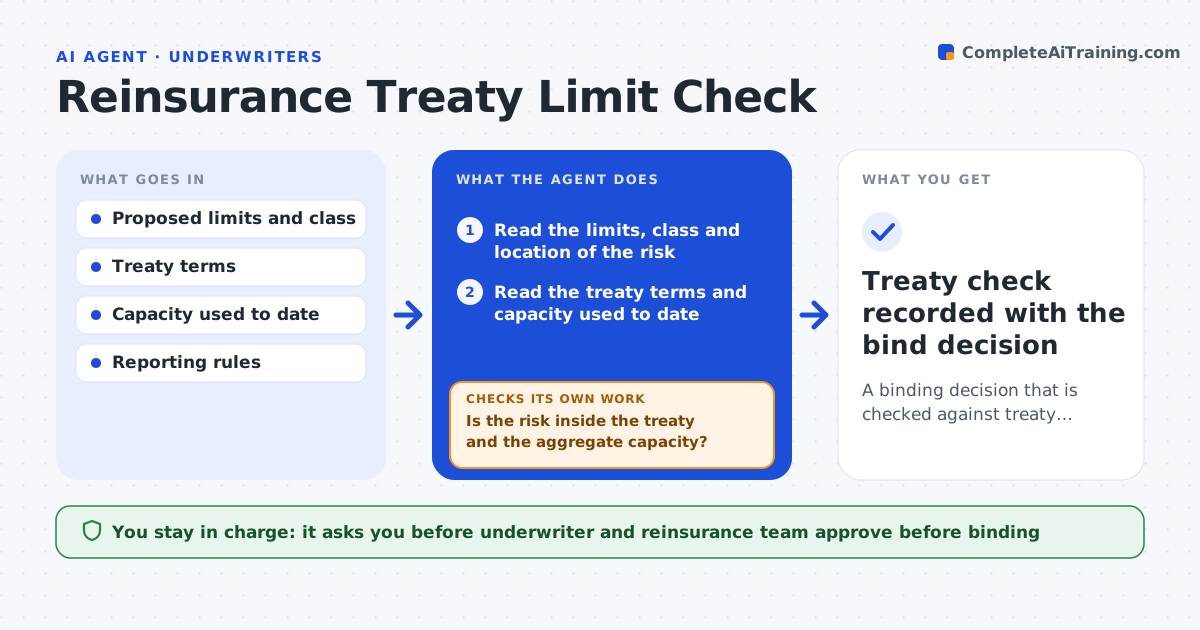
A binding decision that is checked against treaty limits, capacity and reporting duties
What it does
Large risks are sometimes bound without anyone checking treaty limits or whether facultative cover is needed. For each risk this agent reads the proposed limits and class of business. It checks them against the treaty terms and the capacity already used in the period. It flags when facultative reinsurance or special reporting is required and drafts the request. If the limit changes during negotiation, it reruns the whole check so an old result is never used. The underwriter and reinsurance team approve before binding. Edge case: the new limit fits the treaty alone but pushes the quarter's aggregate over capacity, so the agent flags the aggregate.
How it works
Follow the arrows from top to bottom. The orange dashed arrow is the loop: when a check fails, the agent goes back and tries again.
Read the steps as a list
- Large risk is quoted
- Read the limits, class and location of the risk
- Read the treaty terms and capacity used to date
- Test the risk against the treaty limit, class and aggregate
- Is the risk inside the treaty and the aggregate capacity?If not: flag the breach and draft a facultative request or a referral. Back to step 4.
- List reporting duties triggered by the risk
- Underwriter and reinsurance team approve before bindingThe agent waits here for your OK.
- If the limit changes, read the updated terms
- Does the changed limit still fit?If not: rerun the full test and update the request. Back to step 4.
- Treaty check recorded with the bind decision
How it decides
A risk is inside the treaty when its limit, class and aggregate fit the terms. Otherwise facultative cover or a referral is needed.
- Use the treaty terms in force on the effective date
- Add the new risk to capacity used before testing the aggregate
- Flag any class excluded from the treaty
- Treat any limit change as a new test
Make it yours
Every agent is a starting point. You choose these settings for your own situation.
- Referral limit (default: $5 million)
- Treaties and capacity reports used
- Reporting rules
- Who approves facultative requests
What keeps you in control
It always asks you first
- Underwriter and reinsurance team approve before binding
Hard limits
- Never binds coverage
- Never changes treaty records
It stops when
- Done: the risk is cleared or the facultative request is approved
- Stop: treaty terms are missing
Set it up
We guide you through the set-up, step by step
Members get the full set-up guide for this agent. No technical skills needed: you copy, paste and upload.
- One set of instructions to paste into your AI, with the clicks for ChatGPT, Claude, Microsoft 365 Copilot, Gemini and Grok
- The agent then walks you through connecting your own data, one source at a time
- A downloadable copy with the flow chart, the rules and the full guide