AI agent for customer service representatives
Policy Change Impact Check Agent
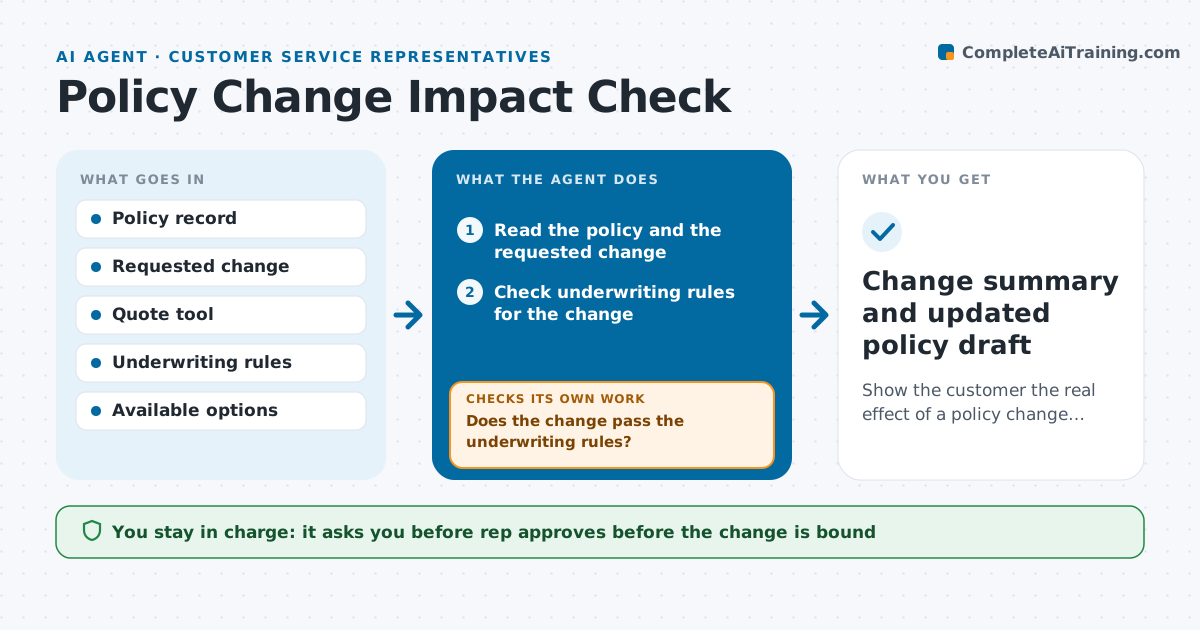
Show the customer the real effect of a policy change before it is bound.
What it does
A customer calls to add a teenage driver, and the rep processes the change, but the customer is surprised by a higher premium and a new excess. This agent reads the requested change and recalculates the premium and coverage effects in the quote tool. It checks underwriting rules, such as whether a young driver needs a different rating or a vehicle type needs approval, and lists the effects in plain words: new price, changed limits, new conditions, and the effective date. It prepares options, such as a higher excess, and recalculates when the customer chooses one. It checks that the numbers and conditions match the quote tool and rules once more before anything is bound. The rep approves before the change is bound. Edge case: the new address is in a flood zone, so the agent flags a coverage restriction.
How it works
Follow the arrows from top to bottom. The orange dashed arrow is the loop: when a check fails, the agent goes back and tries again.
Read the steps as a list
- Customer requests a mid-term change
- Read the policy and the requested change
- Check underwriting rules for the change
- Does the change pass the underwriting rules?If not: list the restriction and ask the rep about referral or alternatives. Back to step 3.
- Recalculate premium and coverage in the quote tool
- Write the effects in plain words
- Offer options such as a different excess and recalculate
- Do the final figures match the quote tool and policy terms?If not: recalculate and correct the summary. Back to step 5.
- Rep approves before the change is boundThe agent waits here for your OK.
- Change summary and updated policy draft
How it decides
It applies underwriting rules first, then rating. Any rule that blocks the change or alters terms is listed before any price.
- List any underwriting restriction before the price
- Show old and new premium, excess and limits side by side
- Recalculate for each option the customer considers
- Refer to underwriting any change the rules do not allow the rep to bind
Make it yours
Every agent is a starting point. You choose these settings for your own situation.
- Change types covered
- Options to offer
- Plain-language style
- Referral rules
- Fields shown in the summary
What keeps you in control
It always asks you first
- Rep approves before the change is bound
- Underwriter approves referrals
Hard limits
- Never bind a change or collect payment without rep approval
- Never state a price that the quote tool did not produce
It stops when
- Done: customer accepts and the rep binds the change
- Stop: underwriting rules block the change
Set it up
We guide you through the set-up, step by step
Members get the full set-up guide for this agent. No technical skills needed: you copy, paste and upload.
- One set of instructions to paste into your AI, with the clicks for ChatGPT, Claude, Microsoft 365 Copilot, Gemini and Grok
- The agent then walks you through connecting your own data, one source at a time
- A downloadable copy with the flow chart, the rules and the full guide