AI agent for customs brokers
Related-Party Valuation Review Agent
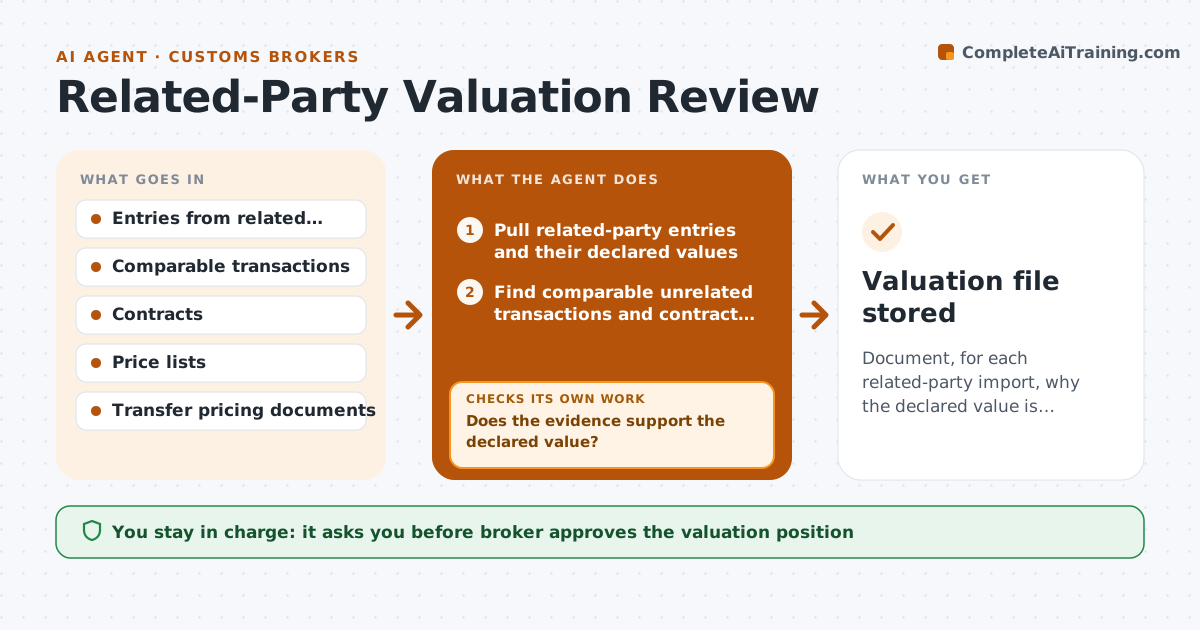
Document, for each related-party import, why the declared value is supported.
What it does
A client imports from its parent company at a transfer price, and customs may ask why the price is acceptable. The agent compares the declared values for related-party imports with comparable transactions, such as sales to unrelated buyers and contract terms, and with adjustments such as royalties or assists. It flags outliers where the declared value is much lower than comparable prices. For each outlier, it requests supporting records from the client, such as price lists, contracts, cost sheets and transfer pricing reports. It then reassesses the position with the new evidence. If the evidence still does not support the price, it asks for more records and shows the broker the gap. It drafts a file note explaining why the price is or is not acceptable. Edge case: price changes within a quarter. The broker approves the position.
How it works
Follow the arrows from top to bottom. The orange dashed arrow is the loop: when a check fails, the agent goes back and tries again.
Read the steps as a list
- Quarterly valuation review
- Pull related-party entries and their declared values
- Find comparable unrelated transactions and contract terms
- Compare declared values with the comparable range
- Flag outliers over 10 percent from the range
- Request supporting records for each outlier from the client
- Does the evidence support the declared value?If not: ask for more records and reassess the comparison. Back to step 3.
- Check for royalties, assists or other additions to value
- Draft the file note with the evidence and conclusion
- Broker approves the positionThe agent waits here for your OK.
- Valuation file stored
How it decides
A value is supported when it falls within the range of comparable prices or has a documented adjustment. Outliers beyond 10 percent require evidence.
- Flag values more than 10 percent below the comparable range
- Check royalties, assists and commissions on every related-party import
- Ask for records in one list
- Mark a position unsupported when evidence is missing after two requests
Make it yours
Every agent is a starting point. You choose these settings for your own situation.
- Outlier threshold (default 10 percent)
- Comparable sources
- Records requested
- Review schedule
- File note format
What keeps you in control
It always asks you first
- Broker approves the valuation position
- Broker approves requests for records from the client
Hard limits
- Never give a legal opinion on transfer pricing
- Do not alter declared values without the broker
It stops when
- Done: file note approved for each outlier
- Stop: client will not provide records, report the risk to the broker
Set it up
We guide you through the set-up, step by step
Members get the full set-up guide for this agent. No technical skills needed: you copy, paste and upload.
- One set of instructions to paste into your AI, with the clicks for ChatGPT, Claude, Microsoft 365 Copilot, Gemini and Grok
- The agent then walks you through connecting your own data, one source at a time
- A downloadable copy with the flow chart, the rules and the full guide