AI agent for technical writers
Release Notes Assembly Agent
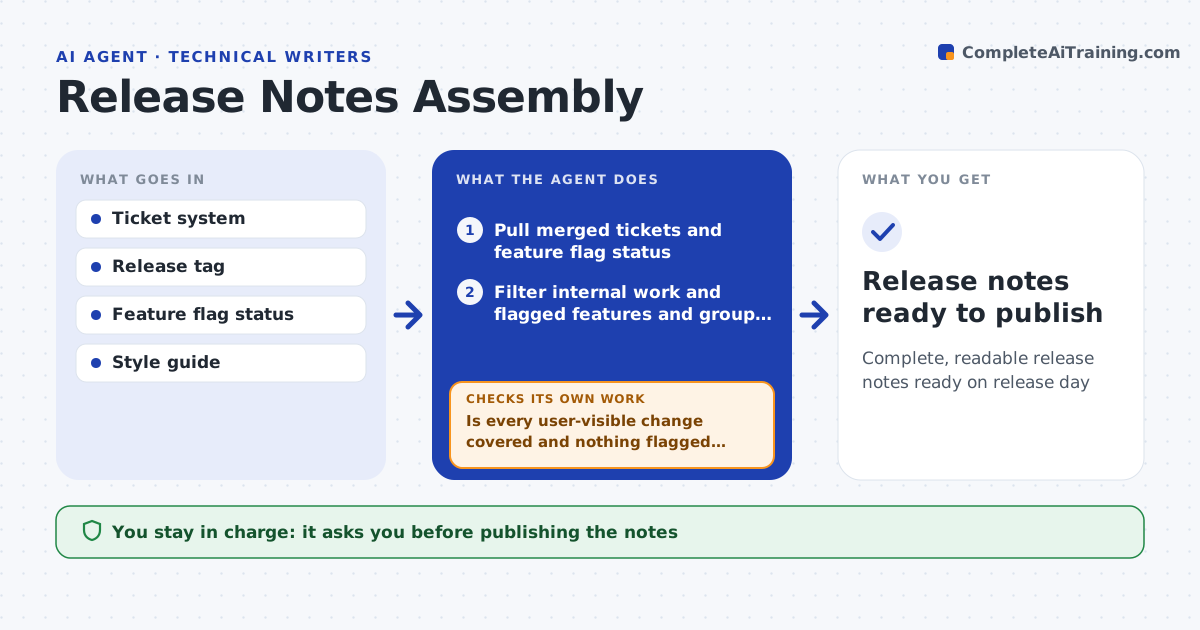
Complete, readable release notes ready on release day
What it does
Each release contains dozens of tickets, but users need short, clear notes about what changed for them, not a list of ticket titles. When a release is tagged, this agent pulls the merged tickets and the feature flag status. It filters out internal work and features still behind a flag, groups the rest into breaking changes, new features, improvements and fixes, and drafts plain-language notes following the style guide. Breaking changes go first, and fixes describe the symptom users saw. It then compares the changed components with the draft to confirm every user-visible change is covered and nothing flagged is mentioned. If something is missing, it finds the tickets and adds them. A second check confirms wording follows the style guide. The writer edits and approves before publishing. Edge case: a flagged feature is held back until the flag is on for customers.
How it works
Follow the arrows from top to bottom. The orange dashed arrow is the loop: when a check fails, the agent goes back and tries again.
Read the steps as a list
- Release tagged
- Pull merged tickets and feature flag status
- Filter internal work and flagged features and group changes
- Draft plain-language notes with breaking changes first
- Compare changed components with the draft
- Is every user-visible change covered and nothing flagged mentioned?If not: find missing tickets by component and add them, remove flagged items. Back to step 3.
- Does the wording follow the style guide?If not: rewrite the lines that break the guide. Back to step 4.
- Writer edits and approves notesThe agent waits here for your OK.
- Release notes ready to publish
How it decides
It includes tickets that change what users see or do, excludes internal work and features still behind a flag.
- Flagged features are held back
- Fixes describe the symptom users saw
- Breaking changes go first
Make it yours
Every agent is a starting point. You choose these settings for your own situation.
- Labels that mark user-visible work
- Style guide
- Sections and order
- Publish target
What keeps you in control
It always asks you first
- Publishing the notes
Hard limits
- Never publishes
- Never names customers who reported bugs
It stops when
- Done: approved notes
- Stop: release is rolled back
Set it up
We guide you through the set-up, step by step
Members get the full set-up guide for this agent. No technical skills needed: you copy, paste and upload.
- One set of instructions to paste into your AI, with the clicks for ChatGPT, Claude, Microsoft 365 Copilot, Gemini and Grok
- The agent then walks you through connecting your own data, one source at a time
- A downloadable copy with the flow chart, the rules and the full guide