AI agent for technical support specialists
Remote Log Collection and Diagnosis Agent
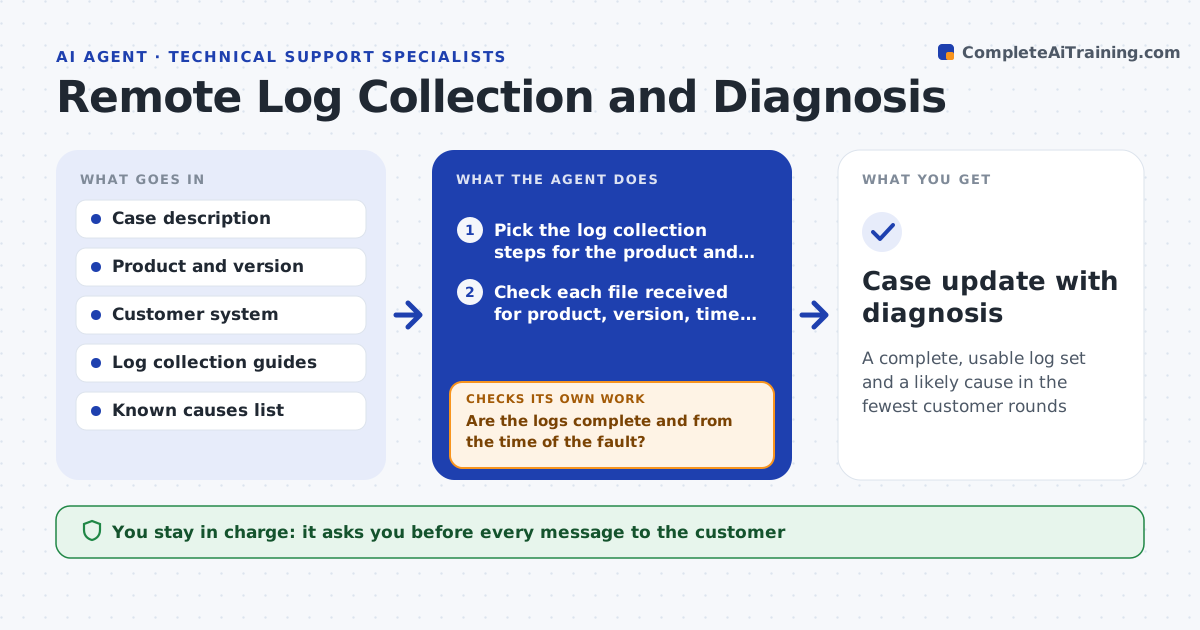
A complete, usable log set and a likely cause in the fewest customer rounds
What it does
A support case can stall for days because the customer sends the wrong log, a cut-off file or logs from the wrong time. This agent tells the customer exactly which logs to collect for the product and symptom, with steps for their system. When files arrive, it checks them for completeness: right product, right version, covering the time of the problem, not truncated. If something is missing, it asks for that piece in plain words. Once the logs are usable, it finds errors and matches them against known causes. It then checks whether the match explains the timeline in the case. If not, it asks for more data or tries the next cause. The specialist approves the reply before it is sent. Edge case: the logs are from a day after the fault.
How it works
Follow the arrows from top to bottom. The orange dashed arrow is the loop: when a check fails, the agent goes back and tries again.
Read the steps as a list
- Case is opened with a technical symptom
- Pick the log collection steps for the product and symptom
- Specialist approves the first request to the customerThe agent waits here for your OK.
- Check each file received for product, version, time range and truncation
- Are the logs complete and from the time of the fault?If not: ask for the exact missing piece with steps and an example. Back to step 3.
- Find errors and warnings in the logs
- Match patterns against the known causes list
- Does the matched cause explain the error timeline in the case?If not: try the next likely cause or request more data. Back to step 6.
- Draft a reply with the cause, the fix and what to confirm
- Specialist approves the replyThe agent waits here for your OK.
- Case update with diagnosis
How it decides
Logs are usable only if they match the product, version and time of the fault. A cause is accepted only when it explains the error timeline.
- Ask for logs again if they do not cover the fault time
- Reject truncated files
- Request one missing item per message
- Match known causes by error code first
Make it yours
Every agent is a starting point. You choose these settings for your own situation.
- Log types per product
- Known causes source
- Time window to request
- Tone of messages
What keeps you in control
It always asks you first
- Every message to the customer
Hard limits
- Never asks for passwords or private keys
- Never sends a message without approval
It stops when
- Done: cause found and reply approved
- Stop: the customer cannot provide logs and the specialist takes over
Set it up
We guide you through the set-up, step by step
Members get the full set-up guide for this agent. No technical skills needed: you copy, paste and upload.
- One set of instructions to paste into your AI, with the clicks for ChatGPT, Claude, Microsoft 365 Copilot, Gemini and Grok
- The agent then walks you through connecting your own data, one source at a time
- A downloadable copy with the flow chart, the rules and the full guide