AI agent for account executives
Renewal and Expansion Opportunity Agent
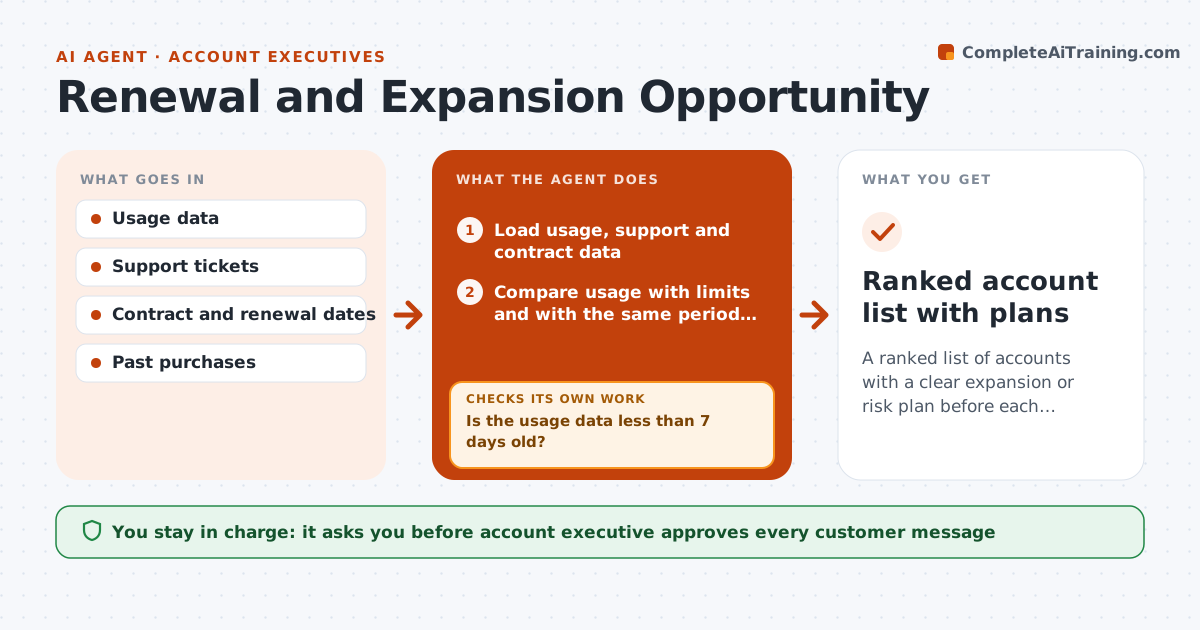
A ranked list of accounts with a clear expansion or risk plan before each renewal
What it does
Customers who use more of a product are the ones likely to buy more, and customers who go quiet are the ones likely to leave. Most account executives review this only when a renewal date is close. This agent reads usage, support tickets and contract data for each account. It looks for expansion signals such as seat growth, hitting limits, new teams and feature requests, and risk signals such as falling logins or open severe tickets. It checks the data is fresh, since a stale usage file can mislead, and refreshes it if not. It then drafts an account plan with the signal, a suggested play and the timing against the renewal date. The executive approves outreach. Edge case: usage drops because the customer is in a seasonal low, so the agent compares to last year first.
How it works
Follow the arrows from top to bottom. The orange dashed arrow is the loop: when a check fails, the agent goes back and tries again.
Read the steps as a list
- Monthly review or renewal window opens
- Load usage, support and contract data
- Is the usage data less than 7 days old?If not: refresh the data or mark the account as unverified. Back to step 2.
- Compare usage with limits and with the same period last year
- Classify each account as expansion, risk or steady
- Look up open tickets and past purchase history
- Draft an account plan with the signal, the play and the timing
- Does the plan fit the contract terms and the renewal date?If not: revise the play to fit the term and timing. Back to step 6.
- Account executive approves outreachThe agent waits here for your OK.
- Ranked account list with plans
How it decides
An account shows an expansion signal when usage is above 80 percent of its limit or growing 20 percent over three months. Risk shows when usage falls 25 percent against last year's same period.
- Flag expansion when usage reaches 80 percent of the limit
- Flag risk when usage falls 25 percent against the same period last year
- Treat seasonal dips by comparing to last year before flagging
- Start renewal planning 120 days out
Make it yours
Every agent is a starting point. You choose these settings for your own situation.
- Expansion and risk thresholds
- Renewal planning window (default 120 days)
- Usage data freshness limit
- Account list scope
What keeps you in control
It always asks you first
- Account executive approves every customer message
- Account executive approves any discount or offer
Hard limits
- Do not offer discounts on its own
- Use only data the account has agreed to share
- Mark stale data
It stops when
- Done: renewal signed or expansion closed
- Stop: customer requests a pause on outreach
Set it up
We guide you through the set-up, step by step
Members get the full set-up guide for this agent. No technical skills needed: you copy, paste and upload.
- One set of instructions to paste into your AI, with the clicks for ChatGPT, Claude, Microsoft 365 Copilot, Gemini and Grok
- The agent then walks you through connecting your own data, one source at a time
- A downloadable copy with the flow chart, the rules and the full guide