AI agent for customer success managers
Renewal and Expansion Preparation Agent
Start every renewal early with a proven value story
What it does
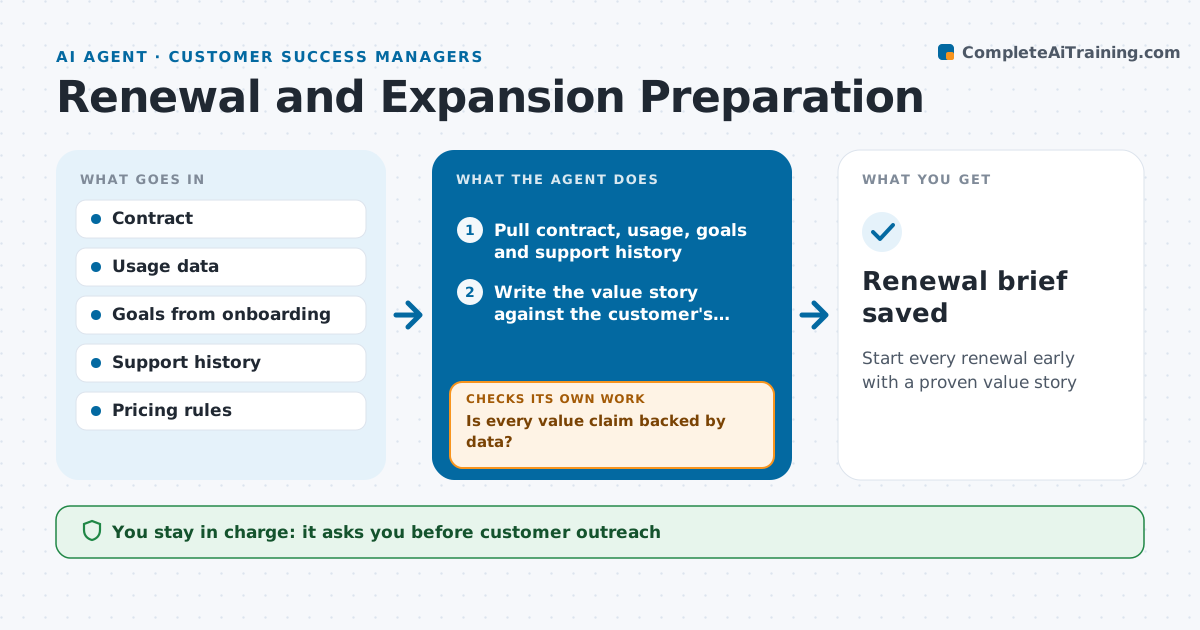
Renewal conversations go poorly when the CSM shows up without proof of value or misses a chance to grow the account. One hundred twenty days before each renewal, this agent builds a renewal brief: value delivered against the customer's goals, usage trends, seats used versus bought, support history and open risks. It spots expansion signals, such as teams near their seat limit or use cases outside the current plan. It checks every value claim against actual data. Claims without data are removed or reworded to what was measured. It drafts a renewal timeline and the first outreach email. The CSM approves the outreach, and any pricing goes to sales or finance. Edge case: if seats used are far below seats bought, it flags downsizing risk instead of expansion.
How it works
Follow the arrows from top to bottom. The orange dashed arrow is the loop: when a check fails, the agent goes back and tries again.
Read the steps as a list
- Renewal 120 days away
- Pull contract, usage, goals and support history
- Write the value story against the customer's goals
- Is every value claim backed by data?If not: remove or reword unsupported claims. Back to step 3.
- Identify expansion or downsizing signals
- Draft renewal timeline and first outreach
- CSM approves outreach; finance approves pricingThe agent waits here for your OK.
- Renewal brief saved
How it decides
It recommends expansion when usage is near limits and flags downsizing when usage is well below the contract.
- Over 90% seat use signals expansion
- Under 60% seat use flags downsizing risk
- No claims without data
Make it yours
Every agent is a starting point. You choose these settings for your own situation.
- Days before renewal (default 120)
- Expansion and downsizing thresholds
- Brief template
- Approvers for pricing
What keeps you in control
It always asks you first
- Customer outreach
- Pricing and discounts
Hard limits
- Never quotes prices
- Never sends without approval
It stops when
- Done: brief and outreach approved
- Stop: account in active dispute, hand to manager
Set it up
We guide you through the set-up, step by step
Members get the full set-up guide for this agent. No technical skills needed: you copy, paste and upload.
- One set of instructions to paste into your AI, with the clicks for ChatGPT, Claude, Microsoft 365 Copilot, Gemini and Grok
- The agent then walks you through connecting your own data, one source at a time
- A downloadable copy with the flow chart, the rules and the full guide