AI agent for property managers
Rent Delinquency Workflow Agent
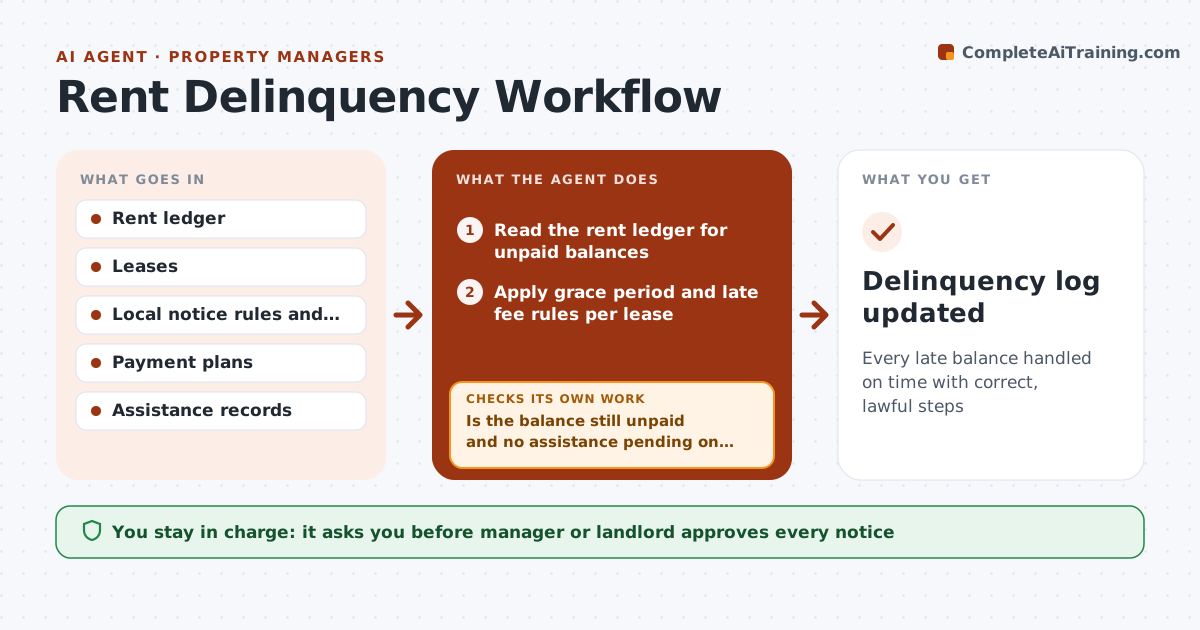
Every late balance handled on time with correct, lawful steps
What it does
Each month some tenants pay late, and the steps that follow are set by the lease and local law: reminders, late fees, formal notices and payment plans. The day after rent is due, this agent reads the rent ledger and lists unpaid balances. It applies the lease's grace period and late fee rules, charging fees only as the lease and law allow. It drafts reminders and, when the timeline allows, the required notice using the jurisdiction's template and timing. On the send date, it rechecks the ledger, because a tenant may have paid. A pending rental assistance application pauses escalation. The manager or landlord approves every notice. It tracks payment plans and flags missed installments without acting on them. Edge case: a tenant with an assistance application is flagged and never sent a notice.
How it works
Follow the arrows from top to bottom. The orange dashed arrow is the loop: when a check fails, the agent goes back and tries again.
Read the steps as a list
- Day after rent due
- Read the rent ledger for unpaid balances
- Apply grace period and late fee rules per lease
- Draft reminders or required notices
- Is the balance still unpaid and no assistance pending on the send date?If not: cancel or adjust the draft and recheck the ledger. Back to step 2.
- Manager or landlord approves and sends noticesThe agent waits here for your OK.
- Track payment plans and missed installments
- Delinquency log updated
How it decides
Steps follow the lease grace period and local law timing. Any payment or assistance application pauses the next step until rechecked.
- Late fees only as the lease and law allow
- Assistance applications pause escalation
- Payment plan misses are flagged, not acted on
Make it yours
Every agent is a starting point. You choose these settings for your own situation.
- Grace period and late fee rules
- Jurisdiction notice templates and timing
- Reminder channel (email, text, portal)
- Payment plan terms
What keeps you in control
It always asks you first
- Manager or landlord approves every notice
- Any legal filing is decided by a person with counsel
Hard limits
- Never files evictions
- Never sends notices without approval
It stops when
- Done: balance paid or plan current
- Stop: case handed to an attorney
Set it up
We guide you through the set-up, step by step
Members get the full set-up guide for this agent. No technical skills needed: you copy, paste and upload.
- One set of instructions to paste into your AI, with the clicks for ChatGPT, Claude, Microsoft 365 Copilot, Gemini and Grok
- The agent then walks you through connecting your own data, one source at a time
- A downloadable copy with the flow chart, the rules and the full guide