AI agent for inventory managers
Reorder Point Replenishment Agent
Timely, right-sized replenishment
What it does
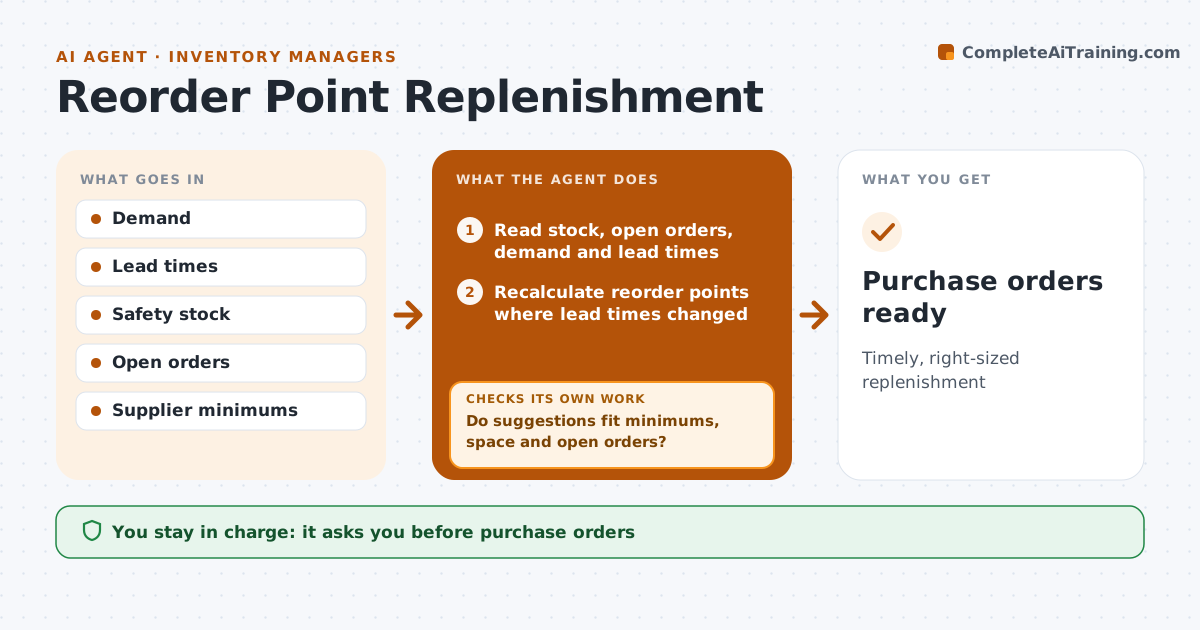
Replenishment depends on reorder points and order quantities, and when those are wrong, buyers stop trusting the system and order by gut feel. This agent reads demand, lead times, safety stock and supplier minimums and calculates reorder points and order quantities. Each day it finds items where stock plus open orders has fallen below the reorder point. Items being phased out are excluded. It drafts purchase suggestions and checks them against open orders, supplier minimums and storage space. If a suggestion fails, it adjusts the quantity, for example rounding up to a minimum or removing a duplicate. It then groups suggestions by supplier into draft orders. The buyer or manager approves purchase orders. Edge case: an item whose lead time grew sharply in recent receipts has its reorder point recalculated before ordering.
How it works
Follow the arrows from top to bottom. The orange dashed arrow is the loop: when a check fails, the agent goes back and tries again.
Read the steps as a list
- Daily run
- Read stock, open orders, demand and lead times
- Recalculate reorder points where lead times changed
- Find items below reorder point and exclude phase-outs
- Draft purchase suggestions
- Do suggestions fit minimums, space and open orders?If not: adjust quantities or remove duplicates. Back to step 5.
- Group suggestions into draft orders by supplier
- Buyer or manager approves ordersThe agent waits here for your OK.
- Purchase orders ready
How it decides
Reorder when stock plus open orders falls below reorder point; order quantity respects minimums and space.
- Open orders counted
- Phase-out items excluded
- Minimums respected
Make it yours
Every agent is a starting point. You choose these settings for your own situation.
- Reorder method
- Space limits
- Phase-out list
- Approval limits
What keeps you in control
It always asks you first
- Purchase orders
Hard limits
- Never sends orders
- Spending limits
It stops when
- Done: orders approved
- Stop: supplier unavailable
Set it up
We guide you through the set-up, step by step
Members get the full set-up guide for this agent. No technical skills needed: you copy, paste and upload.
- One set of instructions to paste into your AI, with the clicks for ChatGPT, Claude, Microsoft 365 Copilot, Gemini and Grok
- The agent then walks you through connecting your own data, one source at a time
- A downloadable copy with the flow chart, the rules and the full guide