AI agent for process improvement analysts
Repeat Issue Problem Record Agent
Recurring issues turned into owned problem records with a tested cause and a confirmed fix
What it does
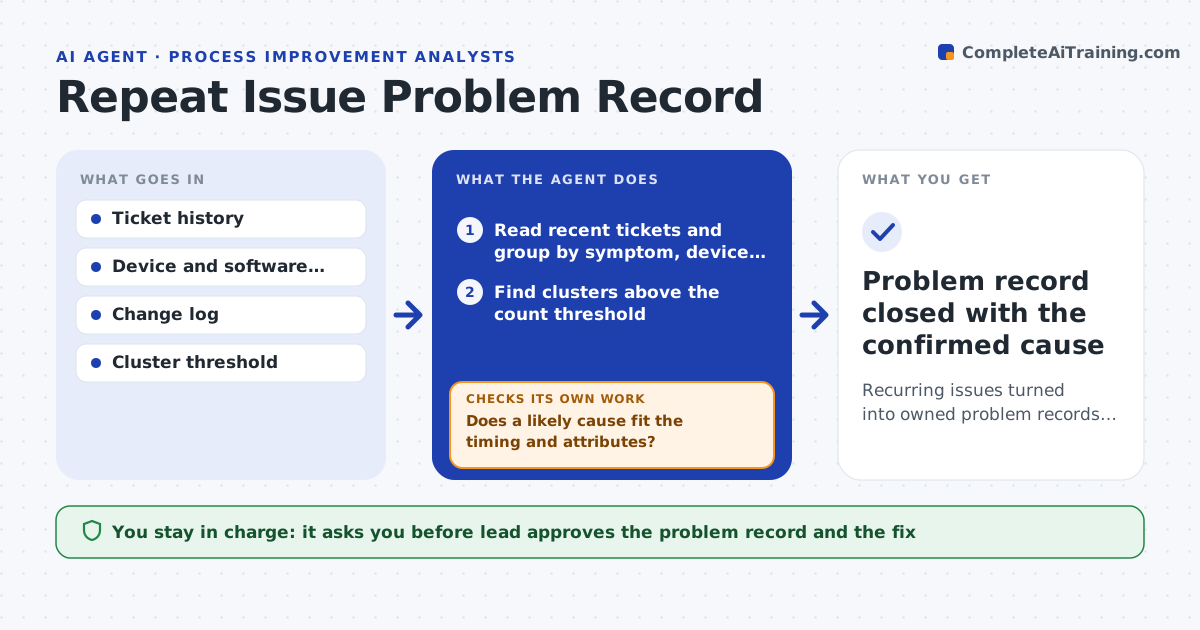
The same issue gets fixed ticket by ticket and nobody owns the root cause. Each week this agent groups tickets by symptom, device model, location and software version. It looks for clusters above a count you set and, for each one, opens a draft problem record with the evidence. It tests possible causes, such as a recent update, against the data to see which one fits. After a fix is applied, it watches for new tickets in the cluster and checks whether they drop. The lead approves the problem record and the fix. Edge case: a cluster only appears on one floor, so the agent tests network and power causes first.
How it works
Follow the arrows from top to bottom. The orange dashed arrow is the loop: when a check fails, the agent goes back and tries again.
Read the steps as a list
- Weekly ticket review
- Read recent tickets and group by symptom, device, location and version
- Find clusters above the count threshold
- Draft a problem record with evidence for each cluster
- Compare cluster dates with the change log and shared attributes
- Does a likely cause fit the timing and attributes?If not: test the next possible cause and widen the data window. Back to step 5.
- Lead approves the problem record and the proposed fixThe agent waits here for your OK.
- After the fix, count new tickets in the cluster
- Did new tickets drop below the threshold?If not: reopen the record and test the next cause. Back to step 5.
- Problem record closed with the confirmed cause
How it decides
A cluster is a problem when the count passes the threshold within the window. A cause is supported when ticket timing matches a change or shared attribute.
- Open a record when a cluster passes the count threshold
- Check recent changes before other causes
- Close a record only after tickets stay low for two weeks
- Merge clusters that share a cause
Make it yours
Every agent is a starting point. You choose these settings for your own situation.
- Cluster threshold (default: 5 tickets in 7 days)
- Grouping fields
- Review day
- Stability period before closing (default: 2 weeks)
What keeps you in control
It always asks you first
- Lead approves the problem record and the fix
Hard limits
- Never applies fixes
- Never closes a problem record without the lead
It stops when
- Done: the cluster stays below the threshold for two weeks
- Stop: no cluster passes the threshold
Set it up
We guide you through the set-up, step by step
Members get the full set-up guide for this agent. No technical skills needed: you copy, paste and upload.
- One set of instructions to paste into your AI, with the clicks for ChatGPT, Claude, Microsoft 365 Copilot, Gemini and Grok
- The agent then walks you through connecting your own data, one source at a time
- A downloadable copy with the flow chart, the rules and the full guide