AI agent for home inspectors
Report Finding Library Update Agent
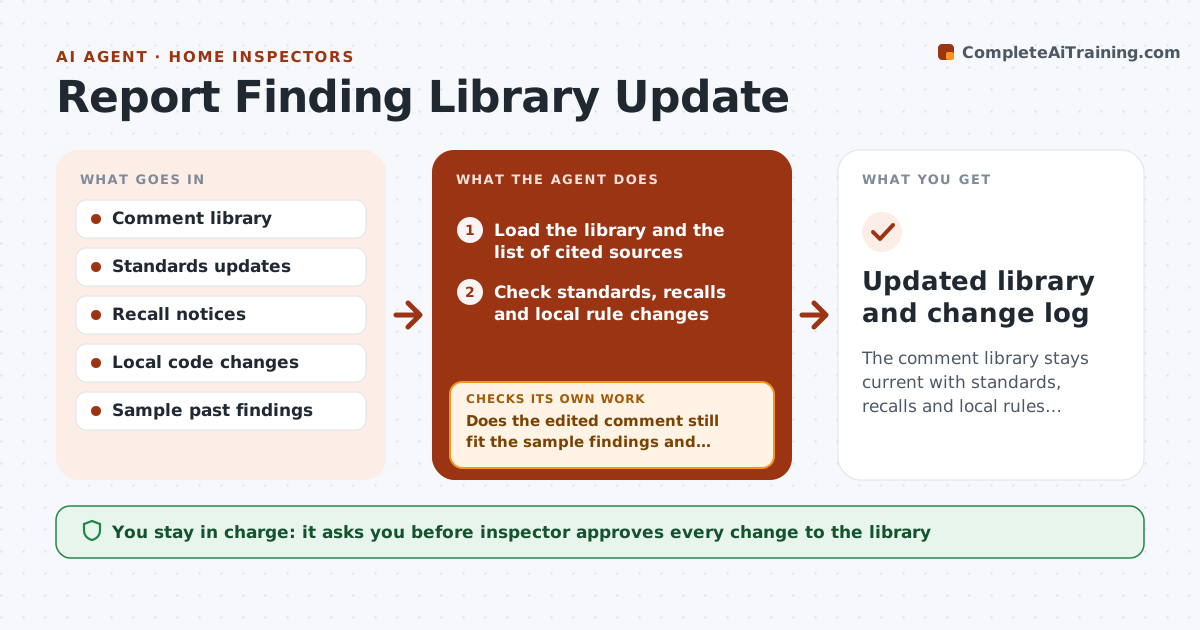
The comment library stays current with standards, recalls and local rules, with every change approved.
What it does
Your standard comment about a product still refers to a recall from five years ago, and the code reference changed last year. This agent reviews your library each quarter. It compares each comment with current standards, recall notices and local rules, flags outdated wording, and proposes edits. It tests edited text against a sample of past findings to see whether it still fits, and revises the wording if it does not. You approve every change to the library. Edge case: a comment tied to a local rule that varies by county is split into county versions or marked with a lookup note.
How it works
Follow the arrows from top to bottom. The orange dashed arrow is the loop: when a check fails, the agent goes back and tries again.
Read the steps as a list
- Quarterly review
- Load the library and the list of cited sources
- Check standards, recalls and local rule changes
- Flag comments affected by a change
- Draft the smallest edit for each flagged comment
- Test the edited wording against sample past findings
- Does the edited comment still fit the sample findings and read clearly?If not: Revise the wording or split into versions, then retest. Back to step 4.
- Build a change list with sources and before and after text
- Inspector approves each library changeThe agent waits here for your OK.
- Updated library and change log
How it decides
It flags a comment when a source it cites changed or a newer notice affects the same item, and proposes the smallest edit.
- Flag comments citing a changed source
- Add recall notices for named products
- Propose the smallest edit
- Split comments for county differences
Make it yours
Every agent is a starting point. You choose these settings for your own situation.
- Review frequency
- Sources to check
- Sample size (default 12)
- Local rule areas
What keeps you in control
It always asks you first
- Inspector approves every change to the library
Hard limits
- Never change the library itself
- Never present recall information without a source link
It stops when
- Done: approved changes applied by the inspector
- Stop: sources cannot be reached
Set it up
We guide you through the set-up, step by step
Members get the full set-up guide for this agent. No technical skills needed: you copy, paste and upload.
- One set of instructions to paste into your AI, with the clicks for ChatGPT, Claude, Microsoft 365 Copilot, Gemini and Grok
- The agent then walks you through connecting your own data, one source at a time
- A downloadable copy with the flow chart, the rules and the full guide