AI agent for ux researchers
Research Request Backlog Triage Agent
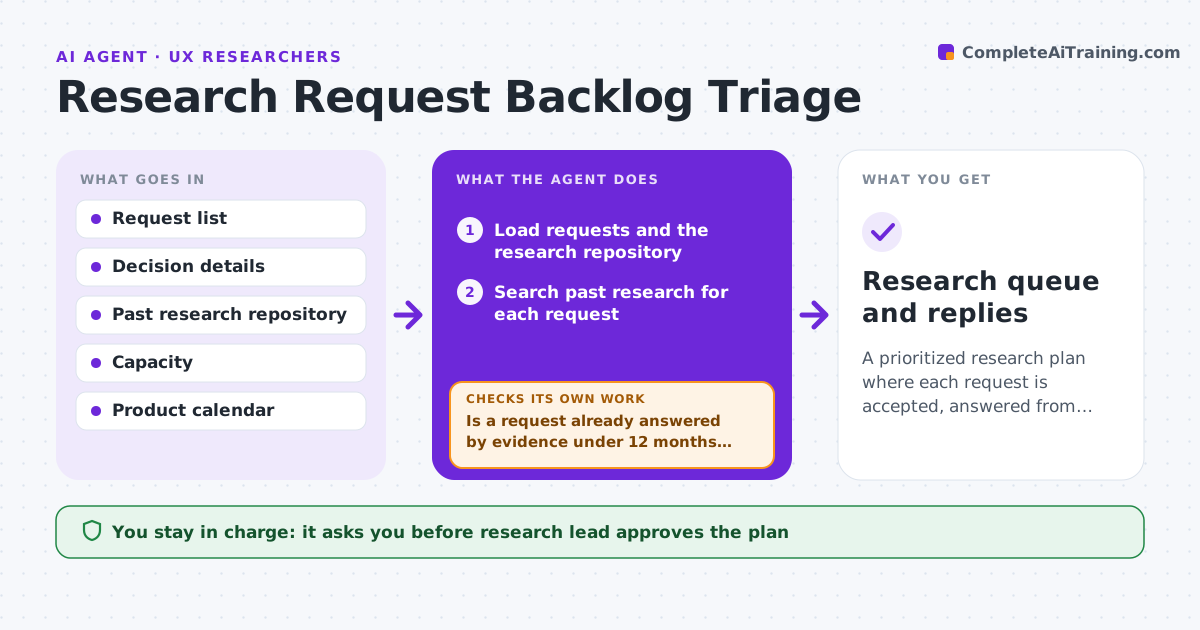
A prioritized research plan where each request is accepted, answered from existing work or declined with a reason.
What it does
Eleven teams want research this quarter and the loudest ones win. This agent triages the queue. It scores each request on the decision at stake, risk if wrong, existing evidence and effort. Before proposing to run anything new, it searches your research repository and past reports for answers that already exist, and marks those requests as reuse. It proposes accept, reuse or decline for each, with a short reason. When requests change or new ones arrive, it rechecks the scores and the plan. The research lead approves the plan. Edge case: two teams asking about the same flow are merged into one study and the agent names both stakeholders.
How it works
Follow the arrows from top to bottom. The orange dashed arrow is the loop: when a check fails, the agent goes back and tries again.
Read the steps as a list
- Weekly run or new request
- Load requests and the research repository
- Search past research for each request
- Is a request already answered by evidence under 12 months old?If not: If answered, mark reuse and link it; otherwise continue with scoring. Back to step 2.
- Score remaining requests on decision, risk and effort
- Merge requests that cover the same question
- Fit accepted requests into capacity and propose a plan
- Does the plan fit the research capacity for the quarter?If not: Move the lowest scored requests to decline or later. Back to step 5.
- Research lead approves the planThe agent waits here for your OK.
- Research queue and replies
How it decides
It ranks by decision value and risk, then subtracts anything answered by existing evidence, and fits the rest into capacity.
- Reuse when evidence is under 12 months old and covers the question
- Merge requests about the same flow or audience
- Score decision value above effort
- Decline requests with no decision attached
Make it yours
Every agent is a starting point. You choose these settings for your own situation.
- Scoring weights
- Evidence age limit (default 12 months)
- Quarterly capacity
- Requester groups
What keeps you in control
It always asks you first
- Research lead approves the plan
- Research lead approves replies to requesters
Hard limits
- Never reject requests to stakeholders itself
- Never use old research without checking its date
It stops when
- Done: queue approved and communicated
- Stop: capacity or priorities unknown
Set it up
We guide you through the set-up, step by step
Members get the full set-up guide for this agent. No technical skills needed: you copy, paste and upload.
- One set of instructions to paste into your AI, with the clicks for ChatGPT, Claude, Microsoft 365 Copilot, Gemini and Grok
- The agent then walks you through connecting your own data, one source at a time
- A downloadable copy with the flow chart, the rules and the full guide