AI agent for environmental consultants
Restoration Success Criteria Monitoring Agent
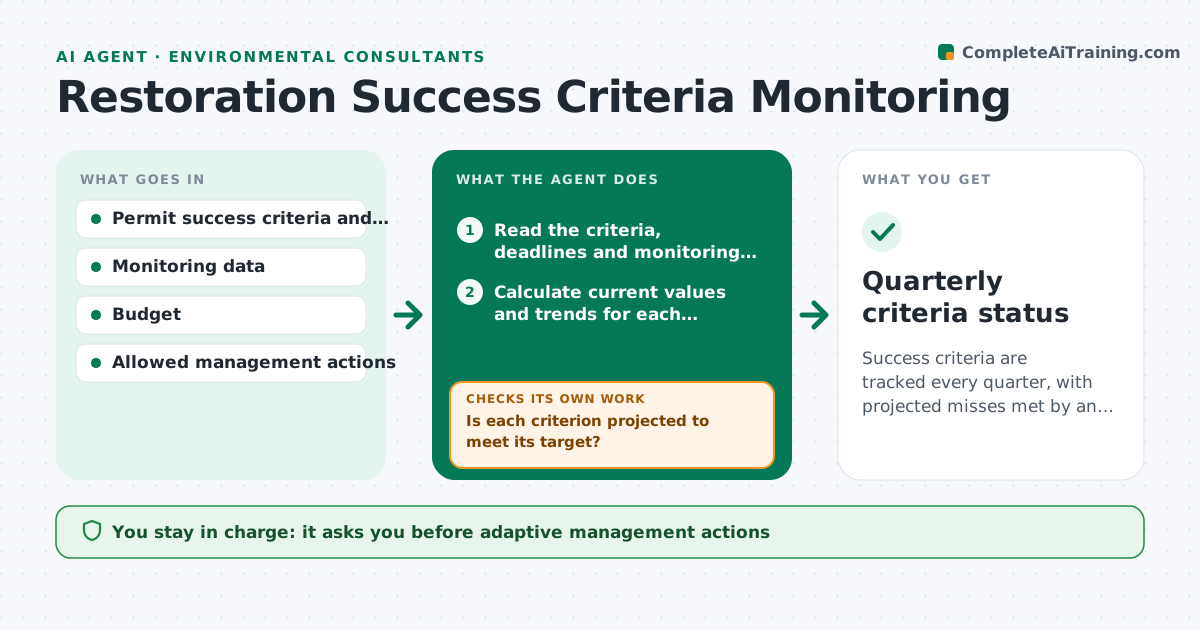
Success criteria are tracked every quarter, with projected misses met by an approved action early.
What it does
A permit says 80 percent native cover by year three, and the team learns in year three that it is at 55 percent. This agent runs each quarter. It compares monitoring data to each success criterion in the permit or plan, such as cover, survival, stem density and water levels, and flags metrics that fail or trend the wrong way. It projects whether the criterion will be met by the deadline. For gaps it proposes adaptive management steps, such as replanting, regrading or invasive control, and checks them against the budget and the permit's allowed actions. You approve actions. Edge case: a criterion measured only in a certain season is marked pending, not failing, in other quarters.
How it works
Follow the arrows from top to bottom. The orange dashed arrow is the loop: when a check fails, the agent goes back and tries again.
Read the steps as a list
- Quarterly monitoring data entered
- Read the criteria, deadlines and monitoring data
- Calculate current values and trends for each criterion
- Project each criterion to its deadline
- Is each criterion projected to meet its target?If not: mark it at risk and list likely causes from the data. Back to step 4.
- Propose adaptive management steps with cost and timing
- Does each step fit the budget and the permit's allowed actions?If not: revise the step or propose an alternative and recheck. Back to step 6.
- Practitioner approves the actionsThe agent waits here for your OK.
- Draft the monitoring summary for the regulator report
- Quarterly criteria status
How it decides
It compares the current value and the trend to the target and deadline. A projected miss triggers action options, checked for cost and permit allowance.
- Projected value below the target by over 10 percent: at risk
- Criterion measured in one season: mark pending in other quarters
- Action not allowed by the permit: propose another action or a permit amendment request
- Two quarters of decline: recommend a site visit
Make it yours
Every agent is a starting point. You choose these settings for your own situation.
- Success criteria and deadlines
- At risk margin (default 10 percent)
- Budget limit per quarter
- Allowed actions list
- Report template
What keeps you in control
It always asks you first
- Adaptive management actions
- Anything sent to the regulator
Hard limits
- Never contact the regulator
- Never propose an action the permit forbids
It stops when
- Done: status issued and actions approved
- Stop: monitoring data missing
Set it up
We guide you through the set-up, step by step
Members get the full set-up guide for this agent. No technical skills needed: you copy, paste and upload.
- One set of instructions to paste into your AI, with the clicks for ChatGPT, Claude, Microsoft 365 Copilot, Gemini and Grok
- The agent then walks you through connecting your own data, one source at a time
- A downloadable copy with the flow chart, the rules and the full guide