AI agent for prompt engineers
Retrieval Grounding Check Agent
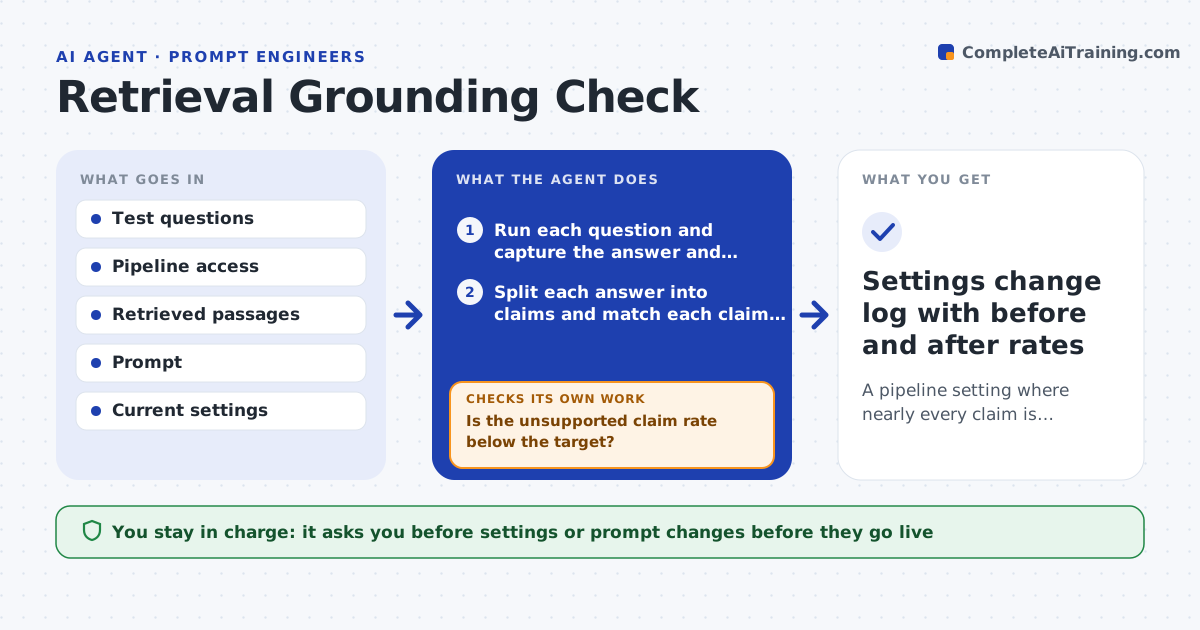
A pipeline setting where nearly every claim is supported by a cited passage
What it does
A search-based assistant may quote a source that does not say what the answer claims. This agent takes a set of test questions and runs them through the full pipeline. For each answer it splits the text into separate claims and checks each claim against the passages that were retrieved. Claims with no support are flagged, and so are citations that point to the wrong passage. It then looks for the cause. If the right passage was never retrieved, it adjusts retrieval settings such as passage count or chunk size. If the passage was there but ignored, it changes the prompt wording about sticking to sources. After each change it reruns the questions and compares the unsupported claim rate. It loops until the rate stops falling. The engineer approves the final settings. Edge case: a claim is true but only in a passage the pipeline never fetched.
How it works
Follow the arrows from top to bottom. The orange dashed arrow is the loop: when a check fails, the agent goes back and tries again.
Read the steps as a list
- Engineer supplies test questions and access to the pipeline
- Run each question and capture the answer and retrieved passages
- Split each answer into claims and match each claim to a passage
- Is the unsupported claim rate below the target?If not: find the cause for each miss, retrieval or prompt, and pick one change. Back to step 3.
- Adjust passage count, chunk size or the sourcing instruction
- Rerun the questions with the new settings
- Did the unsupported rate fall without hurting answer coverage?If not: undo the change and try a different one. Back to step 3.
- Record the final rate and the remaining unsupported examples
- Engineer approves the new settingsThe agent waits here for your OK.
- Settings change log with before and after rates
How it decides
A claim counts as supported only if a retrieved passage states it. The agent changes retrieval when the passage is missing and the prompt when the passage was ignored.
- Flag any claim that no retrieved passage states
- Change retrieval first if the right passage was never fetched
- Reject a change that drops answered questions by more than 5 percent
- Stop after the rate stops falling for two rounds
Make it yours
Every agent is a starting point. You choose these settings for your own situation.
- Target unsupported rate (default 5 percent)
- Settings it may change
- Number of test questions
- Citation format to check
What keeps you in control
It always asks you first
- Settings or prompt changes before they go live
Hard limits
- Never edits the document collection
- Never changes live settings without approval
It stops when
- Done: unsupported rate meets the target
- Stop: test questions have no known answer source
Set it up
We guide you through the set-up, step by step
Members get the full set-up guide for this agent. No technical skills needed: you copy, paste and upload.
- One set of instructions to paste into your AI, with the clicks for ChatGPT, Claude, Microsoft 365 Copilot, Gemini and Grok
- The agent then walks you through connecting your own data, one source at a time
- A downloadable copy with the flow chart, the rules and the full guide