AI agent for warehouse managers
Returnable Asset and Pallet Pool Tracking Agent
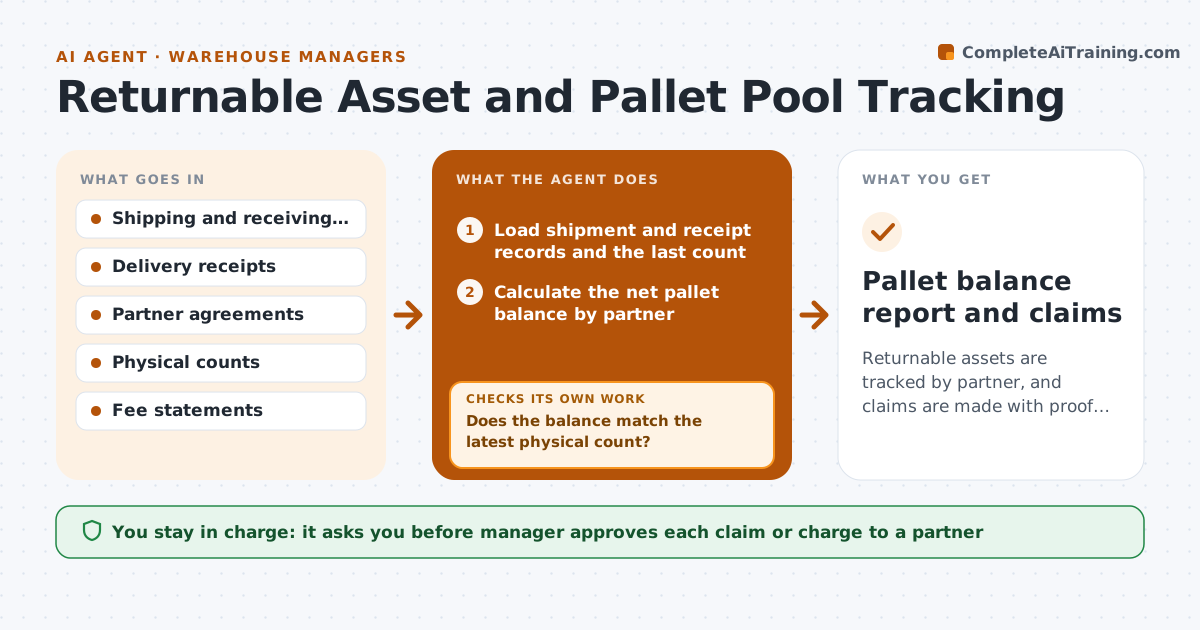
Returnable assets are tracked by partner, and claims are made with proof and approved by you.
What it does
Every month pallet fees arrive for pallets you think you returned. This agent reads shipment and receipt records and keeps a balance of pallets, totes and racks by partner. It flags partners whose balance is growing and finds the shipments behind the gap. It drafts claims or credit requests with dates, quantities and proof of delivery. After your next physical count, it checks the balance again and updates the claim. If the count disagrees with the records, it corrects its figures first. You approve any claim or charge. Edge case: a partner who returned pallets on a day that was not recorded is checked against delivery receipts before anything is claimed.
How it works
Follow the arrows from top to bottom. The orange dashed arrow is the loop: when a check fails, the agent goes back and tries again.
Read the steps as a list
- Weekly run or new count
- Load shipment and receipt records and the last count
- Calculate the net pallet balance by partner
- Flag partners with growing or large balances
- Find the shipments and receipts behind each gap
- Does the balance match the latest physical count?If not: Correct the records or count and recalculate. Back to step 2.
- Draft claims with dates, quantities and proof
- Does each claim have signed proof of delivery or return?If not: Remove it or request the document. Back to step 7.
- Manager approves any claim or chargeThe agent waits here for your OK.
- Pallet balance report and claims
How it decides
It flags a partner when the net balance exceeds an allowed number or has grown for 3 weeks, and claims only with documents.
- Flag a balance over 50 pallets or growing 3 weeks in a row
- Only claim with signed proof
- Compare against physical counts quarterly
- Net credits before claiming
Make it yours
Every agent is a starting point. You choose these settings for your own situation.
- Balance limit per partner (default 50)
- Count schedule
- Pallet types
- Claim format
What keeps you in control
It always asks you first
- Manager approves each claim or charge to a partner
Hard limits
- Never send claims or charge partners itself
- Never claim without proof
It stops when
- Done: claims approved and balances updated
- Stop: records and counts disagree by more than 10%
Set it up
We guide you through the set-up, step by step
Members get the full set-up guide for this agent. No technical skills needed: you copy, paste and upload.
- One set of instructions to paste into your AI, with the clicks for ChatGPT, Claude, Microsoft 365 Copilot, Gemini and Grok
- The agent then walks you through connecting your own data, one source at a time
- A downloadable copy with the flow chart, the rules and the full guide