AI agent for robotics engineers
Robot Cell Cycle Time Reduction Agent
Bring the cell's average cycle time under the takt target with changes proven in simulation first
What it does
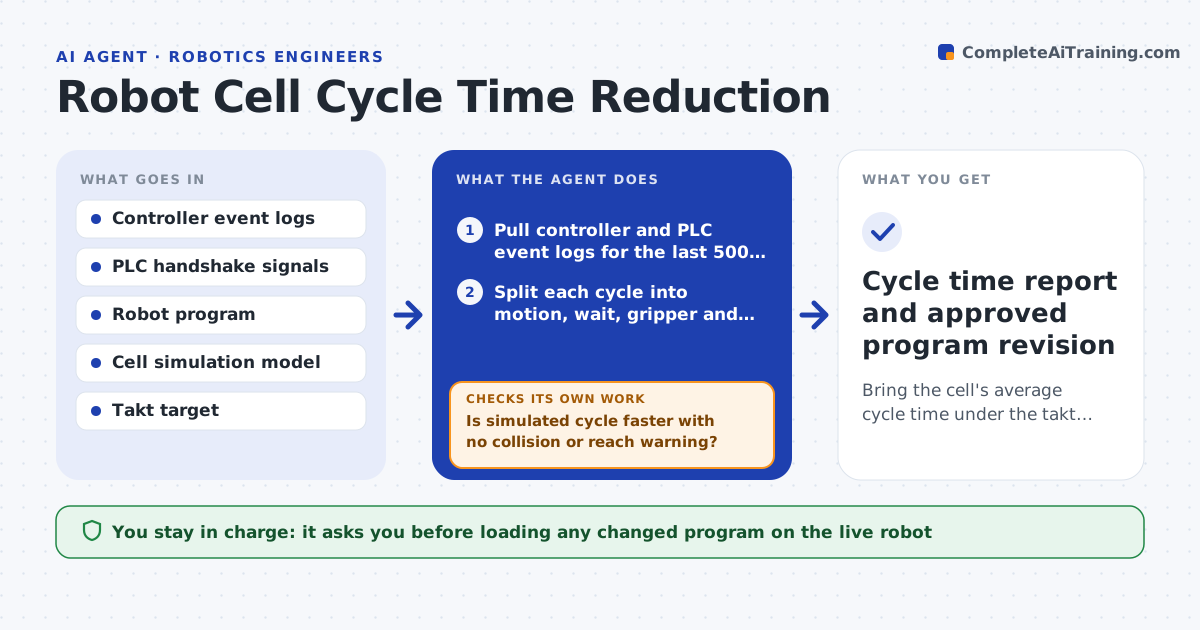
Robot cells often run a few seconds slower than the takt target, and finding where the time goes means scrubbing through controller logs by hand. This agent pulls timestamped program events from the robot controller and PLC and breaks each cycle into motion, wait, gripper and handshake segments. It ranks the biggest losses. It proposes changes such as blending points, running waits in parallel or shortening approach heights, then tests each change in simulation. If the simulated cycle is not faster, or a reach or collision check fails, it drops that change and tries the next one. It checks waits against upstream equipment so outside delays are not tuned away. The engineer approves any program change before it reaches the live cell. Edge case: a wait caused by an upstream conveyor is flagged as outside the cell.
How it works
Follow the arrows from top to bottom. The orange dashed arrow is the loop: when a check fails, the agent goes back and tries again.
Read the steps as a list
- Shift report shows cycle time above takt
- Pull controller and PLC event logs for the last 500 cycles
- Split each cycle into motion, wait, gripper and handshake segments
- Rank losses and pick a candidate change for the largest one
- Apply the change in the simulation model and run 50 cycles
- Is simulated cycle faster with no collision or reach warning?If not: discard the change, note why, and pick the next candidate. Back to step 4.
- Write a change note with before and after times
- Engineer approves loading the new program on the live cellThe agent waits here for your OK.
- Cycle time report and approved program revision
How it decides
It ranks time losses by seconds lost per cycle times cycles per shift and tries the cheapest change on the largest loss first. A change is kept only if simulation shows a gain with no new collision or reach warning.
- Ignore waits caused by upstream equipment and report them separately
- Prefer path blending and parallel I/O over speed increases
- Never raise speed or acceleration above the safety-validated limit
Make it yours
Every agent is a starting point. You choose these settings for your own situation.
- Takt target per cell (default from line plan)
- Number of cycles analyzed (default 500)
- Minimum gain worth a change (default 0.2 s)
- Simulation software used
What keeps you in control
It always asks you first
- Loading any changed program on the live robot
- Changing speed or zone settings
Hard limits
- Never pushes programs to a live controller
- Never changes safety zones or speed limits
It stops when
- Done: simulated cycle meets takt and the engineer has a change note
- Stop: three candidate changes in a row give no gain, escalate for layout review
Set it up
We guide you through the set-up, step by step
Members get the full set-up guide for this agent. No technical skills needed: you copy, paste and upload.
- One set of instructions to paste into your AI, with the clicks for ChatGPT, Claude, Microsoft 365 Copilot, Gemini and Grok
- The agent then walks you through connecting your own data, one source at a time
- A downloadable copy with the flow chart, the rules and the full guide