AI agent for robotics engineers
Robot Fault Log Troubleshooting Agent
Find the root cause of a recurring robot fault with evidence and a test plan
What it does
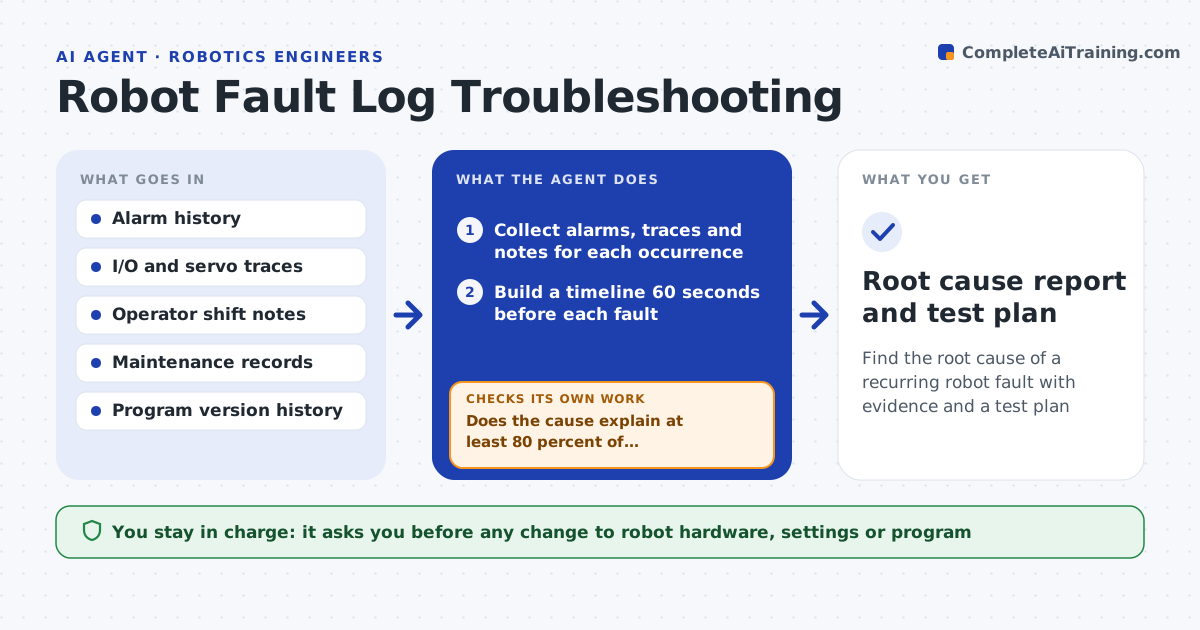
An intermittent robot fault, like a gripper not confirming or a servo overload, can stop a line repeatedly and take days to pin down. This agent collects alarm history, I/O traces, servo load data and operator notes around each occurrence and lines them up on one timeline. It looks for what all occurrences have in common, such as product variant, shift or preceding event. It forms a ranked list of likely causes and tests each against the data, for example whether vacuum pressure dropped before every gripper fault. If the evidence does not support a cause, it drops it and tests the next. It ends with a diagnosis and a test plan for maintenance. The engineer approves any change to the robot or program. Edge case: faults tied to one product variant narrow the search to that variant's program branch.
How it works
Follow the arrows from top to bottom. The orange dashed arrow is the loop: when a check fails, the agent goes back and tries again.
Read the steps as a list
- Same alarm logged three times in a week
- Collect alarms, traces and notes for each occurrence
- Build a timeline 60 seconds before each fault
- List candidate causes ranked by shared patterns
- Test top cause against all occurrences in the trace data
- Does the cause explain at least 80 percent of occurrences?If not: drop this cause and test the next candidate. Back to step 4.
- Write diagnosis and a test plan for maintenance
- Engineer approves any hardware or program changeThe agent waits here for your OK.
- Root cause report and test plan
How it decides
It ranks causes by how many fault occurrences share the same preceding signal pattern and treats a cause as supported only if it explains at least 80 percent of occurrences.
- Group faults by product variant and shift before analysis
- Recent program or hardware changes rank causes higher
- Unexplained occurrences are listed, not ignored
Make it yours
Every agent is a starting point. You choose these settings for your own situation.
- Alarm count that triggers analysis (default 3 per week)
- Time window before each fault (default 60 s)
- Evidence threshold for a supported cause (default 80 percent)
- Data sources connected
What keeps you in control
It always asks you first
- Any change to robot hardware, settings or program
Hard limits
- Read-only access to controllers
- Never clears alarms or resets equipment
It stops when
- Done: supported cause with test plan
- Stop: no candidate explains the faults, request more sensor logging
Set it up
We guide you through the set-up, step by step
Members get the full set-up guide for this agent. No technical skills needed: you copy, paste and upload.
- One set of instructions to paste into your AI, with the clicks for ChatGPT, Claude, Microsoft 365 Copilot, Gemini and Grok
- The agent then walks you through connecting your own data, one source at a time
- A downloadable copy with the flow chart, the rules and the full guide