AI agent for demand planners
S&OP Demand Review Prep Agent
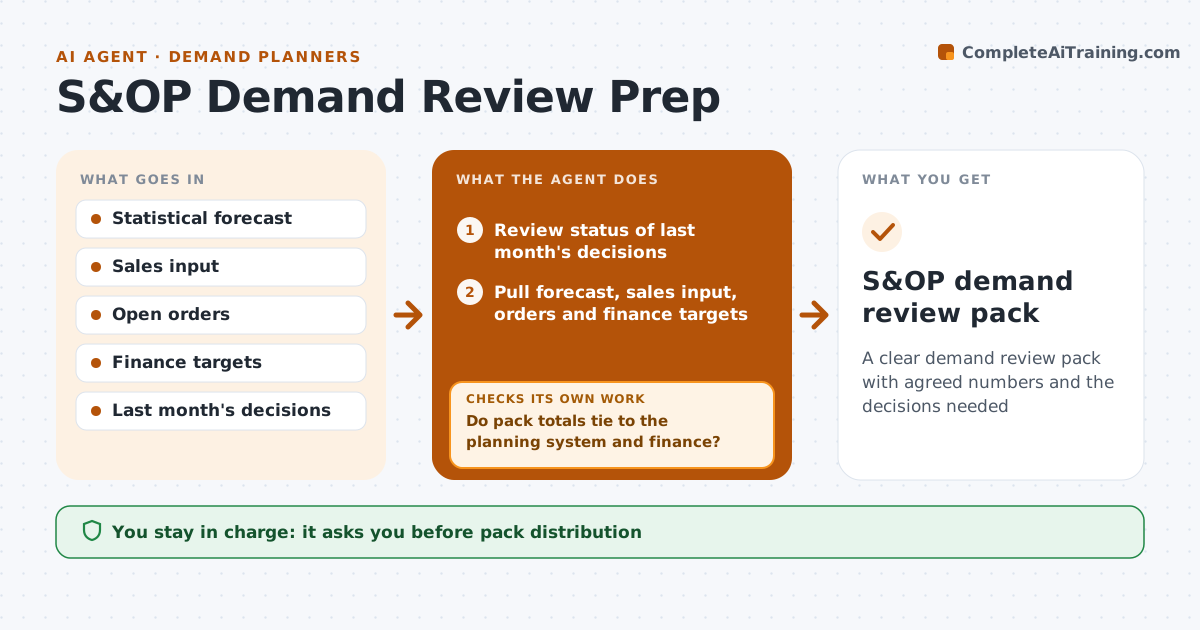
A clear demand review pack with agreed numbers and the decisions needed
What it does
Each month the demand plan goes to an S&OP meeting where sales, supply and finance must agree, and the pack takes days to build by hand. When the review is scheduled, this agent pulls the statistical forecast, sales input, open orders and finance targets. It reviews last month's decisions first, then compares the sources by family and region. Gaps over 10 percent become decisions for the meeting, not data corrections. Sales input far above history without a reason is flagged for discussion. It drafts a short pack with the consensus proposal, main assumptions, risks and decisions needed. It then checks that pack totals tie to the planning system and to finance numbers. If they do not tie, it finds the mismatch and corrects the source before finalizing. The planner approves the pack before it goes out. Edge case: currency differences are checked before any gap is reported.
How it works
Follow the arrows from top to bottom. The orange dashed arrow is the loop: when a check fails, the agent goes back and tries again.
Read the steps as a list
- Demand review scheduled
- Review status of last month's decisions
- Pull forecast, sales input, orders and finance targets
- Compare sources and list gaps over 10 percent
- Flag unexplained sales spikes for discussion
- Draft consensus proposal, assumptions and decisions
- Do pack totals tie to the planning system and finance?If not: find the mismatch and correct the source data. Back to step 4.
- Planner approves the packThe agent waits here for your OK.
- S&OP demand review pack
How it decides
It flags gaps over 10 percent between sources and lists them as decisions, not as data corrections.
- Gaps over 10 percent become decisions
- Unexplained sales spikes are flagged
- Last month's decisions are reviewed first
Make it yours
Every agent is a starting point. You choose these settings for your own situation.
- Gap threshold (default 10 percent)
- Pack template
- Levels shown
- Distribution list
What keeps you in control
It always asks you first
- Pack distribution
Hard limits
- Never sends the pack itself
- Never changes sales input
It stops when
- Done: pack sent
- Stop: sales input missing for a region, mark it and send
Set it up
We guide you through the set-up, step by step
Members get the full set-up guide for this agent. No technical skills needed: you copy, paste and upload.
- One set of instructions to paste into your AI, with the clicks for ChatGPT, Claude, Microsoft 365 Copilot, Gemini and Grok
- The agent then walks you through connecting your own data, one source at a time
- A downloadable copy with the flow chart, the rules and the full guide