AI agent for school administrators
Safeguarding Concern Record Completeness Agent
Keep every open concern record complete, dated and linked to actions and review dates.
What it does
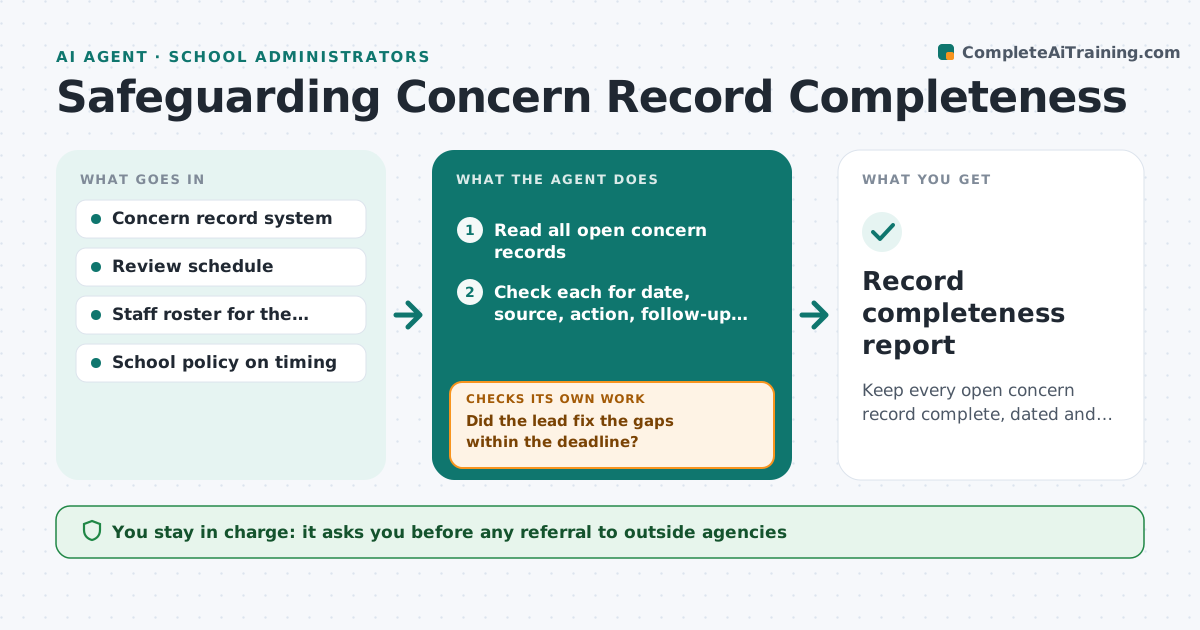
Safeguarding records are checked by inspectors and sometimes by courts. A good record states who raised the concern, when, what was seen, what was done, and what happened next. In busy schools, entries arrive late or half filled in. This agent reads each open concern record and checks that the date, source, action, follow-up and outcome are all present. It flags gaps and overdue reviews, and sends a private request to the designated safeguarding lead for the missing items. After the lead updates the record, it checks again. It never interprets the concern or advises on risk. Edge case: a record with no action logged for more than 24 hours is moved to the top of the lead's list. Any referral stays with the leader.
How it works
Follow the arrows from top to bottom. The orange dashed arrow is the loop: when a check fails, the agent goes back and tries again.
Read the steps as a list
- Daily record check begins
- Read all open concern records
- Check each for date, source, action, follow-up and outcome
- Rank gaps by age of record and gaps count
- Send a private gap list to the designated lead
- Did the lead fix the gaps within the deadline?If not: Escalate the still open gaps to the headteacher and recheck the next day. Back to step 3.
- Check review dates and mark any overdue
- Leader approves any referral or contact with outside agenciesThe agent waits here for your OK.
- Is every record complete after the update?If not: Re-list the remaining gaps. Back to step 3.
- Record completeness report
How it decides
Checks each record against a required-fields list and review deadlines; a missing field or overdue review is a gap, ranked by how long the record has been open.
- Missing action after 24 hours goes to the top of the list
- Review overdue by more than 7 days is escalated to the head
- A record with all fields filled is marked complete only after the lead confirms
- Gap lists contain only field names, never the details of the concern
Make it yours
Every agent is a starting point. You choose these settings for your own situation.
- Required fields list
- Escalation timing (default 24 hours, 7 days)
- Who is the designated lead and deputy
- Report day
- Review interval by record type
What keeps you in control
It always asks you first
- Any referral to outside agencies
- Any change to the policy
- Closing a record
Hard limits
- Never summarize or judge the content of a concern
- Keep gap lists free of identifying detail
It stops when
- Done: all records complete
- Stop: a child is at immediate risk, hand to the lead at once
- Stop: system access lost
Set it up
We guide you through the set-up, step by step
Members get the full set-up guide for this agent. No technical skills needed: you copy, paste and upload.
- One set of instructions to paste into your AI, with the clicks for ChatGPT, Claude, Microsoft 365 Copilot, Gemini and Grok
- The agent then walks you through connecting your own data, one source at a time
- A downloadable copy with the flow chart, the rules and the full guide