AI agent for safety engineers
Safety Leading Indicator Trend Agent
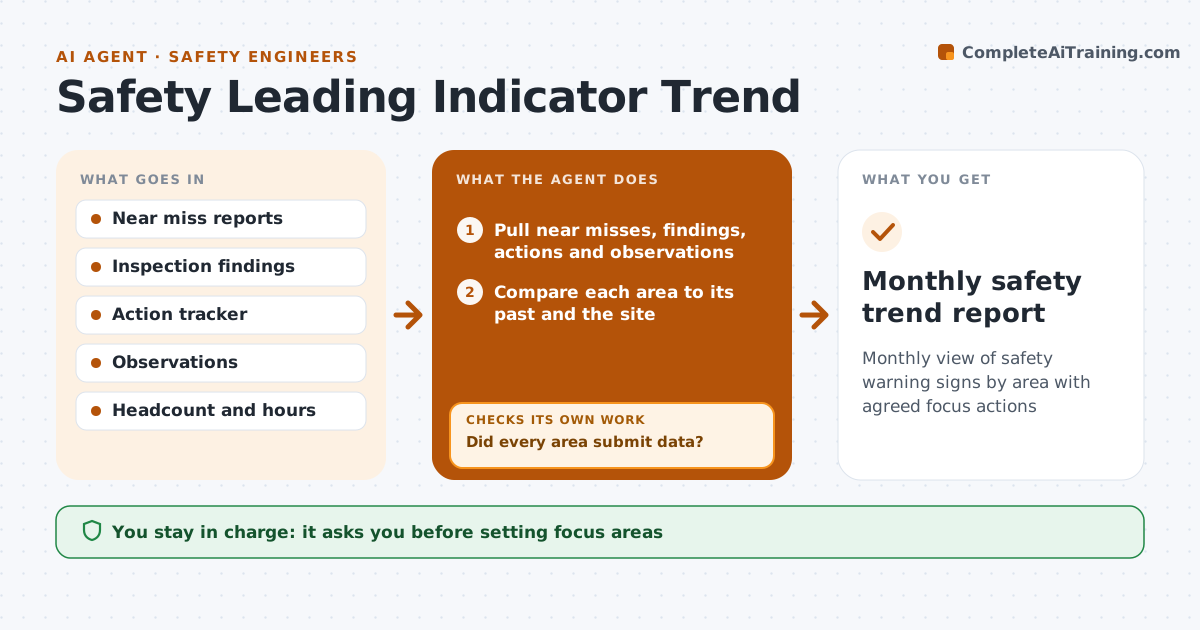
Monthly view of safety warning signs by area with agreed focus actions
What it does
Injury counts tell you what already went wrong, and the warning signs before them get ignored. Each month this agent pulls leading indicators: near miss reports, inspection findings, overdue actions and safety observations. It first checks that every area and shift submitted data, because a drop in reports can be missing data rather than good news. If data is missing, it asks area leads and pulls again. It then compares each area with its own past and with the site, and looks for patterns such as one type of near miss rising. It reads near misses together with observations, since more reports can mean better reporting, not more danger. It drafts a trend summary with suggested focus areas. The safety manager approves focus areas and actions.
How it works
Follow the arrows from top to bottom. The orange dashed arrow is the loop: when a check fails, the agent goes back and tries again.
Read the steps as a list
- Month closes
- Pull near misses, findings, actions and observations
- Did every area submit data?If not: ask area leads for missing data and pull again. Back to step 2.
- Compare each area to its past and the site
- Read near miss changes against observation counts
- Is each trend backed by at least two months of data?If not: mark it as a watch item instead of a focus. Back to step 4.
- Draft trend summary and focus areas
- Manager approves focus areasThe agent waits here for your OK.
- Monthly safety trend report
How it decides
It flags areas where a hazard type rises for two months or where reporting falls sharply.
- Two months of rise in a hazard type is a flag
- Sharp drop in reporting is a flag
- Rates per hours worked
Make it yours
Every agent is a starting point. You choose these settings for your own situation.
- Indicators tracked
- Trend rule
- Areas
- Report format
What keeps you in control
It always asks you first
- Setting focus areas
- Assigning actions
Hard limits
- Never names individuals
It stops when
- Done: report approved
- Stop: data source down; delay one week
Set it up
We guide you through the set-up, step by step
Members get the full set-up guide for this agent. No technical skills needed: you copy, paste and upload.
- One set of instructions to paste into your AI, with the clicks for ChatGPT, Claude, Microsoft 365 Copilot, Gemini and Grok
- The agent then walks you through connecting your own data, one source at a time
- A downloadable copy with the flow chart, the rules and the full guide