AI agent for vice president of sales
Sales Campaign Effectiveness Agent
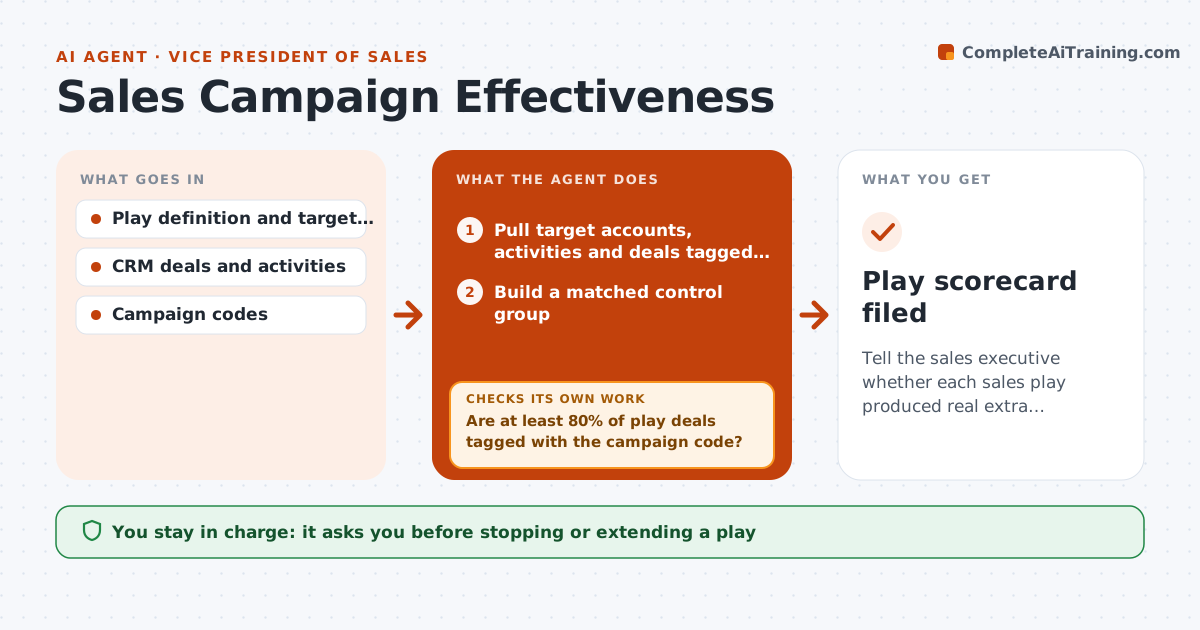
Tell the sales executive whether each sales play produced real extra pipeline and wins
What it does
Sales leaders launch plays such as a bundle push or a competitive displacement offer, then move on without knowing if they worked. At the review date this agent pulls target accounts, activities and deals tagged to the play. It checks that at least 80% of play deals carry the campaign code; if not, it searches notes and emails for the play's keywords and asks reps to confirm likely untagged deals. It builds a matched control group of similar accounts not touched by the play, excluding accounts with deals open before launch. It compares pipeline, win rate and cycle length for both groups. It drafts a keep, change or stop recommendation: stop when lift is under 10% after 60 days, change when fewer than 30% of reps used it. The executive decides. Edge case: accounts already in an open deal at launch are excluded.
How it works
Follow the arrows from top to bottom. The orange dashed arrow is the loop: when a check fails, the agent goes back and tries again.
Read the steps as a list
- Play review date reached
- Pull target accounts, activities and deals tagged to the play
- Are at least 80% of play deals tagged with the campaign code?If not: search notes for play keywords, list likely untagged deals and ask reps to confirm. Back to step 2.
- Build a matched control group
- Calculate pipeline, win rate and cycle length for both groups
- Draft keep, change or stop recommendation
- Executive decides the play's futureThe agent waits here for your OK.
- Play scorecard filed
How it decides
Lift is the difference in pipeline created per account between touched accounts and a matched control group of similar size, segment and region.
- Exclude accounts with deals open before launch
- Recommend stop when lift is under 10% after 60 days
- Recommend change when usage is under 30% of reps
Make it yours
Every agent is a starting point. You choose these settings for your own situation.
- Minimum tagging rate (default 80%)
- Lift threshold for keep (default 10%)
- Review frequency
- Control group matching fields
What keeps you in control
It always asks you first
- Stopping or extending a play
- Changing incentives linked to the play
Hard limits
- Never edits deal tags without rep confirmation
- Labels lift as an estimate
It stops when
- Done: scorecard delivered
- Stop: target list for the play is missing
Set it up
We guide you through the set-up, step by step
Members get the full set-up guide for this agent. No technical skills needed: you copy, paste and upload.
- One set of instructions to paste into your AI, with the clicks for ChatGPT, Claude, Microsoft 365 Copilot, Gemini and Grok
- The agent then walks you through connecting your own data, one source at a time
- A downloadable copy with the flow chart, the rules and the full guide