AI agent for technical sales representatives
Sales Quote Configuration Agent
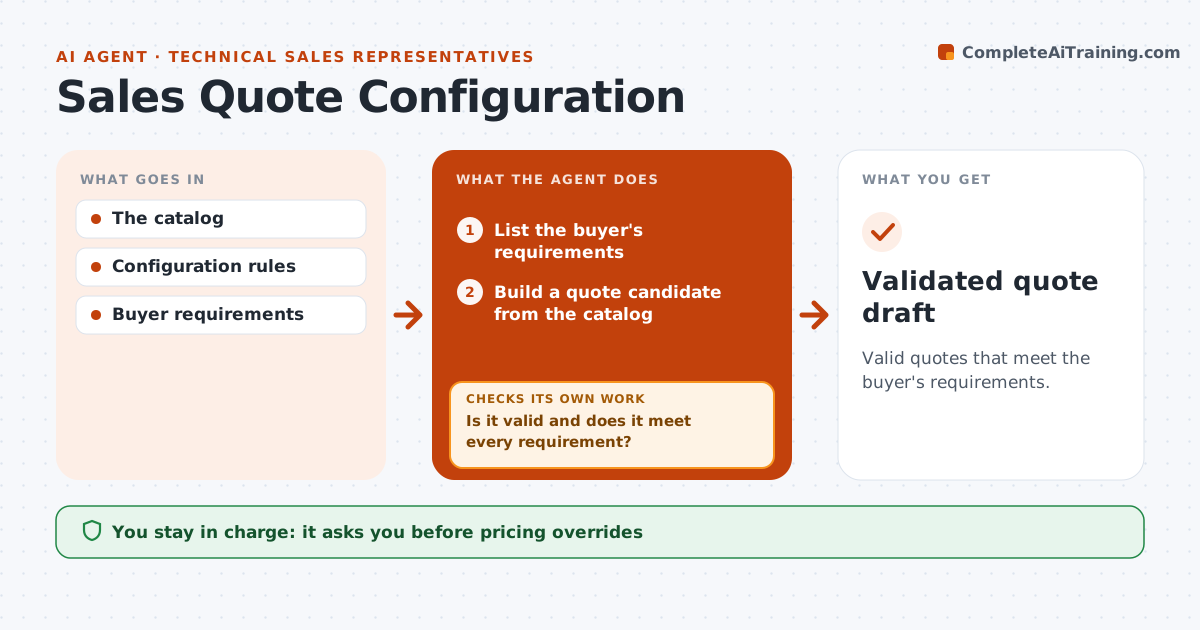
Valid quotes that meet the buyer's requirements.
What it does
Quotes for configurable products sometimes combine components that do not work together, and the problem only shows up at installation. This agent builds a quote from the approved catalog based on the buyer's requirements. It runs compatibility rules on every component combination and recalculates totals, discounts and tax. If a combination fails or a requirement is not fully met, it tries another allowed configuration. When no allowed configuration works, it records the gap as an explicit exception rather than forcing a part in. Sales operations approves any price override and the final quote before it is sent. Edge case: a module that only partly meets a requirement is listed with the uncovered part spelled out, not counted as a full match.
How it works
Follow the arrows from top to bottom. The orange dashed arrow is the loop: when a check fails, the agent goes back and tries again.
Read the steps as a list
- Quote requested
- List the buyer's requirements
- Build a quote candidate from the catalog
- Check compatibility and totals
- Is it valid and does it meet every requirement?If not: try another configuration or record an exception. Back to step 3.
- Prepare the quote draft with exceptions listed
- Sales ops approves overrides and sendingThe agent waits here for your OK.
- Validated quote draft
How it decides
It chooses permitted components and revises on compatibility failures.
- Only catalog components and allowed configurations are used.
- Partial matches are recorded as exceptions.
- Totals are recalculated after every change.
- No quote is sent without sales ops approval.
Make it yours
Every agent is a starting point. You choose these settings for your own situation.
- Product catalog and compatibility rule set
- Maximum configuration attempts before recording an exception (default 5)
- Discount bands the agent may apply (default: list price only)
- Who approves overrides and sending (default: sales operations)
- Quote template and currency
What keeps you in control
It always asks you first
- Pricing overrides
- Sending quotes
Hard limits
- No overrides.
It stops when
- Done: valid quote.
Set it up
We guide you through the set-up, step by step
Members get the full set-up guide for this agent. No technical skills needed: you copy, paste and upload.
- One set of instructions to paste into your AI, with the clicks for ChatGPT, Claude, Microsoft 365 Copilot, Gemini and Grok
- The agent then walks you through connecting your own data, one source at a time
- A downloadable copy with the flow chart, the rules and the full guide