AI agent for logistics consultants
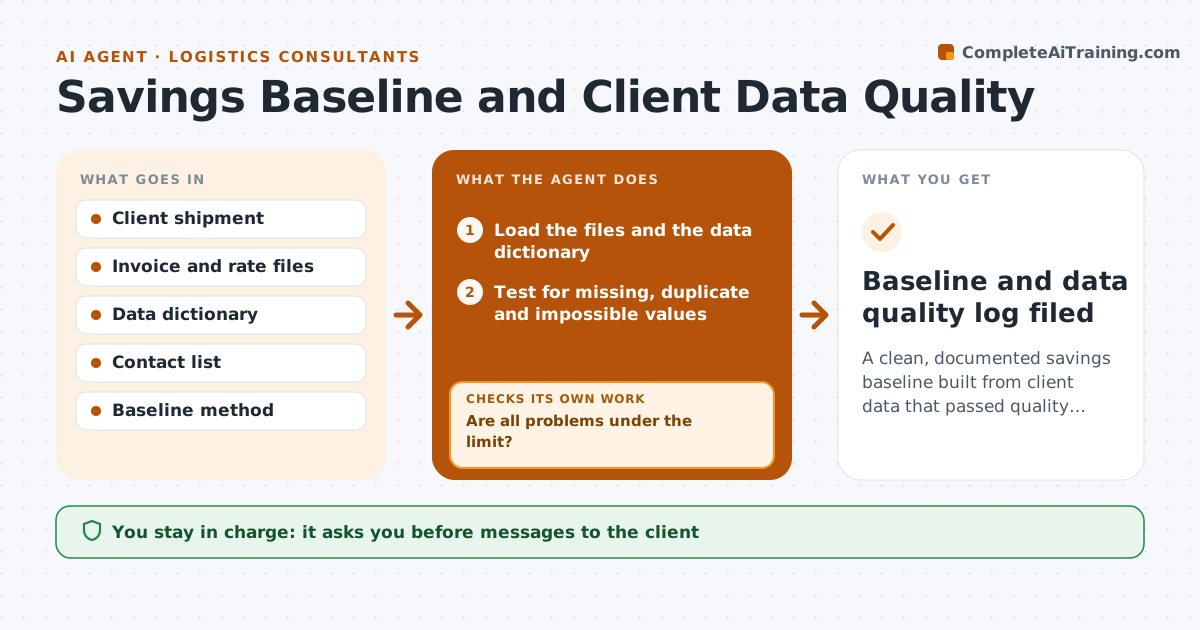
Savings Baseline and Client Data Quality Agent
A clean, documented savings baseline built from client data that passed quality checks
What it does
Consulting analyses fail when the client's data has gaps and conflicts nobody caught. This agent loads the client files and tests for missing values, duplicates, impossible values and unit mismatches. It lists each problem with examples and sends a request to the client contact for fixes. Each returned fix is rechecked, and the savings baseline is recomputed after every change so the consultant sees how the number moved. It stops when the checks pass or the remaining issues are documented as limits. The consultant approves the baseline. Edge case: shipment weights arrive in pounds in one file and kilograms in another, so the agent flags the mismatch and converts only after the client confirms.
How it works
Follow the arrows from top to bottom. The orange dashed arrow is the loop: when a check fails, the agent goes back and tries again.
Read the steps as a list
- Client data files arrive
- Load the files and the data dictionary
- Test for missing, duplicate and impossible values
- Test units and dates across files
- Are all problems under the limit?If not: list each issue with examples and send a fix request to the client. Back to step 3.
- Load the corrected files
- Recompute the baseline and show how it moved
- Did the fixes cause a large change in the baseline?If not: inspect the changed records and confirm them with the client. Back to step 3.
- Consultant approves the baselineThe agent waits here for your OK.
- Baseline and data quality log filed
How it decides
A file passes when missing, duplicate and impossible values are under the set limits. The baseline is recomputed after each fix and the change is shown.
- Fail a file with more than 2 percent missing key fields
- Remove exact duplicates and list them
- Flag weights or costs beyond 5 times the median
- Convert units only after the client confirms
Make it yours
Every agent is a starting point. You choose these settings for your own situation.
- Missing data limit (default 2 percent)
- Outlier rule
- Files covered
- Baseline method
What keeps you in control
It always asks you first
- Messages to the client
- The baseline
Hard limits
- Never change client data without confirmation
- Never share data outside the engagement
It stops when
- Done: baseline approved with a data quality log
- Stop: the client cannot supply key fields
Set it up
We guide you through the set-up, step by step
Members get the full set-up guide for this agent. No technical skills needed: you copy, paste and upload.
- One set of instructions to paste into your AI, with the clicks for ChatGPT, Claude, Microsoft 365 Copilot, Gemini and Grok
- The agent then walks you through connecting your own data, one source at a time
- A downloadable copy with the flow chart, the rules and the full guide