AI agent for public relations specialists
Search Result Reputation Watch Agent
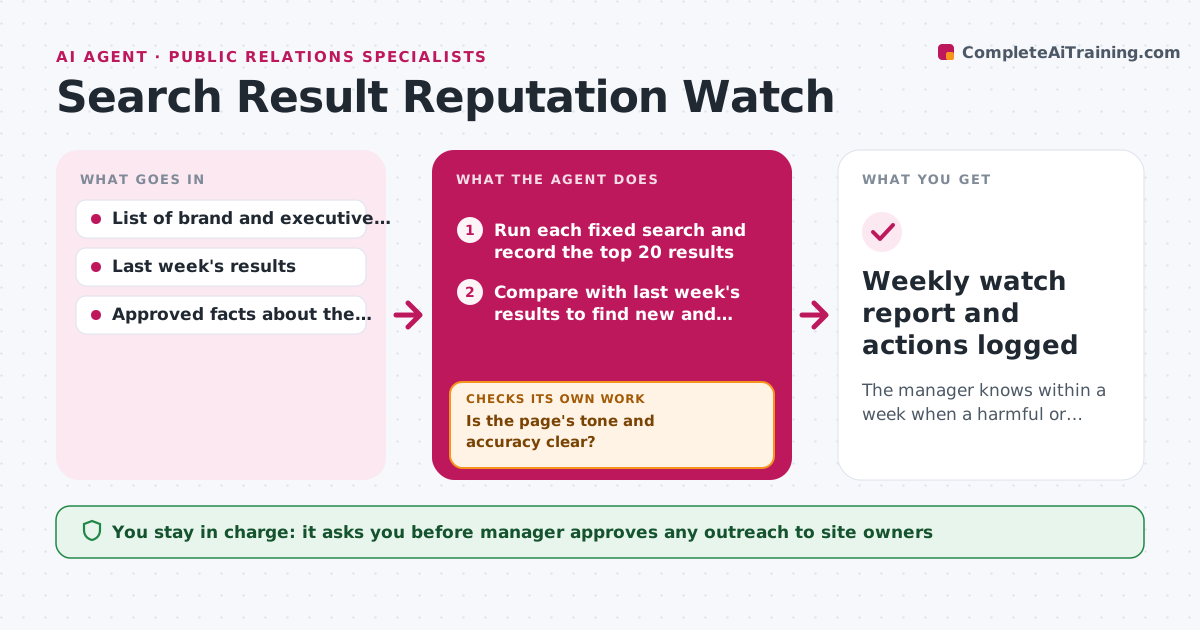
The manager knows within a week when a harmful or outdated page enters the top results and has a ready response.
What it does
Most people judge a company by the first page of search results, and that page changes without warning. This agent runs a fixed set of brand and executive searches every week and records the top results. It compares them with last week's list and flags any new page that is negative, false or out of date. For each flagged page it checks what can be done: a factual correction request, a takedown under a site's policy, or a content update on the company's own pages to push the result down. It drafts the proposed response per page. The manager approves any outreach to site owners or the content plan. Edge case: an old press release outranks the new one, so the fix is an update, not a takedown.
How it works
Follow the arrows from top to bottom. The orange dashed arrow is the loop: when a check fails, the agent goes back and tries again.
Read the steps as a list
- Weekly search run
- Run each fixed search and record the top 20 results
- Compare with last week's results to find new and rising pages
- Read each new page and check it against the approved facts
- Is the page's tone and accuracy clear?If not: read related pages and search the claim before classifying it. Back to step 3.
- Classify each page as negative, false, outdated or neutral
- Check what response is possible: correction, takedown or content update
- Is the proposed response allowed by the site's policy?If not: switch to a content update or monitor only. Back to step 7.
- Draft the outreach and content plan per flagged page
- Manager approves outreach to site owners and the content planThe agent waits here for your OK.
- Weekly watch report and actions logged
How it decides
It flags a page when it enters the top 10 and is negative, false or outdated against the approved facts. It prefers a content update over a takedown request when the page is accurate.
- Flag a page that enters the top 10 and is negative, false or outdated.
- Prefer a content update when the page is accurate but unflattering.
- Request a takedown only when the page breaks the site's own policy.
- Escalate immediately when a false claim appears in the top 3.
Make it yours
Every agent is a starting point. You choose these settings for your own situation.
- Search terms and locations
- Top results depth (default 20)
- Approved facts sheet
- Weekly run day
What keeps you in control
It always asks you first
- Manager approves any outreach to site owners
- Manager approves the content plan
Hard limits
- Never contact site owners without approval
- Do not post fake or paid reviews
It stops when
- Done: report approved and actions logged.
- Stop: search tool blocked, so the manager is told.
Set it up
We guide you through the set-up, step by step
Members get the full set-up guide for this agent. No technical skills needed: you copy, paste and upload.
- One set of instructions to paste into your AI, with the clicks for ChatGPT, Claude, Microsoft 365 Copilot, Gemini and Grok
- The agent then walks you through connecting your own data, one source at a time
- A downloadable copy with the flow chart, the rules and the full guide