AI agent for hotel managers
Seasonal Hiring and Training Readiness Agent
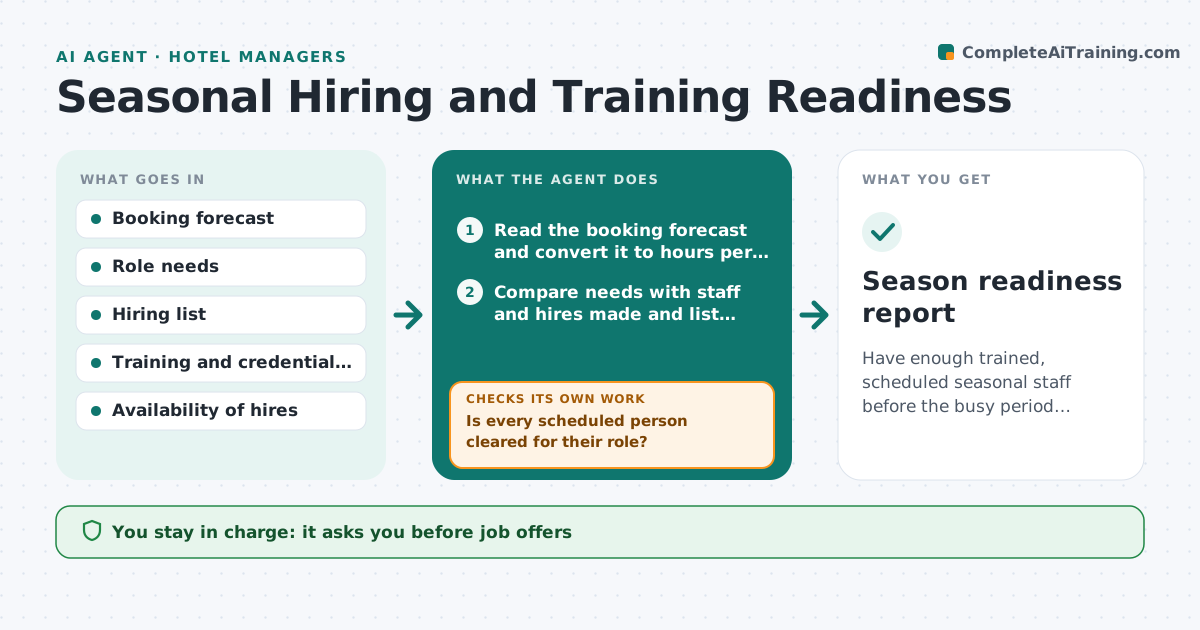
Have enough trained, scheduled seasonal staff before the busy period starts.
What it does
Every year the hotel needs extra staff for a few months. Offers go out late, some hires drop out, and new staff start work before food safety or fire training. This agent forecasts the headcount needed by week from the booking forecast, compares it with hires made, and tracks each hire through paperwork, credentials and training. It builds draft schedules that respect training status, so no one is scheduled for tasks they are not cleared for. When a hire drops out, it updates the forecast gap and drafts a replacement plan. It flags every gap early. The manager approves offers and schedules. Edge case: a hire whose food safety card is missing is scheduled only for roles that do not need it.
How it works
Follow the arrows from top to bottom. The orange dashed arrow is the loop: when a check fails, the agent goes back and tries again.
Read the steps as a list
- Season planning begins
- Read the booking forecast and convert it to hours per role per week
- Compare needs with staff and hires made and list gaps by role and week
- Draft offers and training assignments for each hire
- Manager approves offersThe agent waits here for your OK.
- Track credentials and training completion
- Is every scheduled person cleared for their role?If not: Change the shift to a cleared role or move the training earlier. Back to step 6.
- Build draft schedules from cleared staff
- Does any role fall short in any week?If not: Update the gap list and draft recruitment steps or overtime options. Back to step 3.
- Manager approves the schedulesThe agent waits here for your OK.
- Season readiness report
How it decides
Compares needed hours with scheduled hours by role and week, and assigns shifts only to staff whose required training is complete.
- Staff scheduled for roles only when training is complete
- Gap above 10% of needed hours in any week is flagged
- Hires who miss a start date are replaced in the plan within a day
- Overtime is a last resort and needs approval
Make it yours
Every agent is a starting point. You choose these settings for your own situation.
- Weeks of planning ahead (default 10)
- Gap threshold (default 10%)
- Training required per role
- Max weekly hours
- Who approves offers
What keeps you in control
It always asks you first
- Job offers
- Final schedules
- Any overtime plan
Hard limits
- Never make an offer on its own
- Never schedule untrained staff for restricted tasks
It stops when
- Done: all weeks fully staffed and trained
- Stop: season cancelled
- Stop: budget limit reached
Set it up
We guide you through the set-up, step by step
Members get the full set-up guide for this agent. No technical skills needed: you copy, paste and upload.
- One set of instructions to paste into your AI, with the clicks for ChatGPT, Claude, Microsoft 365 Copilot, Gemini and Grok
- The agent then walks you through connecting your own data, one source at a time
- A downloadable copy with the flow chart, the rules and the full guide