AI agent for sales engineers
Security Review Evidence Refresh Agent
Keep every item in the evidence library current and every open questionnaire accurate
What it does
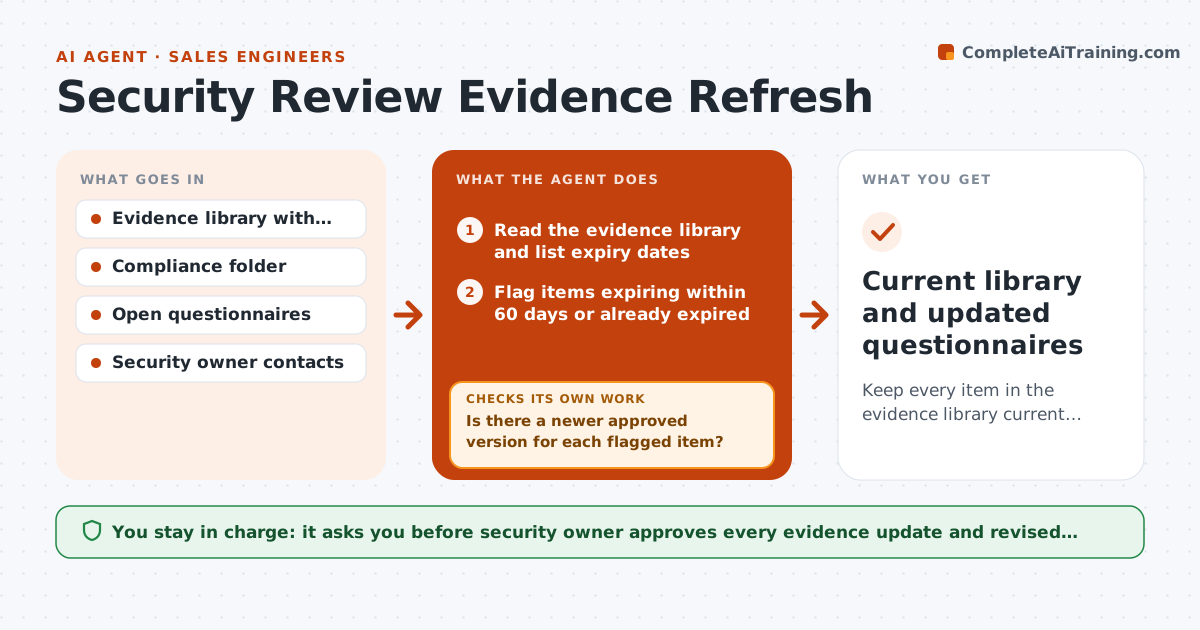
A customer's security team asks for the latest SOC 2 report and the SE sends one that expired last month. The deal slows down for weeks. This agent keeps the evidence library current. It checks expiry dates for certifications, pen-test summaries, policies and insurance, finds newer versions in the compliance folder or asks the security owner for them, updates the library and flags what has no replacement. It also rechecks every open questionnaire against the changes, since an answer based on an expired report may now be wrong. The security owner approves updates. Edge case: a new report has an exception noted. The agent flags it for the security owner before it is shared.
How it works
Follow the arrows from top to bottom. The orange dashed arrow is the loop: when a check fails, the agent goes back and tries again.
Read the steps as a list
- Weekly evidence check
- Read the evidence library and list expiry dates
- Flag items expiring within 60 days or already expired
- Search the compliance folder for newer versions
- Is there a newer approved version for each flagged item?If not: Request it from the security owner and mark the gap. Back to step 3.
- Security owner approves replacing the evidenceThe agent waits here for your OK.
- Update the library and the version history
- Recheck open questionnaires against changed evidence
- Do all answers still match the current evidence?If not: Redraft the affected answers and send them to the security owner. Back to step 8.
- Current library and updated questionnaires
How it decides
An item expires on its end date or after 12 months for reports without a date. Answers that cite an expired item are marked for review.
- Flag items 60 days before expiry
- Reports with exceptions go to the security owner before sharing
- Answers citing expired evidence are reopened
- Old versions are kept in an archive, never deleted
Make it yours
Every agent is a starting point. You choose these settings for your own situation.
- Warning period (default 60 days)
- Evidence types tracked
- Folder locations
- Who approves updates
- Check frequency
What keeps you in control
It always asks you first
- Security owner approves every evidence update and revised answer
Hard limits
- Never shares evidence outside the library without approval
- Never edits a report
It stops when
- Done: all items current and answers matched
- Stop: an item is missing and cannot be replaced, tell the security owner
Set it up
We guide you through the set-up, step by step
Members get the full set-up guide for this agent. No technical skills needed: you copy, paste and upload.
- One set of instructions to paste into your AI, with the clicks for ChatGPT, Claude, Microsoft 365 Copilot, Gemini and Grok
- The agent then walks you through connecting your own data, one source at a time
- A downloadable copy with the flow chart, the rules and the full guide