AI agent for actors
Self-Tape Technical Check Agent
Self-tapes that meet casting instructions technically every time
What it does
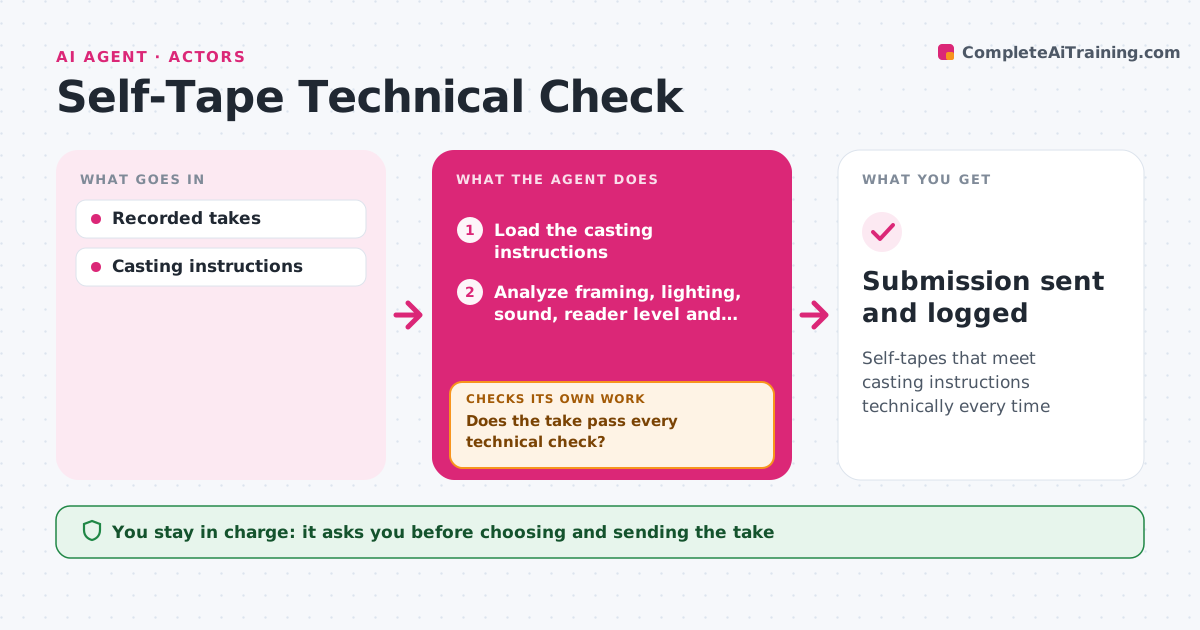
A strong performance can be ignored if the self-tape has bad sound, poor light or the wrong length. After the actor records a take, this agent checks it against the casting instructions and common standards: framing, eye line, light on the face, background, sound level and clarity, reader volume compared with the actor, length, slate and file name. It lists problems with simple fixes, like moving the reader further from the mic. After a new take, it checks again. When a take passes, it exports to the requested format and size and drafts the submission with correct naming. The actor picks the take and approves the send. Edge case: a casting call asking for no slate is respected even though slates are normal.
How it works
Follow the arrows from top to bottom. The orange dashed arrow is the loop: when a check fails, the agent goes back and tries again.
Read the steps as a list
- Take recorded
- Load the casting instructions
- Analyze framing, lighting, sound, reader level and length
- Compare with casting instructions
- Does the take pass every technical check?If not: list simple fixes and wait for a new take. Back to step 3.
- Export to requested format and name
- Do file format, size and name match the request?If not: re-export with the right settings. Back to step 6.
- Actor picks the take and approves sendingThe agent waits here for your OK.
- Submission sent and logged
How it decides
It checks against the casting instructions first and common standards second.
- Casting instructions override standard rules
- Reader should be quieter than the actor
- Length must fit the limit
Make it yours
Every agent is a starting point. You choose these settings for your own situation.
- Standards used
- Export format
- File naming
- Length margin
What keeps you in control
It always asks you first
- Choosing and sending the take
Hard limits
- Never comments on acting choices
- Never sends without approval
It stops when
- Done: tape submitted
- Stop: deadline passed
Set it up
We guide you through the set-up, step by step
Members get the full set-up guide for this agent. No technical skills needed: you copy, paste and upload.
- One set of instructions to paste into your AI, with the clicks for ChatGPT, Claude, Microsoft 365 Copilot, Gemini and Grok
- The agent then walks you through connecting your own data, one source at a time
- A downloadable copy with the flow chart, the rules and the full guide