AI agent for it managers
Service Desk Trend Review Agent
A monthly list of recurring issues turned into owned problem records
What it does
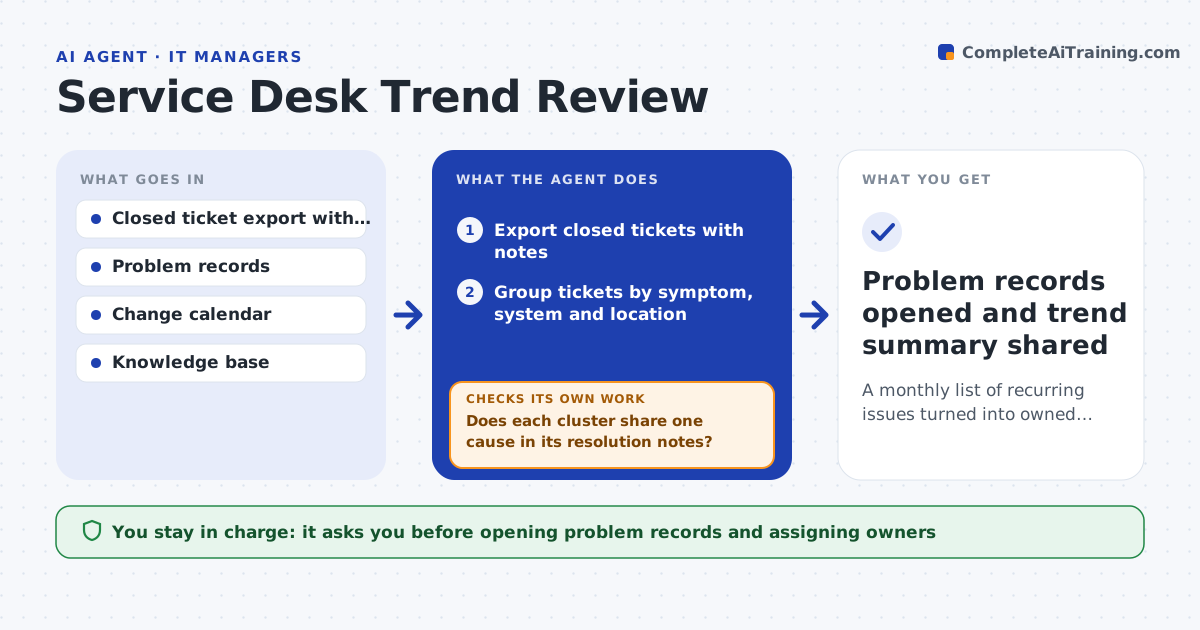
Service desks fix tickets one at a time, so repeat problems hide in the volume and keep costing hours. Each month this agent groups closed tickets by symptom, affected system and location, and finds clusters that grew or repeated. For each cluster it checks whether a problem record or knowledge article already exists, so it does not duplicate work. It then reads resolution notes to test whether the cluster really has one cause. If a cluster mixes unrelated issues, it splits it and regroups before going further. For each clean cluster it drafts a problem record with the likely cause, the ticket count and the hours spent. You decide which problem records to open and who owns them. Edge case: a spike caused by a planned change is labeled change-related and sent to the change owner, not opened as a new problem.
How it works
Follow the arrows from top to bottom. The orange dashed arrow is the loop: when a check fails, the agent goes back and tries again.
Read the steps as a list
- Month closes on the service desk
- Export closed tickets with notes
- Group tickets by symptom, system and location
- Does each cluster share one cause in its resolution notes?If not: split the cluster using resolution notes and regroup. Back to step 3.
- Check problem records, knowledge base and change calendar
- Draft problem records with counts, hours and likely cause
- IT manager picks which records to open and assigns ownersThe agent waits here for your OK.
- Problem records opened and trend summary shared
How it decides
A cluster becomes a candidate when it has at least the minimum ticket count or grew by more than the set rate versus last month, and no open problem record covers it.
- Candidate when 10 or more tickets share a cause, or volume grew 50%
- Link to the change calendar when a spike follows a change
- Skip clusters already covered by an open problem record
Make it yours
Every agent is a starting point. You choose these settings for your own situation.
- Minimum cluster size (default 10 tickets)
- Growth rate that flags a trend (default 50%)
- Categories to ignore
- Report format and audience
What keeps you in control
It always asks you first
- Opening problem records and assigning owners
- Sharing the summary with other departments
Hard limits
- Does not close or edit live tickets
- Does not assign work to people without approval
It stops when
- Done: every candidate cluster is opened, linked or dismissed
- Stop: ticket export lacks resolution notes
Set it up
We guide you through the set-up, step by step
Members get the full set-up guide for this agent. No technical skills needed: you copy, paste and upload.
- One set of instructions to paste into your AI, with the clicks for ChatGPT, Claude, Microsoft 365 Copilot, Gemini and Grok
- The agent then walks you through connecting your own data, one source at a time
- A downloadable copy with the flow chart, the rules and the full guide