AI agent for judges
Settlement Conference Preparation Agent
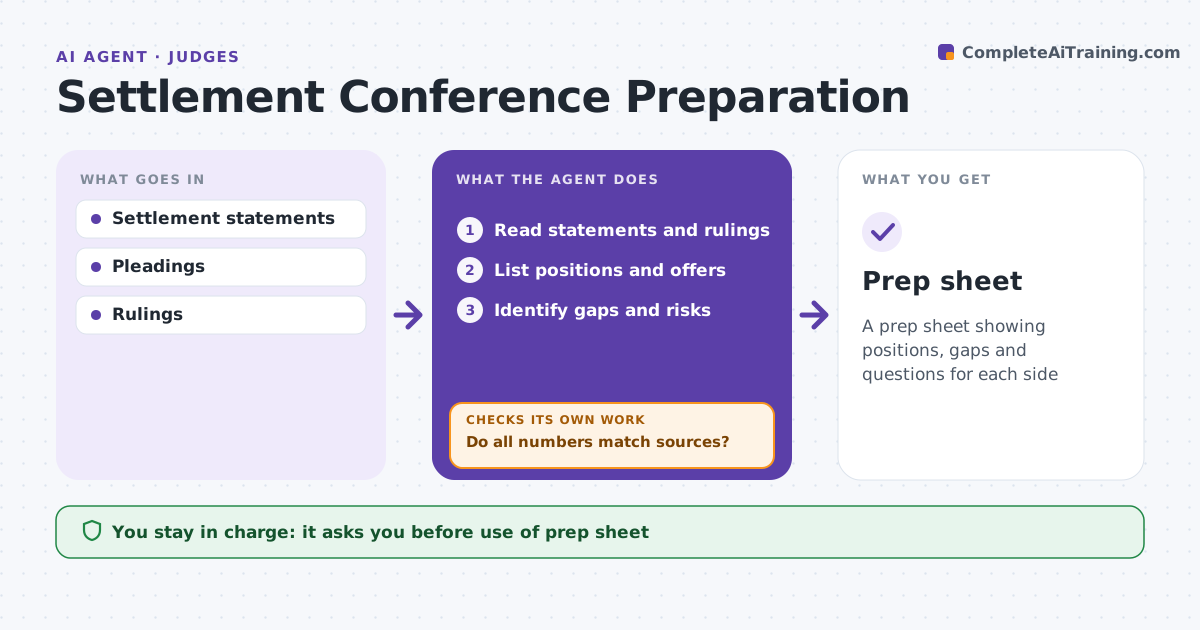
A prep sheet showing positions, gaps and questions for each side
What it does
Settlement conferences go better when the judge or mediator knows where the real gaps are. Before a conference, this agent reads the confidential settlement statements, pleadings and key rulings. It lists claims, defenses, damages claimed, offers made and each side's stated risks. It estimates a range of outcomes from the issues and the law and marks any gap over 50 percent of the demand as a focus area. It then checks each number against its source. When totals differ between documents, it flags the inconsistency and checks again. It notes when a side relies on a claim already dismissed. It drafts questions to explore with each side. The judge or mediator decides how to use the prep sheet and runs the session. Edge case: one side's statement relies on a claim already dismissed, which the agent notes.
How it works
Follow the arrows from top to bottom. The orange dashed arrow is the loop: when a check fails, the agent goes back and tries again.
Read the steps as a list
- Statements received
- Read statements and rulings
- List positions and offers
- Identify gaps and risks
- Do all numbers match sources?If not: flag inconsistencies and recheck. Back to step 3.
- Draft questions for each side
- Judge or mediator reviewsThe agent waits here for your OK.
- Prep sheet
How it decides
It compares the parties' numbers and risks and checks them against sources.
- Dismissed claim relied on: note
- Damages totals differ: flag
- Gap over 50% of demand: focus area
Make it yours
Every agent is a starting point. You choose these settings for your own situation.
- Prep sheet format
- Questions per side
- Confidentiality rules
- Range method
What keeps you in control
It always asks you first
- Use of prep sheet
Hard limits
- Never shares one side's confidential statement with the other
- Never predicts a verdict as fact
It stops when
- Done: prep sheet ready
- Stop: statements missing
Set it up
We guide you through the set-up, step by step
Members get the full set-up guide for this agent. No technical skills needed: you copy, paste and upload.
- One set of instructions to paste into your AI, with the clicks for ChatGPT, Claude, Microsoft 365 Copilot, Gemini and Grok
- The agent then walks you through connecting your own data, one source at a time
- A downloadable copy with the flow chart, the rules and the full guide