
Learning path
Learning AI as a Mediator
Learn how AI can help you prepare for mediation, listen carefully, and draft clear agreements while keeping your neutral voice. The path walks you through setup, prompts, and short videos made for mediators.

Your path
Everything in the Mediator AI kit, in the order that makes sense. Members tick off each step and see their progress.
Set up your AI
We guide you through each click.
Let skills do your everyday tasks
Connect your apps and pick your AI apps
Hand whole tasks to AI agents
Build your own tools
Keep growing
Everything for mediators
All the courses, certifications, AI tools, MCP servers and apps for mediators, most relevant first. Open any list to see more.
Take the prompt courses
A short framework course to learn how to ask, then 8 lessons with ready-to-use prompts for mediators.
Start with this framework: how to talk to AI
CARE fits mediation because each case needs context, action, result, and one model example, like a past settlement agreement.
Then your prompt course for mediatorsWatch the video courses or add them to your Favorites for later
98 video courses our AI picked for mediators, most useful first. Save the ones you want to watch later with the heart.
Favorites are saved to your account: sign in or get your AI kit first.
Show all 98 video courses
Get certified, or add certifications to your Favorites
Every course ends in an exam and a certificate you can add to LinkedIn. Save the certifications you are aiming for with the heart.
Favorites are saved to your account: sign in or get your AI kit first.
More certifications for mediatorsShow all 24 certifications
Try the AI tools for mediators
4 AI tools our AI matched to the work of mediators, best fit first. Each review shows what it does, its alternatives and the jobs it suits.
Favorites are saved to your account: sign in or get your AI kit first.
Connect your AI to the apps mediators use
MCP servers let ChatGPT, Claude or Copilot look things up and get work done in other apps, like your email, calendar or bookkeeping software. These 12 fit the work of mediators best, well-known apps first.

OfficeAgent MCP server
by ilia-sokolovLet your AI edit Word, PowerPoint and Excel files, with changes you can review before saving.
Productivity Official
Box MCP server
by boxLet your AI search your Box files, answer questions about them, and pull out details for you.
Productivity Official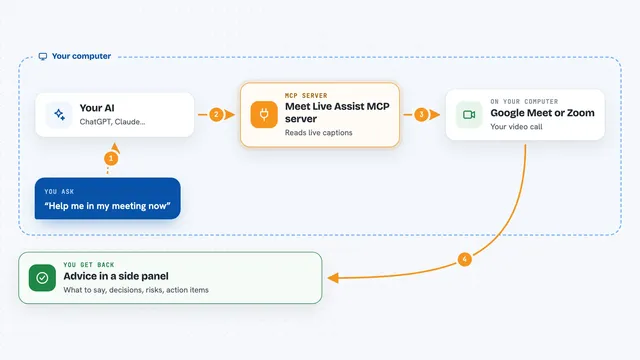
Meet Live Assist MCP server
by krystiangwGet live advice during Google Meet or Zoom calls, based on the captions as they happen.

SignWell MCP server
by BidsketchSend documents for e-signature, track who signed, and download the signed PDFs, all from your AI chat.
Productivity Official
Word document MCP server
by SecurityRoninLet your AI open, edit, and review Word files, with changes shown as tracked revisions.

Safe Docx MCP server
by UseJuniorLet your AI read, search, and carefully edit Word .docx files while keeping the formatting and showing tracked changes.
Show all 12 MCP servers

Turkish Legislation MCP Server
by aydincanLook up official, current Turkish law articles straight from mevzuat.gov.tr.
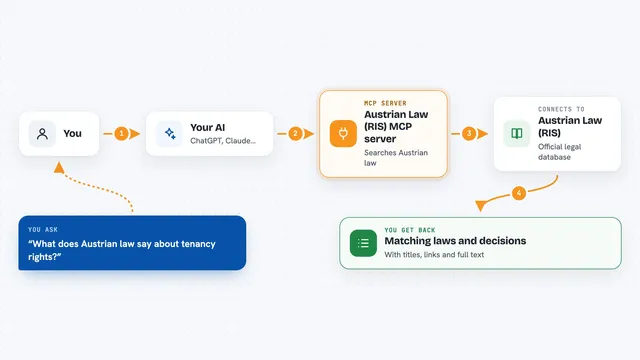
Austrian Law (RIS) MCP server
by philroxLets your AI look up Austrian federal and state laws, court decisions and legal gazettes for you.
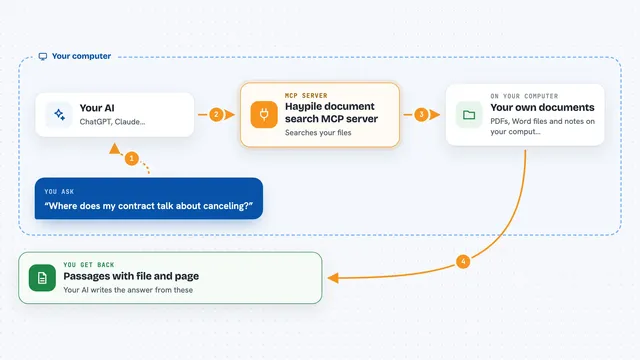
Haypile document search MCP server
by BenyDLets your AI search your own PDFs, Word files and notes by meaning, with file and page citations.

knowmind MCP server
by Schubeler-ConsultingGive your AI a long-term memory that remembers facts, notes and documents across chats.

Normativa Colombia MCP server
by AngelthebestoneConsulta leyes y sentencias colombianas desde tu asistente de IA, sin abrir el navegador.
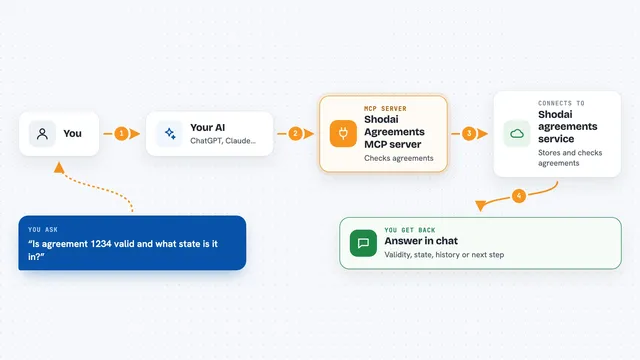
Shodai Agreements MCP server
by CNSLabsLets your AI check, validate and follow the progress of machine-readable agreements for you.
Finance and cryptoNo installBuild your own AI apps for mediators
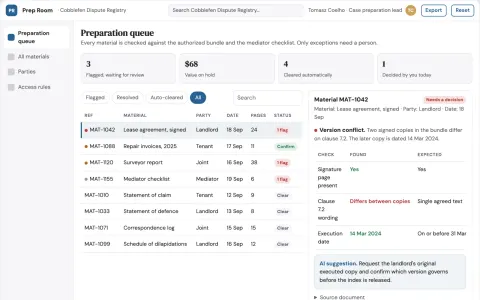
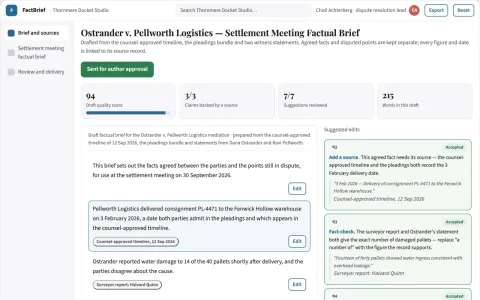
Apps you build yourself with your own AI, no coding needed and no monthly fee. Our AI picked the 2 that fit the work of mediators.































































































About this learning path
6 topicsAI Skills for Mediators to Save Time
Mediation work asks you to hold two stories at once, keep your neutrality, and turn tense conversations into clear written terms. This path shows you how to use AI for the writing and organizing around that work, so your attention stays on the people in the room.
Nothing here asks you to become technical. You will set up your AI, try prompts made for mediators, and watch short video courses chosen for your job. You stay in charge of every decision.
Why AI Matters for Mediators
Your days mix intake calls, session notes, scheduling, and draft agreements. AI can help with the first pass on these tasks, such as turning messy notes into a neutral summary or a plain-language email.
The goal is not to automate mediation. It is to free your mind for listening, asking better questions, and helping people find their own answers.
What the Path Includes
You begin with setup questions so your AI understands your role, your style, and any rules you follow. Then you connect the AI tool you already use, such as ChatGPT, Claude, or Gemini.
Next you add mediator skills inside your AI, work through this prompt course, and watch short video courses chosen for mediators. You also see the certificates those courses offer.
How It Saves You Time
The prompts help with the writing that surrounds a case. You can draft an agenda, summarize both sides, list issues, brainstorm options, and shape an agreement draft in minutes instead of a long afternoon.
Small admin tasks, like follow-up emails and session records, become easier to start and easier to finish. That time adds up across a week.
How It Protects Your Career
Mediators are trusted because they are neutral, careful, and confidential. This path shows you how to use AI as a draft helper while you review every word and keep private details safe.
AI does not decide anything. You still check facts, protect confidentiality, and follow your professional rules and any local requirements.
How to Start
Start with the setup questions and one prompt from the first lesson. Use a case you already know well, then compare the AI draft with your own notes.
Once that feels comfortable, add one new prompt each day. Move through the video courses when you want a deeper look at a skill.
Frequently asked questions
Do I need to be technical to use this path?
No. The path starts with simple setup questions and plain-language lessons. If you can write an email, you can learn to use these prompts.Which AI tool should I use?
You can use ChatGPT, Claude, Gemini, or another tool you trust. The prompts are written to work across common AI assistants, and you can adjust them to your own style.Is it safe to put case details into AI?
Use the same care you would with any outside service. Remove names and identifying details when you can, follow your confidentiality rules, and check with your organization before using real case material.Will AI replace mediators?
No. AI can help with drafting and organizing, but mediation depends on human trust, presence, and judgment. The path keeps you at the center of the work.