AI agent for food scientists
Shelf-Life Study Tracking Agent
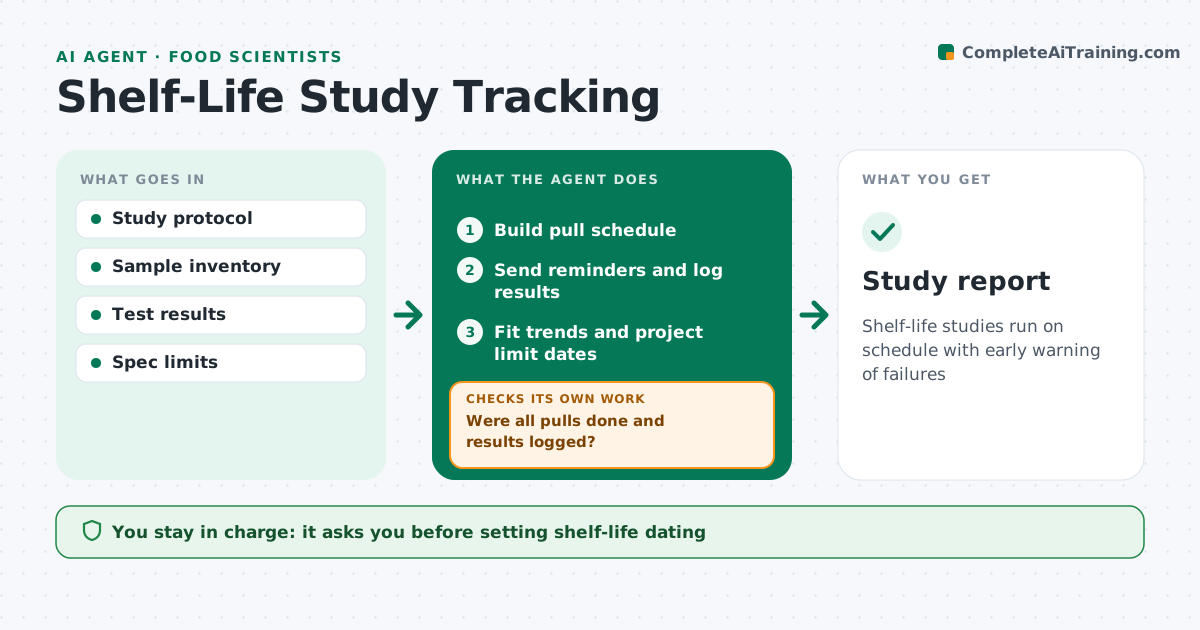
Shelf-life studies run on schedule with early warning of failures
What it does
Shelf-life studies run for months with scheduled pulls for sensory, microbial and chemical tests, and one missed pull can leave a hole in the data. This agent builds the pull schedule, reminds the lab and sensory team before each pull, and logs results as they arrive. After each pull it checks that every planned test was done and logged. It then compares results with spec limits and fits trends for key attributes such as rancidity or moisture. It projects when each attribute will reach its limit and flags when the projected shelf life falls short of the target date. You decide on reformulation, packaging changes or shorter dating. Edge case: a missed pull is flagged at once, and the agent suggests an extra pull at the next feasible date to fill the gap in the trend.
How it works
Follow the arrows from top to bottom. The orange dashed arrow is the loop: when a check fails, the agent goes back and tries again.
Read the steps as a list
- Study starts
- Build pull schedule
- Send reminders and log results
- Were all pulls done and results logged?If not: flag missed pulls and suggest an extra pull. Back to step 3.
- Fit trends and project limit dates
- Food scientist decides on dating or changesThe agent waits here for your OK.
- Study report
How it decides
It fits trends to each attribute and flags when the projected limit date is before the target shelf life.
- Flag projections short of target
- Suggest extra pulls for gaps
- Use spec limits per attribute
Make it yours
Every agent is a starting point. You choose these settings for your own situation.
- Pull schedule
- Attributes to trend
- Reminder timing
- Report format
What keeps you in control
It always asks you first
- Setting shelf-life dating
Hard limits
- Never sets dating
It stops when
- Done: study complete
- Stop: samples lost
Set it up
We guide you through the set-up, step by step
Members get the full set-up guide for this agent. No technical skills needed: you copy, paste and upload.
- One set of instructions to paste into your AI, with the clicks for ChatGPT, Claude, Microsoft 365 Copilot, Gemini and Grok
- The agent then walks you through connecting your own data, one source at a time
- A downloadable copy with the flow chart, the rules and the full guide