AI agent for solutions architects
Solution Cost and Effort Estimate Agent
A reasoned run cost and effort estimate with ranges
What it does
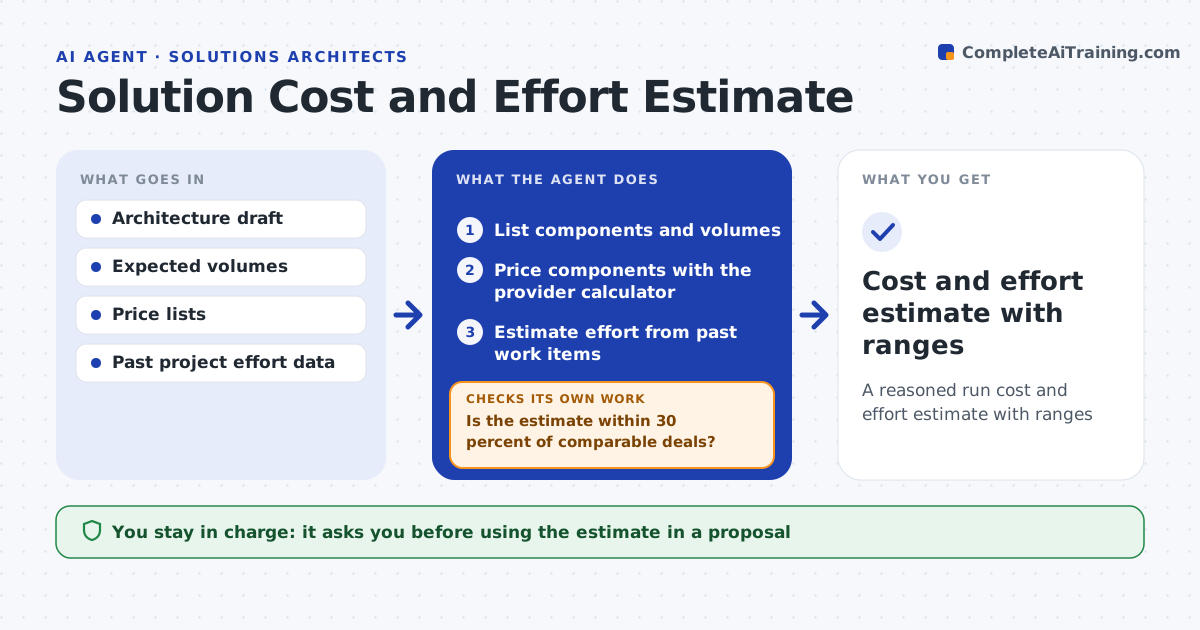
Customers want to know what a solution will cost to run and to build, and a wrong number can sink a deal or a margin. When a draft architecture is ready, this agent lists the components and volumes, prices each one with the cloud provider's calculator and estimates delivery effort from a library of past work items. It includes data transfer and support costs, which are often missed. It runs low and high volume scenarios and shows ranges, not single numbers. It compares the result with similar past deals. If the estimate is more than 30 percent away, it finds the line items causing the gap, starting with the largest, rechecks their assumptions and reprices. Any remaining gap is explained. The architect approves the estimate before it goes into a proposal. Edge case: data transfer between regions is priced separately.
How it works
Follow the arrows from top to bottom. The orange dashed arrow is the loop: when a check fails, the agent goes back and tries again.
Read the steps as a list
- Draft architecture ready
- List components and volumes
- Price components with the provider calculator
- Estimate effort from past work items
- Run low and high volume scenarios
- Is the estimate within 30 percent of comparable deals?If not: find the line items causing the gap, recheck their assumptions, and reprice. Back to step 3.
- Architect approves the estimateThe agent waits here for your OK.
- Cost and effort estimate with ranges
How it decides
It flags any estimate more than 30 percent away from comparable past deals and re-examines the largest line items first.
- Include data transfer and support costs
- Show ranges, not single numbers
- Explain any gap to comparables
Make it yours
Every agent is a starting point. You choose these settings for your own situation.
- Comparison margin (default 30 percent)
- Cloud provider
- Effort library
- Currency and discount rules
What keeps you in control
It always asks you first
- Using the estimate in a proposal
Hard limits
- Never shares prices with customers
- Labels all assumptions
It stops when
- Done: approved estimate
- Stop: volumes unknown, request them
Set it up
We guide you through the set-up, step by step
Members get the full set-up guide for this agent. No technical skills needed: you copy, paste and upload.
- One set of instructions to paste into your AI, with the clicks for ChatGPT, Claude, Microsoft 365 Copilot, Gemini and Grok
- The agent then walks you through connecting your own data, one source at a time
- A downloadable copy with the flow chart, the rules and the full guide