AI agent for no-code developers
Client Change Request Impact Agent
Deliver client changes without side effects and with an accurate estimate
What it does
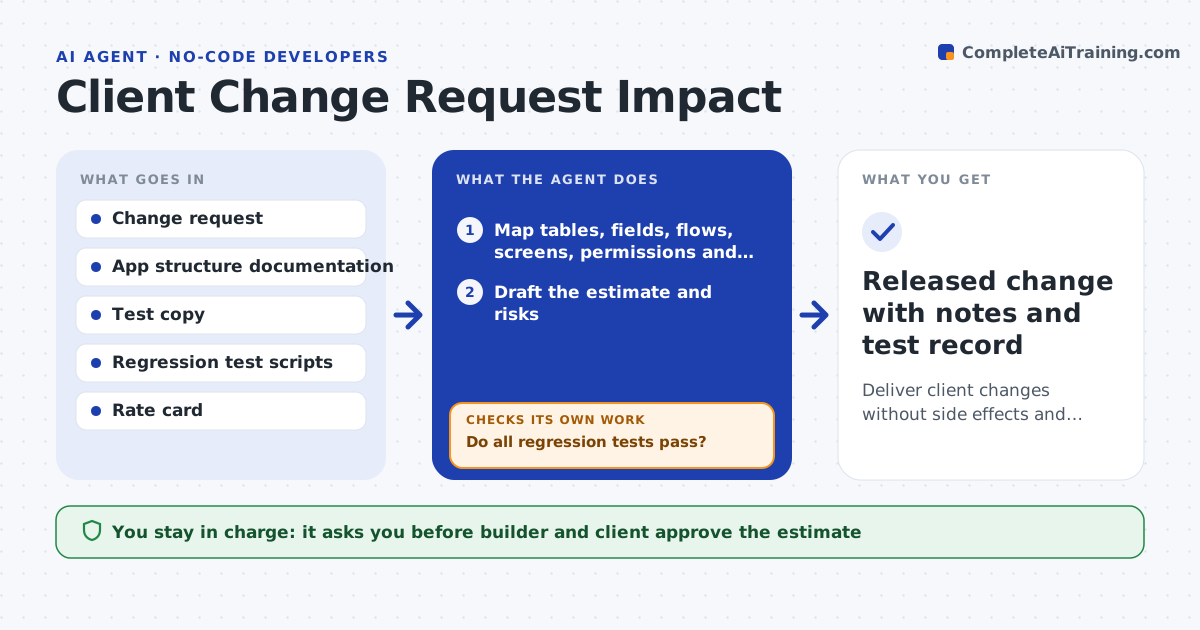
A client asks for one new field on a form, and it quietly breaks a report, a flow and a permission rule. For each change request, this agent maps what the request touches: tables, fields, automations, screens, permissions and integrations. It drafts an estimate with the hours for the change and the testing. After the builder and client agree, it builds the change in a test copy, runs the regression tests for everything on the map, and lists failures. It loops: fix, retest, until the tests pass. It then writes release notes for the client. The builder and client approve the release. Edge case: the new field changes a value used in an export file the client's accounting system reads, so the agent flags the integration.
How it works
Follow the arrows from top to bottom. The orange dashed arrow is the loop: when a check fails, the agent goes back and tries again.
Read the steps as a list
- Change request received
- Map tables, fields, flows, screens, permissions and integrations affected
- Draft the estimate and risks
- Builder and client approve the estimateThe agent waits here for your OK.
- Build the change in a test copy
- Run regression tests on every item on the map
- Do all regression tests pass?If not: fix the failures in the test copy and run the tests again. Back to step 5.
- Write release notes and a rollback plan
- Builder and client approve the releaseThe agent waits here for your OK.
- Released change with notes and test record
How it decides
It lists everything linked to the changed items, estimates effort from the size of that map, and releases only when every regression test on the map passes.
- Include every integration and export on the impact map
- Add a half day to the estimate for each affected automation
- Require all regression tests to pass before release
- Flag any change to a field used in a report or external file
Make it yours
Every agent is a starting point. You choose these settings for your own situation.
- Hourly rate and estimate rules
- Regression test list
- Systems to include in the map
- Release notes style
- Client approval method
What keeps you in control
It always asks you first
- Builder and client approve the estimate
- Builder and client approve the release
Hard limits
- Never change the live app before approval
- Never promise a date, only an estimate
It stops when
- Done: the change is released with a passing test record
- Stop: the request conflicts with an existing rule and the client must decide
Set it up
We guide you through the set-up, step by step
Members get the full set-up guide for this agent. No technical skills needed: you copy, paste and upload.
- One set of instructions to paste into your AI, with the clicks for ChatGPT, Claude, Microsoft 365 Copilot, Gemini and Grok
- The agent then walks you through connecting your own data, one source at a time
- A downloadable copy with the flow chart, the rules and the full guide