AI agent for purchasing managers
Spend Under Management Leakage Agent
Move off-contract purchases onto approved contracts and prove the savings
What it does
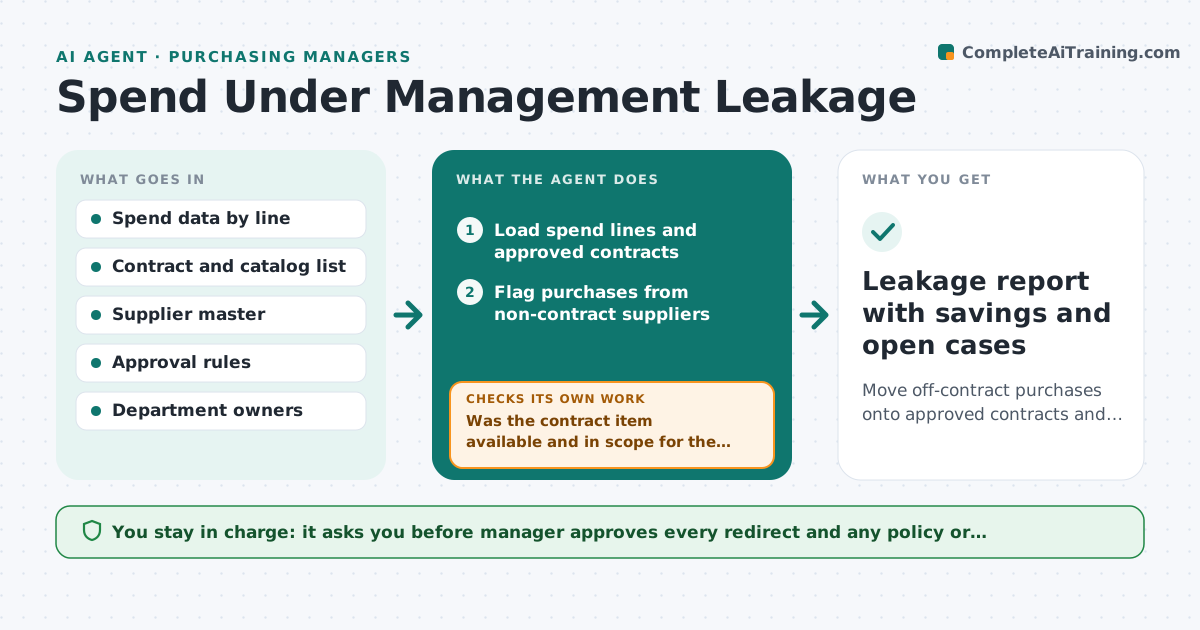
The company negotiated a good price with a preferred supplier, and staff still buy the same item from a different supplier at a higher price. This agent finds that leakage every month. It scans spend data for purchases outside approved contracts, groups them by category, buyer and supplier, and works out which approved contract item could have been used. It estimates the cost of each leak and drafts a short, friendly redirect to the buyer or the department head, with a link to the right catalog item. It tracks whether the next month's spend moves to the contract. The manager approves any policy action. Edge case: the contract item is out of stock. The agent flags it as a valid exception and tells the supplier owner.
How it works
Follow the arrows from top to bottom. The orange dashed arrow is the loop: when a check fails, the agent goes back and tries again.
Read the steps as a list
- Monthly spend data closes
- Load spend lines and approved contracts
- Flag purchases from non-contract suppliers
- Match each flagged line to a contract item that could have been used
- Was the contract item available and in scope for the buyer?If not: Mark as a valid exception and drop it from the leak count. Back to step 3.
- Group leaks by category, buyer and supplier and estimate the cost
- Draft a redirect with the catalog item for each buyer or department
- Purchasing manager approves redirects and any policy actionThe agent waits here for your OK.
- Did next month's spend on those items move to the contract?If not: Escalate to the department head and propose a catalog or approval rule change. Back to step 6.
- Leakage report with savings and open cases
How it decides
A purchase is a leak when a contract item matches the description and the buyer had access. Exceptions are valid for stock-outs or urgent safety needs.
- Leaks under $200 per month per buyer are grouped, not chased
- A stock-out or safety need is a valid exception
- A buyer with 3 leaks in a quarter is escalated
- Savings are the price difference times quantity
Make it yours
Every agent is a starting point. You choose these settings for your own situation.
- Minimum leak to chase (default $200)
- Categories in scope
- Escalation count (default 3 in a quarter)
- Redirect tone
- Who receives the report
What keeps you in control
It always asks you first
- Manager approves every redirect and any policy or approval-rule change
Hard limits
- Never blocks or cancels a purchase itself
- Treats safety items as exceptions by default
It stops when
- Done: leakage under target for two months
- Stop: contract does not cover the need, propose a new sourcing event
Set it up
We guide you through the set-up, step by step
Members get the full set-up guide for this agent. No technical skills needed: you copy, paste and upload.
- One set of instructions to paste into your AI, with the clicks for ChatGPT, Claude, Microsoft 365 Copilot, Gemini and Grok
- The agent then walks you through connecting your own data, one source at a time
- A downloadable copy with the flow chart, the rules and the full guide